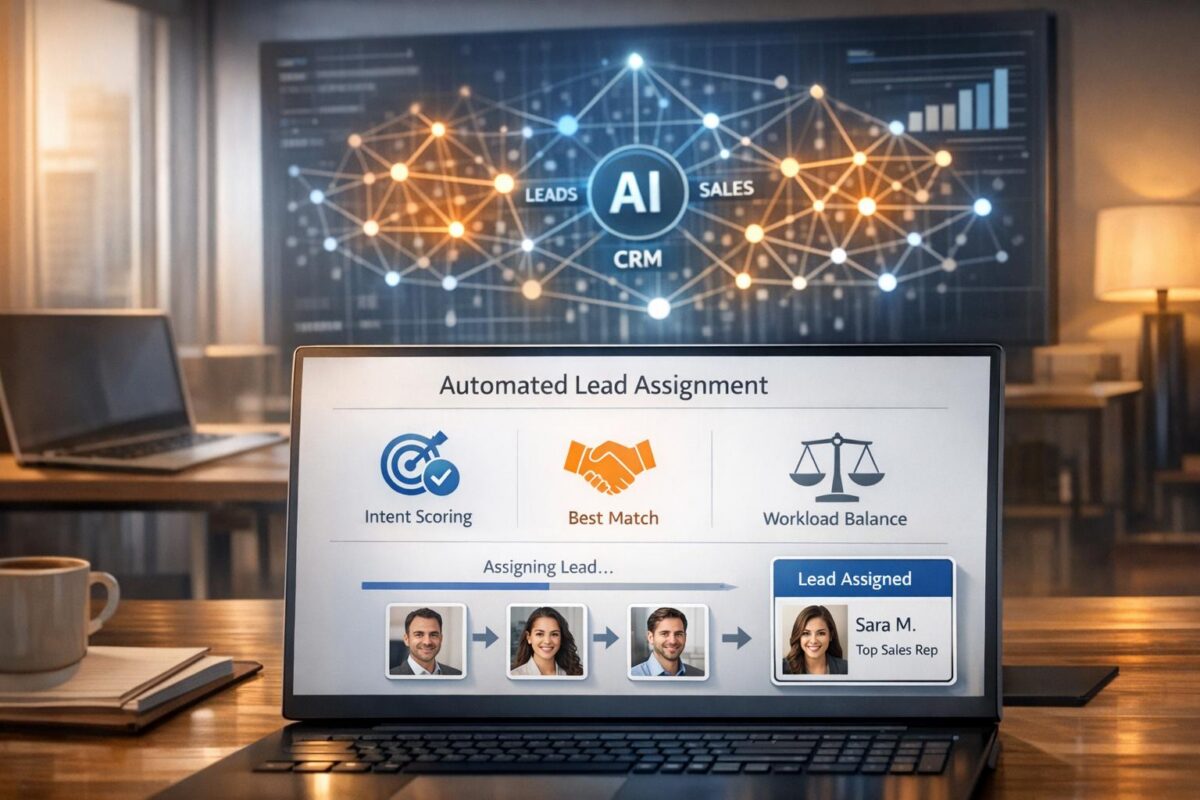
AI lead assignment automates the process of directing leads to the right sales reps by analyzing multiple data points like intent, engagement, and rep performance. Unlike manual or rule-based methods, AI-driven systems work faster, improve accuracy, and continuously learn from outcomes to refine routing decisions.
Key benefits include:
- Speed: Assign leads in under 10 seconds vs. 5–15 minutes manually.
- Improved Conversion Rates: Boosts conversions by 40% by matching leads with the best-suited reps.
- Efficiency: Handles over 1,000 leads daily without delays or additional staffing.
Companies like Ivanti and Jedox have seen results like a 71% increase in opportunities and shorter sales cycles by adopting AI-powered lead routing. To implement, start by cleaning CRM data, integrating AI tools, and training models with historical sales data. Tools like SixtySixTen offer tailored solutions for B2B SaaS businesses to streamline this process.
How AI Lead Assignment Works
AI Algorithms and Data Analysis
AI lead assignment depends on machine learning algorithms that analyze multiple data layers to streamline and optimize lead routing. These systems pull data from both internal tools and external intent providers to build a comprehensive profile for each lead.
The algorithms evaluate signals like firmographics, engagement levels, behavioral patterns, and representative capacity. Using techniques such as regression and clustering, they predict conversion potential and uncover patterns in buyer behavior that traditional methods often miss.
"AI blends intent, fit, engagement, territory, capacity, and rep performance signals to score match quality for each lead–rep pair, then routes in real time and tunes rules as results roll in." – The Pedowitz Group
AI systems also take into account past performance and expertise when assigning leads. For instance, if a sales rep has a strong track record with mid-market healthcare clients, the system may prioritize routing similar leads to them, assuming they have the bandwidth to take on more.
Once this analysis is complete, the system seamlessly moves into a streamlined workflow for quick and efficient lead routing.
The AI Lead Assignment Workflow
After analyzing the data, the system transitions into an automated workflow designed for speed and accuracy. It processes and enriches lead information, generating a conversion score that guides routing decisions.
This score determines the best match between the lead and a sales rep, factoring in skills, availability, and past performance. The assigned representative is notified instantly – often through tools like the CRM, Slack, or a mobile app – along with an AI-generated summary of the lead’s key details and needs.
The system continuously improves through feedback. By analyzing outcomes like closed deals, losses, or no-shows, it refines its routing capabilities over time. For example, in 2025, Jedox, a software company, utilized HubSpot‘s AI-powered segmentation to improve lead management. The result? A 54% rise in marketing-qualified leads and a 12–20% reduction in the sales cycle.
This entire process is lightning-fast, typically taking under 10 seconds. By automating lead routing, it eliminates manual delays and ensures a rapid response. Studies show that engaging a lead within five minutes makes a rep nine times more likely to qualify them. Additionally, the system enforces service-level agreements by automatically reassigning leads if a rep doesn’t respond within the specified timeframe.
Automate Lead Qualification with AI | Make.com Tutorial for CRM & Slack
Benefits of AI Lead Assignment
AI lead assignment offers three major perks: speed, better conversion rates, and improved efficiency. Together, these advantages reshape how CRM systems process leads, allowing sales teams to focus on what really matters – closing deals.
Faster and More Accurate Lead Routing
Manual lead routing can be a slow and tedious process, often taking 12–20 hours to set up. AI simplifies this, reducing it to a quick three-step workflow that takes just 1–2 hours. On a per-lead basis, manual assignment typically takes 5–15 minutes, but AI can handle the same task in about 5 seconds. This speed is critical – companies that respond to leads within five minutes are 21 times more likely to qualify them compared to those that take 30 minutes. AI also achieves 95% routing accuracy by learning from past conversion outcomes.
"Automation takes a process that used to take 5-15 minutes and turns it into something that happens in 5 seconds." – Tara Minh, Operation Enthusiast
Manual methods often struggle when lead volumes exceed 50–100 per day, but AI systems can handle over 1,000 leads daily without breaking a sweat. They operate 24/7, ensuring no lead is left waiting. This combination of speed and accuracy sets the stage for better conversions and effortless scalability.
Higher Conversion Rates and Scalability
When leads are routed quickly and accurately, conversion rates naturally improve. AI analyzes intent signals, firmographics, engagement patterns, and even historical performance data to optimize conversions. This approach has been shown to boost conversion rates by 40% and overall sales performance by 35%.
Companies using AI routing have reported shorter sales cycles and noticeable revenue growth. AI also helps balance workloads by monitoring real-time data, such as open leads and overdue follow-ups. If a sales rep doesn’t respond within a set timeframe, the system automatically reassigns the lead to avoid missed opportunities.
Less Manual Work
By automating lead routing, AI frees sales teams from time-consuming, repetitive tasks. Instead of manually updating CRM records or tweaking routing rules, reps can focus on selling. Businesses have seen a 50% drop in manual hours after adopting AI-driven lead management systems.
Traditional routing often requires constant manual adjustments to account for market changes or team restructuring. AI eliminates this hassle by continuously learning and adapting based on conversion data.
"The AI agents didn’t replace reps – they removed the repetitive work between signal and human conversation." – The Pedowitz Group
With less time spent on administrative tasks, sales teams can dedicate more energy to building relationships and closing deals, making them far more effective at scale.
sbb-itb-647c22e
How to Implement AI Lead Assignment in CRM
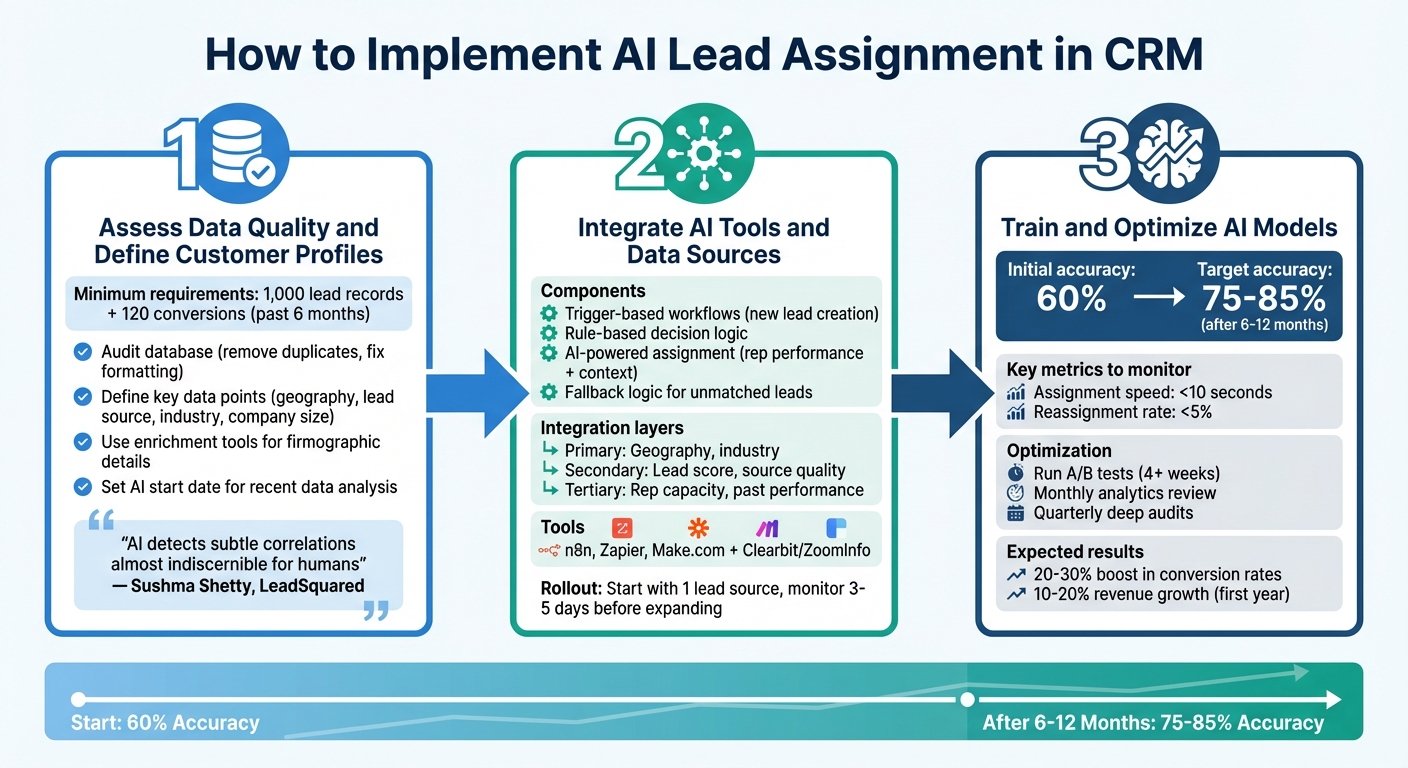
AI Lead Assignment Workflow: 3-Step Implementation Process for CRM
Implementing AI-powered lead assignment in your CRM isn’t as simple as flipping a switch. It requires clean data, careful integration, and ongoing adjustments to make it work effectively. Many businesses underestimate the groundwork needed to get started. Here’s how to approach it step by step.
Step 1: Assess Data Quality and Define Customer Profiles
Start by ensuring your CRM data is in excellent shape. Ideally, you should have at least 1,000 lead records and 120 conversions from the past six months to give the AI enough to work with. Audit your database to remove duplicates, fix formatting issues, and fill in any missing contact details .
Next, define the key data points that matter most for your leads – geographic location, lead source, industry, company size, and behavioral tags are a good place to start. Use enrichment tools to fill in gaps, like firmographic details . Additionally, set a clear "start date" for the AI to begin analyzing your data. This ensures it focuses on recent and relevant sales cycles.
"The potency of using AI for predictive lead scoring lies in its ability to detect subtle correlations that are almost indiscernible for humans." – Sushma Shetty, LeadSquared
Once your data is clean and enriched, you’re ready to move on to integrating AI tools.
Step 2: Integrate AI Tools and Data Sources
With your data prepped, the next step is connecting your CRM to AI tools and relevant data sources. This integration typically involves a few key components: trigger-based workflows (like when a new lead is created), rule-based decision logic, AI-powered assignment that considers rep performance and context, and fallback logic for unmatched leads.
You can use platforms like n8n, Zapier, or Make.com to connect your CRM with tools like Clearbit or ZoomInfo for lead enrichment . Set up routing rules based on layers of criteria: primary (e.g., geography, industry), secondary (e.g., lead score, source quality), and tertiary (e.g., rep capacity, past performance). To keep your team in the loop, sync your CRM with communication tools like Slack or Microsoft Teams. This way, reps get instant notifications with one-click dial links when a lead is assigned.
Always have a backup plan. For example, you can use a round-robin system or have a manager manually review unmatched leads to ensure none slip through the cracks. Roll out the system gradually – start with one lead source, like web forms, and monitor performance for 3–5 days before adding other sources like chat or ad leads .
Step 3: Train and Optimize AI Models
To get the most out of your AI, feed it historical CRM data. Compare won versus lost opportunities and apply feature engineering to identify patterns that indicate higher chances of conversion . For instance, leads who visit your pricing page before checking out a product overview may convert 40% more often.
AI prediction accuracy typically starts around 60% but can climb to 75–85% after analyzing 6–12 months of sales data. Set up a continuous learning process where the AI refines its model based on outcomes. Keep an eye on key metrics like assignment speed (aim for under 10 seconds) and reassignment rates (target less than 5%) .
Run A/B tests to compare different routing strategies, such as standard round-robin versus performance-weighted distribution, for at least four weeks. Review analytics monthly to spot rules with low match rates, and conduct a deeper audit every quarter to ensure your AI remains aligned with your current business goals. Companies using AI for lead assignment and scoring often see a 20–30% boost in conversion rates and report 10–20% revenue growth within the first year.
How SixtySixTen Automates AI Lead Assignment
Custom Solutions for Post-PMF B2B SaaS Companies
SixtySixTen takes AI lead assignment to the next level for post-PMF B2B SaaS companies by offering tailored CRM integrations. Their process starts with a consultation to understand how leads flow through your sales funnel. From there, their GTM automation engineers craft custom solutions that integrate seamlessly with your CRM, sales tools, and outbound platforms. The focus is on automating four key areas: lead qualification, lead enrichment, pipeline management, and CRM updates. By eliminating manual bottlenecks, this approach allows sales teams to focus on closing deals. Companies using SixtySixTen’s solutions have seen impressive results, including a 30% revenue increase and a 2.5x improvement in GTM team efficiency. This customized strategy sets the stage for advanced integration techniques.
Integrating AI Tools and Custom Development
SixtySixTen combines platforms like Clay and n8n with custom AI agents to streamline lead management. Clay handles tasks like real-time lead scoring, enrichment, and segmentation. It can even integrate advanced models like GPT-5 for conducting research and crafting personalized outbound messages.
Their automation architecture is built for speed and precision, using trigger-based workflows and rule-based logic tailored to the unique challenges of post-PMF businesses. For example, workflows activate when a new lead enters the system or when a status changes, taking into account factors like rep performance, capacity, and context. Data enrichment pulls critical details like firmographics, tech stack data, and intent signals from sources such as HG Insights, all while maintaining execution times under 10 seconds.
When off-the-shelf tools fall short, SixtySixTen steps in with custom-coded solutions. They also design dashboards using tools like Google Looker and Power BI to provide unified, real-time insights into GTM performance. This hybrid approach – blending no-code platforms with custom development – ensures scalability without adding to your team’s workload. The result? Faster, more accurate lead management and a system that grows alongside your business.
Conclusion
Key Takeaways
AI is changing the game in CRM lead assignment, turning what used to be a slow, manual process into something fast, precise, and scalable. Tasks that once took 12–20 hours can now be completed in just 1–2 hours, with an impressive 95% accuracy rate and a 40% increase in conversions. By analyzing signals like intent data, rep capacity, historical win rates, and even calendar availability, AI ensures that each lead is matched with the salesperson most likely to close the deal.
What’s more, AI works around the clock, eliminating delays caused by after-hours downtime and ensuring no lead gets left behind. The system also introduces balance and adaptability to your CRM. It prevents burnout by capping workloads for top performers and uses real conversion data to continuously refine its logic. And when it comes to scaling, AI can handle over 1,000 leads per day without requiring additional admin resources. These advancements pave the way for immediate, impactful changes to your lead management process.
Next Steps for Businesses
Ready to take your lead assignment process to the next level? Start by auditing your current lead flow and tracking baseline metrics like speed-to-lead and conversion rates. Next, clean up your CRM data – AI thrives on quality data, so it’s essential to normalize fields and enrich records before diving in. A smart way to begin is by running AI in shadow mode to test its performance before going all-in on automation.
For post-PMF B2B SaaS companies aiming to scale, SixtySixTen offers tailored AI lead assignment solutions that integrate directly with your existing CRM and sales tools. Their approach combines tools like Clay and n8n with custom AI agents and code-based solutions for more complex needs. This is a prime example of the kind of transformation discussed here. Check out SixtySixTen to see how their GTM automation expertise can elevate your lead assignment process.
FAQs
How does AI-driven lead assignment help boost sales conversions?
AI-powered lead assignment transforms the sales process by quickly evaluating critical factors such as lead intent, engagement level, geographic territory, and the availability of sales reps. By matching each lead with the most suitable representative, it ensures faster responses and higher-quality follow-ups.
On top of that, AI can automatically reassign leads that have stalled, keeping the process moving. Over time, these systems learn from previous results, fine-tuning their accuracy in routing leads. This efficient approach minimizes delays and boosts the likelihood of turning leads into loyal customers.
What data is essential for using AI to assign leads in a CRM?
To make AI-powered lead assignment work seamlessly, you need reliable and well-organized CRM data. This includes key details like historical win/loss records, engagement metrics (such as email opens or website visits), and marketing automation scores. It’s also essential to have detailed lead and account attributes, like demographics and buying roles, as well as sales rep data, including territories, workload, and past performance.
By keeping your data clean and structured, AI systems can make quicker, smarter decisions. This ensures leads are matched with the best-suited reps, boosting efficiency across the board.
How does AI improve the accuracy of lead assignment over time?
AI takes the guesswork out of lead assignment by diving into real-time CRM data – everything from lead behavior and intent signals to how your sales team is performing. It doesn’t stop there. AI learns from past successes, like which strategies led to conversions, and fine-tunes its approach over time to improve lead matching.
By constantly updating routing rules and match scores, AI ensures leads always land with the sales reps best suited to handle them. Even as team dynamics or performance shift, the system adapts, keeping the process efficient and boosting results across the board.