Overview
What It Is
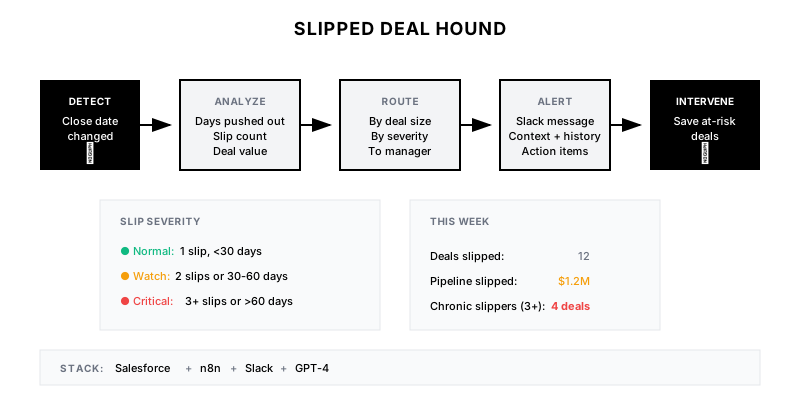
A real-time monitoring system that detects when opportunity close dates are pushed out, alerts managers immediately, tracks slip patterns, and flags chronic slippers for intervention.
Why It Matters
Pipeline doesn't disappear overnight—it slips first. A deal that moves from 'closing this month' to 'closing next quarter' is often a leading indicator of a lost deal. Catching slips early enables intervention while the deal is still saveable.
Who It's For
- Sales managers who need pipeline visibility
- RevOps teams tracking forecast integrity
- Sales reps who want coaching on stuck deals
- Leadership monitoring pipeline health
Preconditions
Required Tools
- Salesforce (with field history tracking)
- Slack/Teams for alerts
- n8n/Zapier (automation)
- GPT-4 (optional, for analysis)
Required Fields/Properties
- Close date (with history tracking enabled)
- Amount
- Stage
- Owner
- Last activity date
Definitions Required
- Significant slip threshold (e.g., >14 days)
- Alert routing rules by deal size
- Chronic slipper threshold (e.g., 3+ slips)
- Excluded scenarios (e.g., stage regression)
Step-by-Step Workflow
Enable Close Date History Tracking
Goal: Ensure CRM captures all close date changes
Actions:
- Enable field history tracking on Close Date field
- Verify historical data is being captured
- Set up report on close date changes
- Confirm tracking includes old/new values and timestamp
Implementation Notes: In Salesforce, enable via Setup > Object Manager > Opportunity > Fields > Close Date > Set History Tracking. Keep 18+ months of history.
Build Slip Detection Query
Goal: Identify close dates moved to the future by significant amounts
Actions:
- Query close date field history
- Calculate days pushed out (new date – old date)
- Filter for significant slips (>14 days)
- Exclude closed deals and minor adjustments
Implementation Notes: Exclude weekends-only adjustments and deals that advanced (pulled in). Focus on material pushes.
Configure Alert Routing
Goal: Send slip alerts to appropriate managers based on deal characteristics
Actions:
- Route by deal size (large deals → leadership)
- Route by rep to direct manager
- Set urgency by slip severity (weeks vs. quarters)
- Include AI analysis for context (optional)
Implementation Notes: Tier alerts: Deals >$100K slip → VP + manager. Deals in commit/forecast → immediate escalation.
Build Slip Alert Messages
Goal: Create informative alerts with context for quick action
Actions:
- Include deal details and slip specifics
- Show slip history (first slip vs. repeat)
- Add last activity date for context
- Include suggested questions/actions
Implementation Notes: Make alerts actionable—include direct links to deal, specific questions to ask, and comparison to similar deals that slipped and lost.
Track Slip Patterns and Chronic Slippers
Goal: Identify deals and reps with repeated slip behavior
Actions:
- Count slips per opportunity
- Calculate average slip days by rep
- Identify deals with 3+ slips (zombie deals)
- Flag reps with consistent slip patterns
Implementation Notes: Deals that slip 3+ times have <20% close rate historically. Use this data for pipeline hygiene reviews.
Build Weekly Slip Report
Goal: Provide leadership with aggregate slip analysis
Actions:
- Summarize total pipeline slipped ($ value)
- Show slip rate by team/segment
- List top chronic slippers (deals)
- Trend slip rate over time
Implementation Notes: Use slip rate (deals slipped / total deals) as leading indicator. Rising slip rate often precedes forecast misses.
Templates
Slip Alert Slack Message
🐕 *Deal Slip Alert*

*Deal:* {{deal_name}}
*Amount:* ${{amount}}
*Owner:* {{owner}}
*Stage:* {{stage}}

*Slip Details:*
• Original close: {{old_date}}
• New close: {{new_date}}
• Days pushed: {{days_slipped}}
• Slip count: {{slip_number}} ({{risk_label}})

*Context:*
• Last activity: {{last_activity_date}} ({{days_since_activity}} days ago)
• Forecast category: {{forecast_category}}

*Suggested Questions:*
1. What changed to push the timeline?
2. What specific milestone is needed to close?
3. Is the budget still approved for {{new_quarter}}?

<{{deal_link}}|View Deal in Salesforce>
Weekly Slip Summary Report
| Metric | This Week | Last Week | Trend |
|--------|-----------|-----------|-------|
| Deals Slipped | X | X | ↑/↓ |
| Pipeline Slipped | $X | $X | ↑/↓ |
| Avg Days Pushed | X | X | ↑/↓ |
| Slip Rate | X% | X% | ↑/↓ |
| Chronic Slippers (3+) | X | X | ↑/↓ |
Chronic Slipper Intervention Checklist
**Deal Intervention Checklist (3+ Slips)**

□ Review all deal notes for pattern
□ Verify buyer engagement (meetings in last 30 days)
□ Confirm budget is still allocated
□ Identify the true blocker
□ Set concrete next step with date
□ Consider: Is this deal real?

**Decision Matrix:**
- Active buyer + clear blocker → Create action plan
- Active buyer + unclear blocker → Discovery meeting
- Inactive buyer → Send break-up email
- No response → Move to nurture or close lost
QA + Edge Cases
Test Cases Checklist
- Verify alert fires when close date pushed out >14 days
- Confirm no alert for close dates pulled in (earlier)
- Test routing logic for large deals vs. regular deals
- Validate slip count tracking across multiple changes
- Verify weekly summary math is accurate
Common Failure Modes
- Bulk update false positives: Admin moves all Q4 deals to Q1 for planning. Add filter for bulk changes (same user, same time, multiple opps).
- Stage regression confusion: Deal moved back to earlier stage with new close date. Exclude slips coinciding with stage regression.
- Alert fatigue: Too many minor slips overwhelm managers. Increase threshold or batch non-urgent slips into daily digest.
Troubleshooting Tips
- If alerts not firing, verify field history tracking is enabled and has data
- For duplicate alerts, add deduplication logic (one alert per deal per day)
- If slip rate seems too high, exclude small deals (<$10K) from metrics
KPIs and Reporting
KPIs to Track
- Slip Rate: <15% of deals slip per month
- Avg Days Slipped: <30 days average push
- Chronic Slipper Intervention Rate: 100% of 3+ slip deals reviewed
- Slipped → Won Rate: Track conversion of slipped deals
Suggested Dashboard Widgets
- Pipeline Slipped This Month: Dollar value of deals that pushed out
- Slip Rate Trend (12 weeks): Weekly slip rate over time
- Top Chronic Slippers: List of deals with most slips
- Slip → Outcome Analysis: Win rate of deals by number of slips