Overview
What It Is
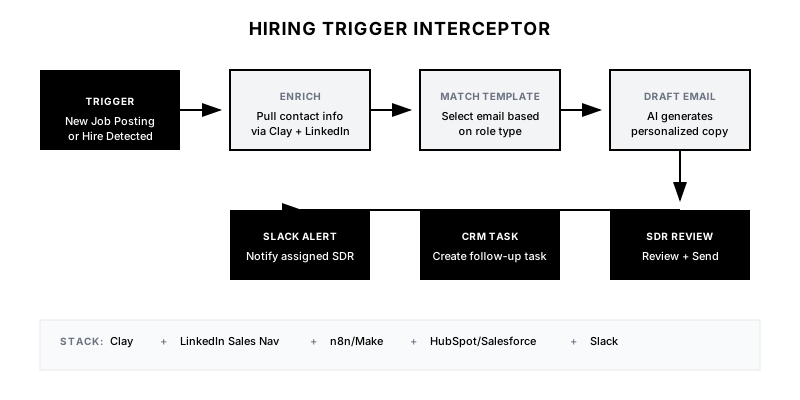
The Hiring Trigger Interceptor monitors your target accounts for specific job postings or new hires that signal a strategic shift. When a company posts a VP of Sales role, they're likely scaling their go-to-market. When they hire a new Head of RevOps, that person has budget and mandate to make changes. This playbook automates the detection of these signals and generates context-rich outreach that addresses the specific challenges associated with that hire.
Why It Matters
Timing is everything in outbound. A cold email to a random VP has a 1-2% reply rate. But reaching out to a newly hired VP in their first 90 days—when they're actively evaluating tools and have budget to spend—can see reply rates of 15-25%. This playbook ensures you never miss these windows of opportunity and that your message is perfectly tailored to their situation.
Who It's For
- B2B SaaS companies selling to sales, marketing, or operations teams
- SDR teams running outbound to mid-market and enterprise accounts
- Revenue operations teams looking to increase outbound efficiency
- Companies with a defined ICP and target account list
Preconditions
Required Tools
- Clay (for enrichment and workflow orchestration)
- LinkedIn Sales Navigator or LinkedIn Recruiter (for job/hire detection)
- n8n or Make.com (for automation)
- CRM (HubSpot/Salesforce) for task creation
- Optional: PhantomBuster for LinkedIn scraping
Required Fields/Properties
- Target Account List (company names or domains)
- Role Keywords (titles to monitor: 'VP Sales', 'Head of RevOps', etc.)
- Email templates mapped to role types
- SDR assignment rules
Definitions Required
- Which roles indicate buying intent for your product
- Time window for 'new hire' (typically 0-90 days in role)
- Outreach SLA (how quickly to contact after signal detected)
- Disqualification criteria (company size, geo, etc.)
Step-by-Step Workflow
Define Target Roles & Signals
Goal: Identify which job titles and hiring events indicate buying intent for your product.
Actions:
- List 5-10 job titles that correlate with purchase decisions for your product
- Categorize roles by outreach angle (e.g., 'scaling pain' vs 'efficiency mandate')
- Define 'new hire' window (recommend: 0-90 days in role)
- Document the specific pain points each role type faces in their first 90 days
Implementation Notes: Focus on roles that have budget authority or direct influence over purchasing decisions. A 'Sales Operations Analyst' hire might indicate need, but a 'VP of Revenue Operations' hire indicates budget.
Set Up Signal Detection in Clay
Goal: Configure Clay to monitor your target accounts for relevant job postings and new hires.
Actions:
- Import your target account list into Clay
- Add LinkedIn Company enrichment to pull job postings
- Create filters for your target role keywords
- Set up a Clay table to capture: Company, Role Title, Posting Date, LinkedIn URL
- Configure refresh frequency (daily recommended)
Implementation Notes: Clay's LinkedIn integration can pull both open job postings and recent hires. For new hires, you'll need to monitor the 'People' changes at target companies.
Automation Logic:
Clay Filter Logic:
IF job_title CONTAINS ['VP Sales', 'Head of RevOps', 'Director of Sales Ops']
AND company_domain IN [target_account_list]
AND posting_date >= TODAY - 7 days
THEN add_to_outreach_queue
Build Role-Specific Email Templates
Goal: Create personalized outreach templates that address the specific challenges of each role type.
Actions:
- Write 3-5 email templates, one per role category
- Include merge fields for: first name, company, role title, specific pain point
- Create subject line variants for A/B testing
- Add a 'Why Now' paragraph that references the hiring signal
- Keep emails under 125 words
Implementation Notes: The key differentiator is the 'Why Now' hook. Don't just say 'Congrats on the new role.' Reference the specific challenge they're likely facing.
Connect Automation Workflow
Goal: Wire up Clay to your CRM and notification systems via n8n or Make.
Actions:
- Create n8n workflow triggered by new Clay row
- Add logic to select correct email template based on role type
- Create task in CRM assigned to appropriate SDR
- Send Slack notification to SDR channel
- Log activity in CRM for tracking
Implementation Notes: Keep the human in the loop for final send. Auto-drafting is fine; auto-sending without review is risky for enterprise outbound.
Automation Logic:
{
  "workflow": "hiring-trigger",
  "trigger": "clay_new_row",
  "steps": [
    {"action": "enrich_contact", "source": "clearbit"},
    {"action": "select_template", "logic": "role_type_mapping"},
    {"action": "draft_email", "destination": "outreach"},
    {"action": "create_task", "destination": "hubspot"},
    {"action": "notify", "destination": "slack"}
  ]
}
Configure SDR Workflow & SLAs
Goal: Ensure detected signals are actioned quickly with clear ownership.
Actions:
- Define routing rules (round-robin, territory, named accounts)
- Set SLA for outreach (recommend: <24 hours from detection)
- Create escalation path if SLA is missed
- Build SDR dashboard showing pending signals and SLA status
- Document the review-and-send workflow for SDRs
Implementation Notes: Speed matters. A hiring signal is most valuable in the first 7 days. After 30 days, the window is closing. Build urgency into your SLAs.
QA & Launch
Goal: Test the full workflow before going live.
Actions:
- Run test with 5-10 known recent hires
- Verify correct template selection
- Confirm CRM task creation and assignment
- Test Slack notifications
- Validate email personalization renders correctly
- Monitor first week of live signals for quality
Implementation Notes: Start with a small batch (50 accounts) before scaling to your full target list. This lets you catch template issues early.
Templates
Email Template: VP of Sales Hire
Subject: {{first_name}}, quick question about scaling {{company}}'s sales team

Hi {{first_name}},

Congrats on the VP Sales role at {{company}}. The first 90 days are always a sprint—inheriting a team, a number, and a tech stack you didn't choose.

One thing we've seen trip up new sales leaders: the systems that got the company to $X often break at $2X. Especially around [specific pain point: pipeline visibility / forecasting accuracy / rep productivity].

Would it be useful to see how other VPs in your situation approached this? Happy to share a quick framework—no pitch, just perspective.

Best,
{{sender_name}}
Email Template: Head of RevOps Hire
Subject: The RevOps audit checklist everyone wishes they had

Hi {{first_name}},

New Head of RevOps at {{company}}—congrats. I'm guessing week one involves a lot of 'Why is this workflow built this way?' and 'Who owns this data field?'

We put together a 30-day RevOps audit checklist based on what we've seen work at [similar company] and [similar company]. Covers the quick wins that build credibility without blowing up the stack.

Want me to send it over?

Best,
{{sender_name}}
Slack Notification Template
🎯 *Hiring Trigger Detected*

*Company:* {{company_name}}
*New Role:* {{job_title}}
*Person:* {{first_name}} {{last_name}}
*LinkedIn:* {{linkedin_url}}
*Signal Date:* {{detected_date}}

*Recommended Angle:* {{outreach_angle}}
*Template:* {{template_name}}

⏰ *SLA:* Outreach within 24 hours

<{{crm_task_url}}|View Task in CRM>
Role-to-Angle Mapping Table
| Role Title | Outreach Angle | Template | Priority |
|------------|----------------|----------|----------|
| VP of Sales | Scaling pain, inherited tech debt | vp-sales-template | High |
| Head of RevOps | Audit mandate, quick wins needed | revops-template | High |
| Director of Sales Ops | Efficiency pressure, automation gaps | sales-ops-template | Medium |
| VP of Marketing | Budget allocation, attribution gaps | vp-marketing-template | Medium |
| Head of Growth | Experimentation velocity, data silos | growth-template | Medium |
QA + Edge Cases
Test Cases Checklist
- New VP Sales posting detected at target account → correct template selected
- New hire (not job posting) detected → workflow triggers correctly
- Role title contains keyword but company not in target list → filtered out
- Multiple signals from same company in same week → deduplicated
- SDR assigned correctly based on territory rules
- Slack notification includes all required fields
- CRM task created with correct due date (SLA)
Common Failure Modes
- Stale job postings: LinkedIn job data can be outdated. A 'new' posting might be 60 days old. Always check posting date and filter for recent signals only.
- Wrong person enrichment: Clay might return the wrong person for a role. Always include LinkedIn URL in the output so SDRs can verify before sending.
- Template mismatch: Generic titles like 'Director' might match multiple templates. Use specific keyword matching and have a fallback 'general' template.
- SLA drift: Without enforcement, SDRs deprioritize trigger-based tasks. Build SLA tracking into your dashboard and escalation into your workflow.
Troubleshooting Tips
- If signals aren't appearing: Check Clay refresh schedule and LinkedIn connection status
- If wrong templates are selected: Review role-to-template mapping logic and keyword matching
- If tasks aren't creating: Verify CRM API connection and field mappings in n8n
- If reply rates are low: A/B test subject lines and review 'Why Now' paragraph relevance
KPIs and Reporting
KPIs to Track
- Signal Detection Rate: >90% of relevant hires at target accounts detected within 7 days
- Time-to-Outreach: <24 hours from signal detection to email sent
- Reply Rate: >15% (vs. 2-3% for cold outbound)
- Meeting Book Rate: >5% of signals result in booked meeting
- SLA Compliance: >85% of signals actioned within SLA
Suggested Dashboard Widgets
- Signals by Role Type: Bar chart showing volume of detected signals by role category (VP Sales, RevOps, etc.)
- SLA Compliance Trend: Line chart showing % of signals actioned within 24-hour SLA over time
- Conversion Funnel: Funnel showing: Signals Detected → Emails Sent → Replies → Meetings Booked
- Reply Rate by Template: Table comparing reply rates across different role-specific templates