Overview
What It Is
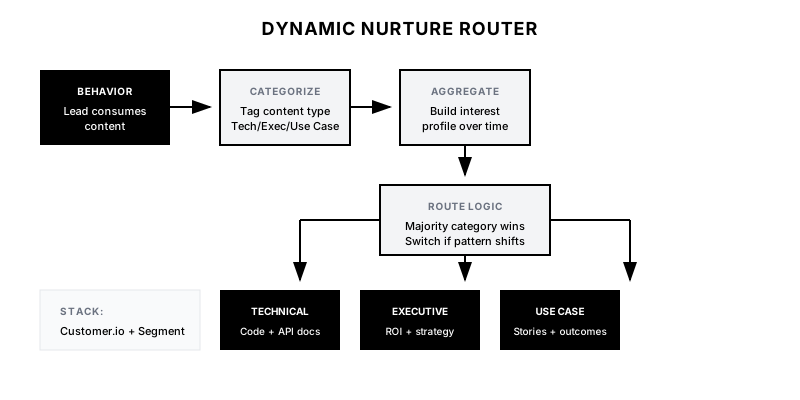
The Dynamic Nurture Router tracks what content a lead consumes and automatically adjusts their email sequence to match. A lead reading API docs gets technical content. A lead reading case studies gets ROI-focused content. The system continuously adapts based on behavior, not static form field answers.
Why It Matters
Static nurture sequences treat everyone the same, resulting in 15-20% open rates and minimal engagement. Behavior-based routing delivers content people actually want to read, typically doubling engagement rates and accelerating qualification by 30-50%.
Who It's For
- Marketing teams with content across multiple personas
- Companies with long consideration cycles
- B2B marketers wanting to personalize at scale
- Organizations with diverse buyer types (technical, executive, user)
Preconditions
Required Tools
- Customer.io, HubSpot, or Marketo (email automation)
- Segment or similar (behavior tracking)
- Make.com or Zapier (workflow orchestration)
- CRM for lead data
Required Fields/Properties
- Content categorization system
- Persona definitions and content mappings
- Engagement scoring model
- Nurture sequence content library
Definitions Required
- Content categories (Technical, Business, Use Case, etc.)
- Threshold rules for category assignment
- Sequence switching logic
- Conflict resolution rules
Step-by-Step Workflow
Categorize Your Content
Goal: Tag all website content by persona, topic, and funnel stage.
Actions:
- Audit all blog posts, guides, and pages
- Create category taxonomy (Technical, Executive, Use Case, etc.)
- Tag each piece of content with primary and secondary categories
- Assign funnel stage (Awareness, Consideration, Decision)
- Document in a central content inventory
Implementation Notes: A piece of content can have multiple tags. An 'API Integration Guide' might be Technical + Consideration. Track primary category for routing decisions.
Build Behavior Tracking
Goal: Capture content consumption with category attribution.
Actions:
- Configure Segment/GTM to track page views with content category
- Pass category metadata to your CDP or email platform
- Set up identity resolution for anonymous-to-known conversion
- Create aggregated 'interest profile' for each contact
- Define decay rules for older behavior (last 30 days weighted higher)
Implementation Notes: Use a composite approach: recent behavior weighted more heavily, but don't ignore early signals. Someone who read 5 technical articles last month and 1 executive article yesterday is still technical-first.
Automation Logic:
// Segment tracking with content category
analytics.page('Blog Post', {
  title: document.title,
  contentCategory: 'Technical',
  contentType: 'Tutorial',
  funnelStage: 'Consideration',
  wordCount: 2500,
  author: 'Engineering Team'
});
Define Routing Rules
Goal: Create logic that determines which sequence a lead should be in.
Actions:
- Set threshold for category assignment (e.g., 3+ pages in category)
- Define primary vs. secondary interest logic
- Create hybrid rules for multi-interest profiles
- Build 'strong signal' overrides (pricing page = late stage)
- Set sequence priority hierarchy
Implementation Notes: Keep rules simple at first. 'Majority category wins' is a fine starting point. You can add complexity after you see initial results.
Automation Logic:
Routing Logic:
IF technical_pages >= 3 AND technical_pages > other_categories
  → Enroll in Technical Nurture
ELSE IF executive_pages >= 2 AND executive_pages > other_categories
  → Enroll in Executive Nurture
ELSE IF case_study_pages >= 2
  → Enroll in Use Case Nurture
ELSE
  → Stay in General Nurture
Build Nurture Sequences
Goal: Create email sequences for each persona/interest category.
Actions:
- Design 5-7 email sequence for each category
- Match content depth to category (technical = detailed, exec = high-level)
- Include progression toward sales engagement
- Add decision-stage content toward end of sequence
- Create re-engagement branch for non-responders
Implementation Notes: Each sequence should feel like it was curated for that person. Technical sequences include code samples, exec sequences include ROI stats. Same product, different lens.
Configure Sequence Switching
Goal: Allow leads to move between sequences as behavior changes.
Actions:
- Enable mid-sequence switching when interest profile changes significantly
- Set cooldown period between switches (min 7 days)
- Handle sequence overlap gracefully (don't send 2 emails same day)
- Preserve engagement history across switches
- Create 'interest shift' notifications for sales visibility
Implementation Notes: Don't switch too aggressively. A technical buyer reading one executive article shouldn't suddenly get CFO content. Require meaningful pattern shift.
Connect to Sales Handoff
Goal: Ensure sales knows the lead's interest profile when they reach out.
Actions:
- Pass interest category to CRM as lead property
- Include top consumed content in MQL notification
- Recommend conversation topics based on behavior
- Alert sales when high-intent behavior triggers (pricing, demo pages)
- Create 'lead insight' block for sales to see in one view
Implementation Notes: The best handoff tells sales: 'This lead is a technical evaluator who read our API docs, integration guide, and security whitepaper. Start with technical validation, not ROI pitch.'
Templates
Email Template: Technical Sequence Opener
Subject: The integration pattern our engineers recommend

Hi {{first_name}},

I noticed you've been exploring our technical documentation. That tells me you're serious about understanding how this actually works—respect.

Here's a resource our engineering team put together: a detailed integration architecture guide that covers the patterns we recommend for [common use case].

Fair warning: it's technical. Includes sample code, authentication flows, and edge case handling.

→ [Read the Architecture Guide]

Questions along the way? Our solutions engineers actually respond to replies.

Best,
{{sender_name}}
Email Template: Executive Sequence Opener
Subject: The 90-day ROI benchmark

Hi {{first_name}},

I wanted to share a data point that might be relevant: companies in {{industry}} typically see ROI from {{product}} within 90 days.

Here's a breakdown of how [similar company] calculated their return—including the metrics they tracked and the payback timeline.

→ [View the ROI Analysis]

No technical deep-dive here—just the business case in plain English.

Worth a look?

Best,
{{sender_name}}
Interest Profile Display Template
📊 *Lead Interest Profile*

*Contact:* {{contact_name}}
*Company:* {{company_name}}

*Primary Interest:* {{primary_category}} ({{primary_score}} points)
*Secondary Interest:* {{secondary_category}} ({{secondary_score}} points)

*Content Consumed:*
{{#each top_content}}
• {{title}} ({{category}}) - {{date}}
{{/each}}

*Current Nurture:* {{active_sequence}}
*Funnel Stage:* {{inferred_stage}}

💡 *Recommended Approach:* {{sales_recommendation}}
Category Mapping Table
| Content Category | Target Persona | Nurture Sequence | Email Tone | CTA Type |
|------------------|----------------|------------------|------------|----------|
| Technical | Developer/Engineer | Tech Deep Dive | Detailed, code-heavy | Try API, Sandbox |
| Executive | C-Suite/VP | Business Impact | High-level, ROI-focused | ROI Calculator |
| Use Case | End User/Manager | Solution Stories | Practical, outcome-focused | Case Study, Demo |
| Security/Compliance | IT/Security | Trust Building | Formal, detailed | Compliance Docs |
| Integration | Ops/Admin | Implementation | Step-by-step, practical | Integration Guide |
QA + Edge Cases
Test Cases Checklist
- Lead reads 4 technical articles → enrolled in Technical nurture
- Lead reads 3 case studies → enrolled in Use Case nurture
- Lead in Technical sequence reads executive content → sequence switch evaluated
- Lead with no clear pattern → stays in General nurture
- Lead visits pricing page from any sequence → high-intent alert fires
Common Failure Modes
- Over-switching between sequences: If rules are too sensitive, leads bounce between sequences weekly. Set minimum thresholds and cooldown periods to prevent whiplash.
- Sequences too similar: If Technical and Executive sequences have the same content rewritten, you've added complexity without value. Each sequence should feel distinct.
- Content not properly tagged: Garbage in, garbage out. If your content isn't consistently categorized, routing logic will be random. Invest in proper tagging.
- Sales handoff loses context: If sales doesn't see the behavioral profile, they'll pitch the same way to everyone. Ensure CRM displays interest data prominently.
Troubleshooting Tips
- If leads aren't being categorized: Review tracking implementation—are categories being captured?
- If engagement is still low: The sequences themselves may need improvement, not the routing
- If too many 'General' leads: Lower category thresholds or improve content tagging coverage
- If sales ignores profiles: Review how data is displayed in CRM—may need UI improvement
KPIs and Reporting
KPIs to Track
- Email Open Rate by Sequence: >35% across personalized sequences (vs. 20% for generic)
- Click-Through Rate: >5% for sequence emails
- Nurture-to-MQL Conversion: >10% of nurtured leads reach MQL
- Time-to-MQL: 30% reduction compared to static nurture
- Sequence Match Accuracy: >80% of sales conversations confirm interest match
Suggested Dashboard Widgets
- Leads by Nurture Sequence: Distribution of active leads across sequences
- Engagement by Sequence: Comparison of open/click rates across sequences
- Interest Shift Trend: How often leads switch sequences and which directions
- Content-to-Conversion: Which content categories correlate with MQL conversion