Overview
What It Is
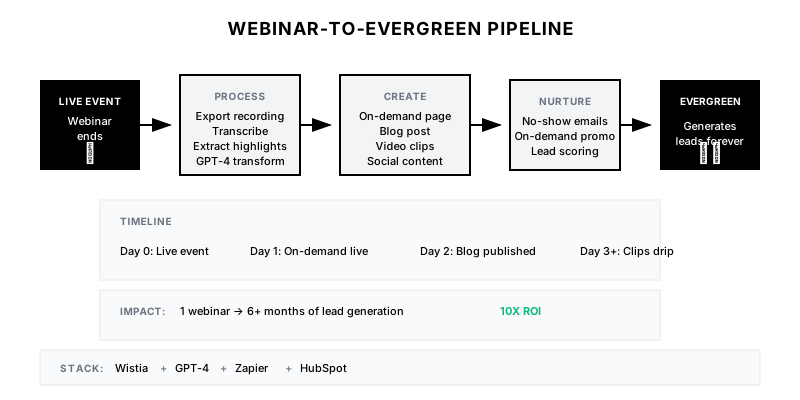
The Webinar-to-Evergreen Pipeline transforms the typical 'one-and-done' webinar into a long-lived content asset. Within 24 hours of a live event, it creates an on-demand viewing page, generates a companion blog post, extracts shareable clips, and sets up automated nurture for new viewers.
Why It Matters
Most webinars generate registrations for one week, then die. But the content remains valuable. An evergreen webinar can generate leads for months or years. This pipeline maximizes ROI on the significant investment of producing live events.
Who It's For
- Demand gen teams running webinar programs
- Content marketers managing webinar archives
- Marketing ops automating post-event workflows
- Event marketers extending event lifespan
Preconditions
Required Tools
- Webinar platform (Zoom, Webex, Livestorm)
- Video hosting (Wistia, Vimeo)
- CMS for on-demand pages
- Marketing automation (HubSpot, Marketo)
- GPT-4 for content generation
Required Fields/Properties
- Webinar recording (high quality)
- Slide deck
- Attendee and registrant lists
- Chat/Q&A export
- Original promotional copy
Definitions Required
- On-demand page template
- Blog post format from webinar
- Nurture sequence for on-demand viewers
- Video clip selection criteria
- Lead scoring for on-demand vs. live
Step-by-Step Workflow
Configure Post-Webinar Processing
Goal: Automate the immediate post-event workflow.
Actions:
- Set up recording auto-export from webinar platform
- Configure transcription (native or via Otter/Descript)
- Export attendee list and engagement data
- Archive chat and Q&A content
- Trigger processing pipeline
Implementation Notes: Speed matters. The faster you get on-demand content live, the more no-shows and registrants you'll convert. Target 24-48 hours post-event for full asset availability.
Automation Logic:
// Example: Post-webinar automation trigger
const processWebinar = async (webinarData) => {
  // Export recording
  const recording = await zoom.downloadRecording(webinarData.id);

  // Generate transcript
  const transcript = await descript.transcribe(recording);

  // Extract key moments (Q&A, high engagement)
  const highlights = await analyzeEngagement({
    transcript,
    chat: webinarData.chat_export,
    polls: webinarData.poll_data
  });

  // Queue content generation
  await queue.add('generate_evergreen_assets', {
    recording,
    transcript,
    highlights,
    metadata: webinarData
  });

  // Notify team
  await slack.notify('#marketing', `Processing ${webinarData.title}`);
};
Create On-Demand Landing Page
Goal: Build a gated page for on-demand viewing.
Actions:
- Generate page from webinar template
- Upload recording to video host
- Create/update registration form
- Add chapter markers and timestamps
- Set up engagement tracking
Implementation Notes: On-demand pages should feel intentional, not like an afterthought. Add chapter markers, key takeaways, and related resources. Make it a destination, not just a recording dump.
Generate Companion Content
Goal: Create derivative content from the webinar.
Actions:
- Generate blog post from transcript
- Extract quotable moments for social
- Create video clips (2-5 minutes each)
- Build infographic from key data points
- Draft email promoting on-demand access
Implementation Notes: The blog post isn't a transcript—it's a reimagined article that captures the insights in readable form. Use GPT-4 to transform, not just transcribe.
Automation Logic:
GPT-4 Webinar-to-Blog Prompt:

Transform this webinar transcript into a comprehensive blog post.

Webinar Title: {{title}}
Speaker: {{speaker_name}}, {{speaker_title}}
Transcript: {{transcript}}
Key Q&A: {{qa_highlights}}

Generate a blog post that:

1. Opens with a compelling hook (not "We recently hosted a webinar...")
2. Structures insights into clear sections with headers
3. Preserves the speaker's expertise without being a transcript
4. Incorporates relevant Q&A as additional value
5. Includes practical takeaways readers can implement
6. Ends with CTA to watch the full recording

Format:
- 1,500-2,000 words
- Use subheadings every 300-400 words
- Include 3-5 pull quotes
- Add bulleted lists for actionable items

Tone: Educational, authoritative, not promotional
Build Nurture Sequence
Goal: Create automated follow-up for on-demand viewers.
Actions:
- Design email sequence (3-5 emails)
- Personalize based on viewing behavior
- Include related content and next steps
- Set up lead scoring for engagement
- Configure handoff to sales for high-intent
Implementation Notes: On-demand viewers are in research mode. Nurture with related content, not hard sales. Score based on viewing completion and engagement with follow-up content.
Promote and Measure
Goal: Drive ongoing traffic and track evergreen performance.
Actions:
- Add to resource library/content hub
- Include in relevant nurture streams
- Promote via social and email
- Track registrations and viewing metrics
- Measure lead quality and conversion
Implementation Notes: Evergreen webinars should be promoted continuously, not just at launch. Add to email signatures, include in sales outreach, and reference in related content.
Templates
On-Demand Page Structure
## [Webinar Title]

**Originally aired:** {{live_date}}
**Duration:** {{duration}}
**Speaker:** {{speaker_name}}, {{speaker_title}}

### What You'll Learn

{{#each key_takeaways}}
✓ {{takeaway}}
{{/each}}

---

[VIDEO PLAYER WITH CHAPTERS]

**Chapters:**
- 0:00 - Introduction
- {{chapter_1_time}} - {{chapter_1_title}}
- {{chapter_2_time}} - {{chapter_2_title}}
- {{chapter_3_time}} - {{chapter_3_title}}
- {{qa_time}} - Audience Q&A

---

### Resources Mentioned

{{#each resources}}
- [{{resource_title}}]({{resource_link}})
{{/each}}

### Related Content

{{related_content_links}}

---

[CTA: Schedule a consultation / Download the guide / etc.]
No-Show Follow-Up Email
Subject: You missed it, but here's the recording: {{webinar_title}}

Hi {{first_name}},

We noticed you registered for "{{webinar_title}}" but couldn't make it live. No worries—we've got you covered.

**Watch the recording here:** [View On-Demand →]({{on_demand_link}})

Here's what you'll learn:
{{#each key_points}}
• {{point}}
{{/each}}

**Duration:** {{duration}} (with chapter markers so you can skip around)

{{speaker_name}} covered some great material on {{topic_summary}}. The Q&A section (starting at {{qa_timestamp}}) is particularly valuable.

Let me know if you have any questions after watching.

Best,
{{sender_name}}
On-Demand Nurture Sequence
**Email 1: Post-View (1 day after)**
Subject: What did you think of {{webinar_title}}?
Content: Quick check-in, link to blog post version, ask for questions

**Email 2: Related Content (4 days after)**
Subject: Going deeper on {{topic}}
Content: Related resources, case study, additional materials

**Email 3: Next Step (7 days after)**
Subject: Ready to take action on {{topic}}?
Content: Soft CTA - consultation, demo, or deeper resource

**Email 4: Sales Handoff (14 days after, high engagement only)**
Subject: Quick question about {{company_name}}
Content: Personal outreach from sales based on content engagement
Evergreen Performance Tracker
| Webinar | Live Date | On-Demand Views | Blog Views | Clips Engagement | MQLs Generated | Status |
|---------|-----------|-----------------|------------|------------------|----------------|--------|
| Q4 Planning | Oct 15 | 342 | 1,240 | 5,600 | 28 | Active |
| Sales AI Guide | Nov 3 | 567 | 2,100 | 8,400 | 45 | Active |
| 2025 Trends | Dec 10 | 234 | 890 | 3,200 | 18 | Active |
| Pricing Strategy | Sep 5 | 128 | 450 | 1,100 | 8 | Sunset Review |
QA + Edge Cases
Test Cases Checklist
- Webinar ends → on-demand page live within 48 hours
- Blog post generated and reviewed → published within 72 hours
- No-shows receive recording email → within 24 hours of live event
- On-demand registration → nurture sequence triggers
- High engagement viewer → sales notified
Common Failure Modes
- Delayed processing: Taking a week to get on-demand content live. Automate and streamline to hit 24-48 hour target.
- Low-quality recording: Audio issues, screen share problems. Do pre-event checks and have backup recording.
- Transcript as blog post: Posting raw transcript instead of proper article. Use AI to transform into readable content.
- No ongoing promotion: Launching on-demand then forgetting about it. Build into ongoing content distribution.
Troubleshooting Tips
- If on-demand views are low: Improve promotion, check page/form conversion
- If blog engagement is low: Review content quality, may need better transformation
- If nurture isn't converting: Adjust timing and content mix, add more value
- If leads aren't qualified: Review scoring, tighten on-demand form fields
KPIs and Reporting
KPIs to Track
- On-Demand Registration Rate: Track registrations as % of promotions
- Viewing Completion: >40% watch more than 50% of recording
- Evergreen MQLs: X MQLs per month from on-demand content
- Content Lifespan: Webinars generating leads 6+ months after live event
- Time to Evergreen: All assets live within 48 hours of event
Suggested Dashboard Widgets
- On-Demand Library: All evergreen webinars with performance
- Registration Trends: On-demand registrations over time
- MQL Attribution: Leads generated by webinar content
- Content Lifespan: Performance trajectory post-launch