Overview
What It Is
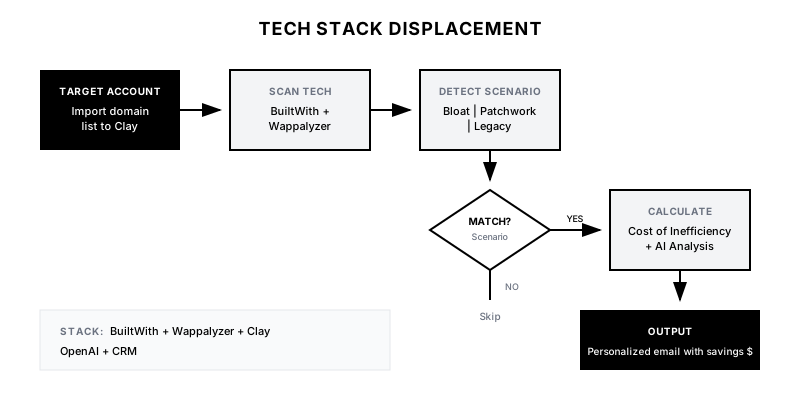
The Tech Stack Displacement playbook uses technographic data to identify companies whose current tool stack signals an opportunity for your solution. This could mean they're using a competitor you can displace, running a fragmented set of point solutions you can consolidate, or paying enterprise prices for tools they're underutilizing. The playbook automates the detection, analysis, and personalized outreach to these prospects.
Why It Matters
Generic outbound ignores the single most important factor in B2B sales: timing and relevance. A company running 5 different tools to do what your platform does in one is experiencing real pain—even if they don't realize it yet. By leading with a specific observation about their stack and a calculated 'Cost of Inefficiency,' you transform cold outreach into a consultative conversation.
Who It's For
- Platform companies that consolidate point solutions
- Challenger brands competing against entrenched incumbents
- Companies with clear cost or efficiency advantages to quantify
- Sales teams comfortable with technical/consultative selling
Preconditions
Required Tools
- BuiltWith or Wappalyzer (for technographic data)
- Clay (for enrichment and workflow orchestration)
- OpenAI/GPT-4 (for personalized analysis generation)
- CRM (HubSpot/Salesforce)
- Optional: ZoomInfo, Clearbit for firmographic enrichment
Required Fields/Properties
- Target Account List with domains
- Tool combinations that signal opportunity (displacement targets)
- Pricing benchmarks for competitor tools
- Your value proposition by displacement scenario
Definitions Required
- Which tool combinations indicate 'bloat' vs 'patchwork' vs 'underutilization'
- Cost calculation methodology (licenses, integration overhead, etc.)
- Displacement scenarios mapped to your solution's strengths
- Minimum company size/spend threshold for displacement relevance
Step-by-Step Workflow
Define Displacement Scenarios
Goal: Identify specific tool combinations that signal displacement opportunities.
Actions:
- List tools your product replaces or consolidates
- Define 3-5 'displacement scenarios' with clear value props
- Scenario 1: 'The Bloat' – using enterprise tool at <10% feature utilization
- Scenario 2: 'The Patchwork' – using 3+ point solutions you consolidate
- Scenario 3: 'The Legacy' – using outdated tool with known limitations
- Document estimated cost savings for each scenario
Implementation Notes: Focus on scenarios where you can quantify the value. 'Our UI is better' is subjective. 'You're paying $50k/year for features you don't use' is concrete.
Automation Logic:
Example Displacement Scenarios:

1. THE BLOAT
   Signal: Salesforce Enterprise + Marketo
   Insight: Paying for full suites but only using CRM + email
   Your Pitch: "You're likely spending $80k+ on features you don't use"

2. THE PATCHWORK
   Signal: Typeform + Zapier + Airtable + Mailchimp
   Insight: Duct-taping point solutions together
   Your Pitch: "4 tools, 4 bills, 4 failure points. We unify this."

3. THE LEGACY
   Signal: On-prem or older version of major tool
   Insight: Missing modern capabilities, security risks
   Your Pitch: "[Tool] v2019 lacks [critical feature]. Here's the upgrade path."
Set Up Technographic Enrichment
Goal: Configure automated tech stack detection for target accounts.
Actions:
- Import target account domains into Clay
- Add BuiltWith and/or Wappalyzer enrichment
- Create columns for key tools in each displacement scenario
- Build boolean flags: 'bloat_detected', 'patchwork_detected', etc.
- Configure filters to surface accounts matching scenarios
Implementation Notes: Technographic data isn't perfect—tools behind login screens aren't always detected. Use this as a signal, not a guarantee. Verify in your outreach: 'I noticed you might be using...'
Automation Logic:
{
  "clay_enrichment": {
    "source": "builtwith",
    "fields": [
      "technologies_detected",
      "marketing_automation",
      "crm_detected",
      "analytics_tools",
      "form_tools"
    ]
  },
  "scenario_flags": {
    "bloat_detected": "IF crm = 'Salesforce' AND marketing_automation = 'Marketo' THEN true",
    "patchwork_detected": "IF COUNT(form_tools, automation_tools, database_tools) >= 3 THEN true",
    "legacy_detected": "IF crm_version < 2020 OR tool IN legacy_list THEN true"
  }
}
Build Cost Calculation Engine
Goal: Automate 'Cost of Inefficiency' calculations for each scenario.
Actions:
- Research typical pricing for tools in each scenario
- Build calculation logic: tool costs + integration overhead + time waste
- Factor in company size (employee count, revenue) for scaling
- Create 'savings estimate' ranges (conservative to aggressive)
- Store calculation in Clay for use in email personalization
Implementation Notes: Be conservative with savings estimates. Overpromising destroys credibility. Better to say '$30-50k in potential savings' than '$100k guaranteed.'
Automation Logic:
Cost Calculation Framework:

DIRECT COSTS
- Tool A license: $X/user/month × estimated users
- Tool B license: $Y/user/month × estimated users
- Total direct: $Z/year

INDIRECT COSTS (ESTIMATES)
- Integration maintenance: 10-20 hrs/month × $100/hr
- Context switching: 30 min/day × team size × $50/hr
- Data sync errors: X incidents/month × resolution cost

TOTAL COST OF INEFFICIENCY: $XX,XXX - $XX,XXX/year

YOUR SOLUTION: $[Your Price]
ESTIMATED SAVINGS: $XX,XXX - $XX,XXX/year
Generate Personalized Analysis with AI
Goal: Use GPT-4 to create custom stack analysis for each prospect.
Actions:
- Create prompt template that takes stack data as input
- Generate 2-3 sentence 'stack observation' for each prospect
- Include specific tool names detected
- Reference the relevant displacement scenario
- Keep analysis factual, not judgmental
Implementation Notes: AI-generated content should sound like an analyst's observation, not marketing copy. 'I noticed you're running Salesforce alongside 3 standalone form tools' not 'Your stack is a mess!'
Automation Logic:
GPT-4 Prompt Template:

You are a RevOps analyst. Based on the following technographic data for {{company}}, write a 2-3 sentence neutral observation about their stack that could open a sales conversation.

Tech Stack Detected:
{{detected_tools}}

Displacement Scenario: {{scenario_type}}
Estimated Cost: {{cost_estimate}}

Rules:
- Be specific (name the tools)
- Be factual, not judgmental
- Mention one potential efficiency gap
- Keep under 50 words

Example Output:
"I noticed {{company}} is running Typeform for lead capture, Zapier for automation, and Airtable for data management. That's a common stack, but teams at your stage often find the integration overhead adds up—especially when data needs to flow to Salesforce in real-time."
Create Scenario-Specific Email Templates
Goal: Build outreach templates for each displacement scenario.
Actions:
- Write email template for 'The Bloat' scenario
- Write email template for 'The Patchwork' scenario
- Write email template for 'The Legacy' scenario
- Include merge fields for: AI analysis, cost estimate, specific tools
- Add soft CTA: 'Worth a 15-min conversation?'
Implementation Notes: Lead with observation, not pitch. The first email should make them think 'Huh, they noticed something real about my situation' not 'Another vendor trying to sell me something.'
Configure Workflow & Launch
Goal: Wire up the full automation and launch the campaign.
Actions:
- Connect Clay to n8n/Make for workflow orchestration
- Set up: detect scenario → calculate cost → generate analysis → draft email
- Create CRM task for SDR review before send
- Configure Slack alerts for new displacement opportunities
- Launch with small batch (50 accounts) to validate
- Monitor reply rates by scenario and iterate
Implementation Notes: Always keep human review in the loop for the first 2-4 weeks. AI-generated content needs QA until you've validated the prompts produce consistently good output.
Templates
Email Template: The Bloat Scenario
Subject: Quick observation about {{company}}'s stack

Hi {{first_name}},

{{ai_generated_analysis}}

Teams in your situation often find they're paying enterprise rates—somewhere in the ${{cost_estimate_low}}k-${{cost_estimate_high}}k range—for capabilities they're using maybe 10-20% of.

Not saying that's definitely your situation, but it might be worth a quick conversation to see if there's a simpler path. We've helped a few similar teams cut stack costs by 40-60% without losing functionality.

15 minutes to compare notes?

{{sender_name}}
Email Template: The Patchwork Scenario
Subject: Noticed you're running {{tool_count}} tools for {{function}}

Hi {{first_name}},

{{ai_generated_analysis}}

The "Zapier tax" is real—every integration is a potential failure point, and someone's spending hours each week maintaining the duct tape. We've seen teams at {{company}}'s stage spending ${{indirect_cost_estimate}}+ per year just keeping point solutions talking to each other.

We built {{your_product}} specifically for teams who've outgrown the patchwork. One platform, one bill, one throat to choke.

Worth a quick look?

{{sender_name}}
Email Template: The Legacy Scenario
Subject: {{tool_name}} in 2024—you're not alone

Hi {{first_name}},

I noticed {{company}} is running {{legacy_tool}}. No judgment—plenty of teams are in the same boat. The tool works, switching is painful, and there's always something more urgent.

But I've also seen what happens when teams finally make the move: {{specific_benefit_1}}, {{specific_benefit_2}}, and usually 30-40% lower TCO.

If you're even vaguely considering an upgrade path in 2024, might be worth a 15-minute conversation to map out what that could look like—no commitment, just context.

Thoughts?

{{sender_name}}
Displacement Scenario Reference
| Scenario | Signal Tools | Estimated Annual Cost | Your Value Prop | Email Template |
|----------|-------------|----------------------|-----------------|----------------|
| The Bloat | Salesforce Enterprise + Marketo + Outreach | $80-150k | Use 10%, pay 100%. We right-size. | bloat-template |
| The Patchwork | Typeform + Zapier + Airtable + Mailchimp | $15-30k + integration overhead | One platform, no duct tape. | patchwork-template |
| The Legacy | On-prem CRM, tools >3 years old | Varies + opportunity cost | Modern capabilities, same data. | legacy-template |
| The Overlap | Two tools with 70%+ feature overlap | 50% waste | Consolidate and save. | overlap-template |
Slack Alert Format
📊 *Tech Stack Displacement Opportunity*

*Company:* {{company_name}}
*Scenario:* {{scenario_type}}

*Stack Detected:*
{{#each detected_tools}}
• {{this}}
{{/each}}

*Estimated Cost of Inefficiency:* ${{cost_estimate_low}}k - ${{cost_estimate_high}}k/year

*AI Analysis:*
> {{ai_analysis}}

*Contact:* {{contact_name}} ({{title}})
*Email:* {{email}}

<{{crm_link}}|View in CRM> | <{{email_draft_link}}|Review Draft Email>
QA + Edge Cases
Test Cases Checklist
- Account with Salesforce + Marketo detected → flagged as 'Bloat' scenario
- Account with 4+ point solutions detected → flagged as 'Patchwork' scenario
- Cost calculation produces reasonable estimate based on company size
- AI analysis mentions specific tools detected
- Correct email template selected based on scenario
- Non-target accounts (wrong size, wrong industry) filtered out
- SDR task created with all context needed
Common Failure Modes
- False positive on tech detection: BuiltWith may detect tools that are no longer in use or were only tested. Use hedging language: 'I noticed you might be running…' instead of definitive statements.
- Cost estimates way off: Public pricing doesn't account for enterprise discounts. Keep ranges wide and conservative. Better to underestimate savings than lose credibility.
- AI analysis sounds robotic: GPT-4 can produce generic-sounding copy. Review first 20-30 outputs and refine prompts. Add examples of good/bad output to the prompt.
- Irrelevant scenario match: A small company with Salesforce isn't 'bloated'—they might just have a good deal. Factor in company size when classifying scenarios.
Troubleshooting Tips
- If tech detection seems incomplete: Cross-reference with manual LinkedIn research on ops/IT team
- If cost estimates feel off: Benchmark against public case studies and adjust formulas
- If AI output is poor: Add more examples to prompt and constrain output format
- If reply rates are low: Test whether the scenario is actually a pain point or just an observation
KPIs and Reporting
KPIs to Track
- Accounts with Displacement Signal: 20-30% of target accounts should match at least one scenario
- Reply Rate by Scenario: >12% overall, with 'Patchwork' typically highest
- Meeting Book Rate: >4% of contacted accounts
- Pipeline Generated: Track $ pipeline from displacement campaigns specifically
- Cost Estimate Accuracy: Post-meeting validation: estimates within 30% of actual
Suggested Dashboard Widgets
- Displacement Opportunities by Scenario: Pie chart showing distribution of Bloat vs Patchwork vs Legacy signals
- Conversion Funnel by Scenario: Funnel comparing: Detected → Contacted → Replied → Meeting for each scenario
- Most Common Tool Combinations: Table showing most frequently detected tool pairings in target accounts
- Pipeline from Displacement: $ pipeline attributed to tech stack displacement campaigns over time