Overview
What It Is
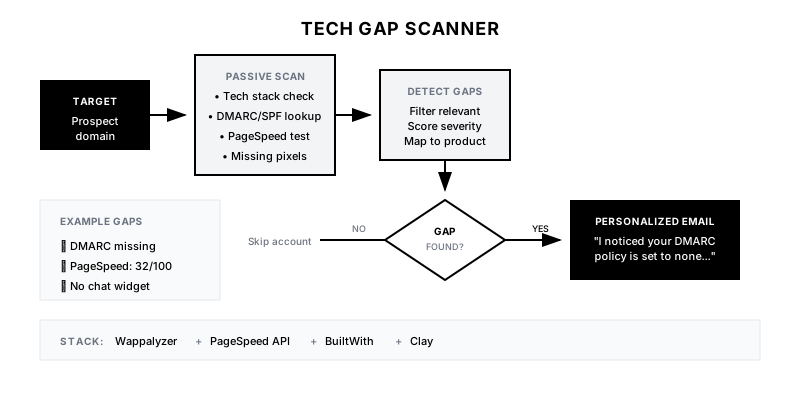
The Tech Gap Scanner runs passive scans of a prospect's public digital assets to identify technical gaps or misconfigurations. Missing tracking pixels, poor page speed, broken security settings, or absent tools become specific, helpful observations that open doors to conversation.
Why It Matters
Generic cold outreach says 'I can help.' Tech Gap outreach says 'I noticed your DMARC policy is set to none, which means anyone can spoof your domain.' The latter demonstrates expertise, provides immediate value, and creates a natural conversation starter.
Who It's For
- SDRs doing personalized outbound prospecting
- Marketing tech vendors who can spot gaps in their category
- Security and compliance vendors
- Agencies offering technical audits
Preconditions
Required Tools
- Wappalyzer or BuiltWith (tech stack detection)
- Google PageSpeed Insights API
- DNS/DMARC checking tools
- Custom scripts for specific gap detection
- Clay for orchestration
Required Fields/Properties
- Target company domain
- Gap detection rules relevant to your product
- Severity scoring for different gaps
- Outreach templates by gap type
Definitions Required
- Which technical gaps are relevant to your product
- What constitutes a 'finding' vs. noise
- How to translate technical findings into business impact
- Ethical boundaries for scanning
Step-by-Step Workflow
Define Relevant Tech Gaps
Goal: Identify which technical issues are relevant to your product and prospecting.
Actions:
- List gaps your product addresses (e.g., missing analytics, poor performance)
- Identify gaps that indicate buying readiness (e.g., using competitor)
- Define gaps that signal technical maturity level
- Create severity scoring (critical, moderate, minor)
- Map gaps to business impact statements
Implementation Notes: Focus on gaps that lead naturally to your solution. If you sell email security, DMARC issues are gold. If you sell analytics, missing pixels matter. Don't scan for everything—scan for what's relevant.
Configure Scanning Tools
Goal: Set up automated scanning for target domains.
Actions:
- Set up Wappalyzer/BuiltWith API integration
- Configure Google PageSpeed API calls
- Add DNS record checking (DMARC, SPF, DKIM)
- Create custom checks for industry-specific gaps
- Set up rate limiting to avoid looking like a bot
Implementation Notes: Keep scans passive and ethical. Only analyze publicly accessible information. Never attempt to access private systems or exploit vulnerabilities.
Automation Logic:
// Example: DMARC record check
const dns = require('dns').promises;

async function checkDMARC(domain) {
  try {
    const records = await dns.resolveTxt(`_dmarc.${domain}`);
    const dmarc = records.find(r => r[0].startsWith('v=DMARC1'));

    if (!dmarc) return { status: 'missing', severity: 'high' };
    if (dmarc[0].includes('p=none')) return { status: 'weak', severity: 'medium' };
    return { status: 'configured', severity: 'none' };
  } catch (e) {
    return { status: 'missing', severity: 'high' };
  }
}
Build Gap Detection Logic
Goal: Create rules that identify meaningful gaps from scan results.
Actions:
- Define what 'missing' means for each tool/config
- Set thresholds for performance scores (e.g., PageSpeed <50)
- Create competitor detection rules
- Add context-aware filtering (B2B vs B2C expectations differ)
- Build composite scoring for overall 'gap severity'
Implementation Notes: Not every finding is worth mentioning. A missing Facebook Pixel on a B2B site isn't a gap. A missing LinkedIn Insight Tag might be. Filter for relevance.
Automation Logic:
Gap Detection Rules:

SECURITY:
- DMARC missing or p=none → High severity
- No SSL/HTTPS → Critical
- Outdated CMS version → Medium

MARKETING:
- No Google Analytics → High (if B2C)
- Missing conversion tracking → Medium
- No chat/chatbot → Low

PERFORMANCE:
- PageSpeed mobile <50 → High
- No CDN detected → Medium
- Large unoptimized images → Low
Generate Actionable Reports
Goal: Transform technical findings into business-relevant insights.
Actions:
- Translate technical issues into business impact
- Prioritize findings by severity and relevance
- Include specific recommendations
- Add comparison to industry benchmarks
- Create outreach-ready summaries
Implementation Notes: Technical findings need translation. 'DMARC policy is none' becomes 'Anyone can send emails pretending to be from your domain, which could damage your brand or enable phishing.'
Create Outreach Templates
Goal: Build email templates that leverage specific findings.
Actions:
- Write templates for each major gap type
- Lead with the finding, not the pitch
- Include specific data (score, comparison)
- Offer to share more details
- Keep focus on being helpful, not salesy
Implementation Notes: The best tech gap emails feel like help, not sales. 'I noticed X' followed by 'here's what that means' followed by 'happy to share more if useful.' No pitch in the first email.
Templates
Tech Gap Report Template
🔍 TECH GAP SCAN REPORT
━━━━━━━━━━━━━━━━━━━━━━━━━━━━━━━━━━━━━

🏢 Company: {{company_name}}
🌐 Domain: {{domain}}
📅 Scanned: {{scan_date}}

━━━━━━━━━━━━━━━━━━━━━━━━━━━━━━━━━━━━━

⚠️ CRITICAL FINDINGS
{{#each critical_findings}}
• {{finding_title}}
  Impact: {{business_impact}}
  Recommendation: {{recommendation}}
{{/each}}

🟡 MODERATE FINDINGS
{{#each moderate_findings}}
• {{finding_title}}
  Impact: {{business_impact}}
{{/each}}

📊 PERFORMANCE SCORES
• Mobile PageSpeed: {{mobile_score}}/100 (Industry avg: 55)
• Desktop PageSpeed: {{desktop_score}}/100 (Industry avg: 70)

🛠️ TECH STACK DETECTED
{{#each tech_stack}}
• {{category}}: {{tool_name}}
{{/each}}

🎯 OUTREACH ANGLE
{{recommended_angle}}
Cold Email: DMARC Gap
Subject: Quick note on {{company_name}}'s email security

Hi {{first_name}},

I was doing some research on {{company_name}} and noticed your DMARC policy is currently set to 'none.'

In practice, this means anyone can send emails that appear to come from @{{domain}}—which can be exploited for phishing attacks targeting your customers or partners.

It's an easy fix (usually 15 minutes to configure), but I've seen it overlooked at even well-resourced companies.

Happy to share a quick guide on the fix if useful—no strings attached.

Best,
{{sender_name}}
Cold Email: PageSpeed Gap
Subject: {{company_name}}'s mobile site score: {{mobile_score}}/100

Hi {{first_name}},

Ran a quick PageSpeed check on {{domain}} and saw the mobile score is {{mobile_score}}.

For context, Google recommends 90+ for optimal user experience, and most of your competitors are in the 60-75 range. At {{mobile_score}}, you're likely seeing higher bounce rates on mobile—potentially costing conversions.

The biggest quick wins are usually image optimization and render-blocking resources. Would a prioritized fix list be helpful?

Best,
{{sender_name}}
Gap-to-Product Mapping Table
| Gap Type | Detection Method | Severity | Product Fit | Outreach Template |
|----------|------------------|----------|-------------|-------------------|
| DMARC Missing | DNS lookup | High | Email Security | dmarc-gap-email |
| No Analytics | Wappalyzer | Medium | Analytics | analytics-gap-email |
| Poor PageSpeed | PageSpeed API | Medium | Performance | pagespeed-gap-email |
| Using Competitor | BuiltWith | High | Your Product | competitor-displacement |
| Outdated CMS | Wappalyzer | Medium | Security | cms-update-email |
| No Chat | Wappalyzer | Low | Chat/Support | chat-gap-email |
QA + Edge Cases
Test Cases Checklist
- Domain with DMARC missing → flagged as high severity
- Domain with PageSpeed 85 → no performance finding (above threshold)
- Competitor tool detected → flagged for displacement outreach
- Invalid domain → graceful error handling
- Rate limit reached → queue for later processing
Common Failure Modes
- Irrelevant findings: Flagging gaps that don't matter to the prospect or your product. Filter ruthlessly for relevance.
- False positives: Tools can misidentify tech stack or miss things. Verify critical findings manually before outreach.
- Condescending tone: 'Your site has problems' feels insulting. 'I noticed X' feels helpful. Tone matters enormously.
- Ethical overreach: Stick to passive, public analysis. Never attempt to access private systems or exploit findings.
Troubleshooting Tips
- If detection is missing things: Review API coverage and consider adding data sources
- If too many false positives: Tighten detection thresholds and add verification step
- If response rates are low: Review email tone—may be coming across as salesy
- If scans are slow: Implement caching and rate limiting
KPIs and Reporting
KPIs to Track
- Scans Completed: All target accounts scanned before outreach
- Findings Per Account: Average 2-3 relevant findings per account
- Response Rate: Tech gap emails >15% response rate
- Meeting Conversion: >5% of tech gap emails result in meeting
- Finding Accuracy: >95% of findings verified accurate
Suggested Dashboard Widgets
- Findings by Type: Distribution of gap types found across accounts
- Outreach Performance by Gap: Response and meeting rates by finding type
- Scan Coverage: Percentage of target accounts scanned
- Top Gaps Found: Most common findings in target market