Overview
What It Is
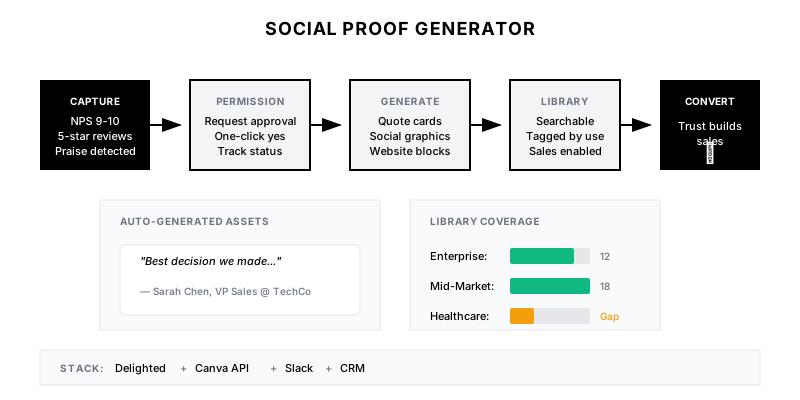
The Social Proof Generator monitors for positive customer signals—high NPS scores, 5-star reviews, success milestones—and automatically transforms them into usable marketing assets. From website testimonial blocks to LinkedIn quote cards, it creates a steady stream of social proof.
Why It Matters
Customers say great things about you every day—in surveys, support tickets, and conversations. Most of it disappears. Systematic capture and formatting turns casual compliments into conversion-driving assets.
Who It's For
- Marketing teams needing fresh testimonials
- CS teams capturing customer success
- Sales teams wanting deal-specific proof
- Founders collecting early validation
Preconditions
Required Tools
- NPS/CSAT tool (Delighted, Wootric, ChurnZero)
- Review platforms (G2, Capterra, TrustRadius)
- Design tool with API (Canva, Figma)
- CRM for customer data
- Slack for alerts
Required Fields/Properties
- Customer name and company
- Permission status for public use
- Feedback text/quote
- Context (product, use case, timing)
- Customer logo (if available)
Definitions Required
- What qualifies as 'testimonial-worthy' feedback
- Permission request process
- Quote formatting guidelines
- Graphic templates for each use case
- Storage and organization system
Step-by-Step Workflow
Define Social Proof Triggers
Goal: Identify all sources of positive customer feedback.
Actions:
- Map all feedback collection points (NPS, CSAT, reviews)
- Define thresholds for capture (NPS 9-10, 5-star reviews)
- Identify milestone triggers (first value, ROI achieved)
- Set up monitoring for unsolicited praise (support, social)
- Create capture workflow for each source
Implementation Notes: Cast a wide net. Social proof comes from surveys, reviews, support tickets, Slack channels, social mentions, and sales calls. Set up listeners for all channels.
Automation Logic:
Social Proof Sources:

1. SURVEY RESPONSES
   - NPS 9-10 with comment → Capture
   - CSAT 5-star with feedback → Capture
   - Onboarding survey praise → Capture

2. REVIEW PLATFORMS
   - G2 review (any star, prioritize 5-star)
   - Capterra review
   - TrustRadius review
   - Product Hunt launch comments

3. MILESTONE TRIGGERS
   - First [key action] completed
   - 90-day success metric hit
   - ROI milestone achieved
   - Expansion/upgrade decision

4. UNSOLICITED PRAISE
   - Customer Slack channel messages
   - Support ticket thank-you's
   - LinkedIn mentions/posts
   - Twitter/X praise
   - Sales call compliments (from recordings)
Build Permission Workflow
Goal: Get approval to use feedback publicly.
Actions:
- Create permission request email template
- Automate request when feedback is captured
- Track permission status in CRM
- Define what permissions allow (quote, logo, case study)
- Set up reminder for non-responses
Implementation Notes: Always get permission. Even for NPS comments, ask before publishing. Make it easy—a single reply or checkbox. Track who said yes for case study escalation.
Automation Logic:
Permission Request Email:

Subject: Can we share your kind words?

Hi {{first_name}},

Thank you for your recent feedback! We were thrilled to hear:

"{{their_quote}}"

Would you be open to us sharing this on our website? We'd include your name and {{company_name}}.

[Yes, you can share it →] ← One-click link
[No thanks] ← Respect the no

If you're open to a longer conversation for a case study, just reply to this email. We'd love to feature {{company_name}}'s success.

Thanks again for being a customer!

{{sender_name}}
Create Asset Generation
Goal: Automatically format testimonials into usable assets.
Actions:
- Build quote card templates (social, website)
- Create automated design generation (Canva API)
- Format quotes for different lengths (snippet, full)
- Generate platform-specific versions
- Organize in searchable library
Implementation Notes: Create templates for common uses: LinkedIn (square), Twitter (horizontal), website (text block), sales deck (slide). Automated design means instant assets.
Automation Logic:
// Example: Auto-generate quote graphic
const generateQuoteCard = async (testimonial) => {
  const templates = {
    linkedin: 'template_linkedin_square',
    twitter: 'template_twitter_card',
    website: 'template_website_block',
    sales: 'template_sales_slide'
  };

  const assets = {};

  for (const [platform, templateId] of Object.entries(templates)) {
    assets[platform] = await canva.generate({
      template: templateId,
      variables: {
        quote: testimonial.quote,
        name: testimonial.customer_name,
        title: testimonial.customer_title,
        company: testimonial.company_name,
        logo: testimonial.company_logo
      }
    });
  }

  // Save to library
  await saveToLibrary({
    testimonial_id: testimonial.id,
    assets,
    tags: [testimonial.use_case, testimonial.industry]
  });

  return assets;
};
Build Distribution Workflow
Goal: Get social proof to the right people at the right time.
Actions:
- Alert marketing when new testimonials are ready
- Push to sales enablement library
- Tag by industry, use case, product
- Create weekly digest of new proof
- Enable self-service for sales team
Implementation Notes: Social proof loses value if no one uses it. Make it findable. Weekly digests remind teams what's available. Tag everything for easy filtering.
Track Usage and Impact
Goal: Measure how social proof affects conversion.
Actions:
- Track which testimonials are used where
- Measure conversion lift on pages with social proof
- Identify most-requested proof types
- Flag stale testimonials for refresh
- Report on social proof coverage gaps
Implementation Notes: Know which testimonials drive results. If enterprise prospects convert better with Fortune 500 logos, prioritize capturing those. Data should inform capture priorities.
Templates
Quote Card Template
┌─────────────────────────────────────┐
│                                     │
│  "{{quote}}"                        │
│                                     │
│  ──────────────                     │
│                                     │
│  [PHOTO]  {{name}}                  │
│           {{title}}                 │
│           {{company}} [LOGO]        │
│                                     │
└─────────────────────────────────────┘

Variations:
• Short quote (< 100 chars): Large text, centered
• Medium quote (100-200 chars): Standard layout
• Long quote (> 200 chars): Two-line, smaller text

Brand Elements:
• Background: Brand color or white
• Quote marks: Brand accent color
• Font: Brand typography
• Logo placement: Bottom right
Weekly Social Proof Digest
📣 *WEEKLY SOCIAL PROOF DIGEST*
{{week_of}}
━━━━━━━━━━━━━━━━━━━━━━━━━━━━━━━━━━━━━

**New Testimonials Ready to Use:**

🆕 **{{customer_1}}** - {{industry_1}}
"{{quote_snippet_1}}"
[View Assets]({{assets_link_1}}) | [Full Quote]({{full_link_1}})

🆕 **{{customer_2}}** - {{industry_2}}
"{{quote_snippet_2}}"
[View Assets]({{assets_link_2}}) | [Full Quote]({{full_link_2}})

━━━━━━━━━━━━━━━━━━━━━━━━━━━━━━━━━━━━━

**Testimonials by the Numbers:**
• Total in library: {{total_count}}
• Added this month: {{month_count}}
• Most-used this week: {{top_used}}
• Gap to fill: {{gap_area}} (only {{gap_count}} testimonials)

<{{library_link}}|Browse Full Library>
Testimonial Library Entry
## Testimonial: {{customer_name}}

**Customer:** {{customer_name}}, {{title}} at {{company}}
**Captured:** {{date}} | **Source:** {{source}}
**Permission:** {{permission_status}}

---

### Full Quote
"{{full_quote}}"

### Shortened Versions
**Tweet-length (< 280):**
"{{short_quote}}"

**Snippet (< 100):**
"{{snippet}}"

---

### Tags
- Industry: {{industry}}
- Use Case: {{use_case}}
- Product: {{product}}
- Size: {{company_size}}

### Assets
- [LinkedIn Card]({{linkedin_asset}})
- [Twitter Card]({{twitter_asset}})
- [Website Block]({{website_asset}})
- [Sales Slide]({{sales_asset}})

### Usage History
{{#each usage_history}}
- {{date}}: Used in {{location}} by {{user}}
{{/each}}
Social Proof Coverage Matrix
| Segment | Current Count | Target | Gap | Priority |
|---------|---------------|--------|-----|----------|
| Enterprise | 12 | 15 | 3 | High |
| Mid-Market | 18 | 15 | +3 | Covered |
| SMB | 8 | 10 | 2 | Medium |
| Healthcare | 3 | 8 | 5 | High |
| Finance | 6 | 8 | 2 | Medium |
| Tech | 22 | 15 | +7 | Covered |
| Manufacturing | 1 | 5 | 4 | High |
QA + Edge Cases
Test Cases Checklist
- NPS 10 with comment → testimonial captured within 1 hour
- Permission requested → tracked in CRM with status
- Permission granted → assets generated within 24 hours
- New testimonial added → team notified via Slack
- Sales searches 'healthcare' → finds relevant testimonials
Common Failure Modes
- Permission not obtained: Publishing without approval. Always confirm permission before use, track status clearly.
- Stale testimonials: Using quotes from customers who've churned or changed roles. Regular audits needed.
- Library not used: Building assets no one knows about. Push weekly digests, train sales on access.
- Coverage gaps: Lots of SMB proof, no enterprise. Track by segment and prioritize outreach.
Troubleshooting Tips
- If permission rates are low: Simplify the ask, make it one-click
- If capture rate is low: Add more triggers, check NPS/CSAT integration
- If sales doesn't use: Make findable, add to deal room template
- If assets look generic: Improve templates, add more customization
KPIs and Reporting
KPIs to Track
- Testimonials Captured: X new testimonials per month
- Permission Rate: >50% of requests approved
- Library Usage: Track how often assets are accessed/used
- Coverage Score: Testimonials across all key segments
- Conversion Impact: Measure lift on pages with social proof
Suggested Dashboard Widgets
- Testimonial Pipeline: Captured, pending permission, approved
- Coverage Map: Testimonials by industry/segment
- Most Used Testimonials: Top assets by access count
- Recent Additions: Latest approved testimonials