Overview
What It Is
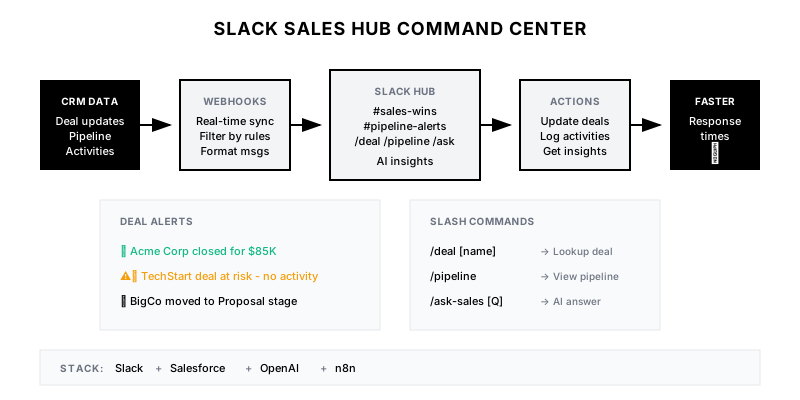
A Slack-native sales command center that brings CRM updates, deal alerts, competitive intelligence, and AI-powered insights directly into the flow of work—enabling sales teams to stay informed and act quickly without context-switching.
Why It Matters
Sales reps spend too much time switching between tools. A Slack hub reduces friction, ensures critical deal updates aren't missed, enables faster team collaboration, and provides instant access to information that wins deals.
Who It's For
- Sales reps wanting real-time deal visibility
- Sales managers monitoring team performance
- Deal desk coordinating complex deals
- RevOps automating sales workflows
Preconditions
Required Tools
- Slack (Business+ or Enterprise)
- Salesforce (or HubSpot)
- n8n or Zapier (automation)
- OpenAI API (for AI features)
Required Fields/Properties
- Opportunity stage and amount
- Close date and probability
- Account and contact information
- Activity history and notes
Definitions Required
- Alert thresholds (deal size, stage changes)
- Channel structure (team, deal, account)
- Slash command permissions
- AI prompt templates
Step-by-Step Workflow
Design Channel Architecture
Goal: Create Slack channel structure for sales visibility
Actions:
- Create #sales-wins channel for closed deals
- Create #sales-pipeline for deal alerts
- Create #competitive-intel for battlecard updates
- Set up deal-specific channels for large opps
- Create regional/team channels as needed
Implementation Notes: Balance visibility with noise. Not every update needs a channel post. Use threading to keep conversations organized.
Build Real-Time Deal Alerts
Goal: Push critical CRM updates to Slack instantly
Actions:
- Set up Salesforce → Slack webhook
- Configure alert triggers (stage, amount, close date)
- Build rich message templates
- Add action buttons (view in CRM, update, log call)
- Implement smart filtering to reduce noise
Implementation Notes: Use Salesforce Flow or Platform Events to trigger webhooks. Format messages for quick scanning. Include context that helps reps act.
Create Slash Commands
Goal: Enable instant data access via Slack commands
Actions:
- Build /deal command for opportunity lookup
- Build /pipeline command for team pipeline
- Build /account command for account 360
- Build /forecast command for forecast snapshot
- Add AI-powered /ask-sales command
Implementation Notes: Slash commands should return in <3 seconds. Use ephemeral messages for personal queries. Cache frequently accessed data.
Build Scheduled Digests
Goal: Deliver proactive intelligence at the right time
Actions:
- Morning pipeline digest for managers
- Weekly forecast summary
- Deal health alerts (stale, at-risk)
- Competitor mention roundup
- Win/loss analysis weekly
Implementation Notes: Time digests for when they're most useful (Monday morning for weekly, 8am for daily). Let users customize digest preferences.
Add AI-Powered Features
Goal: Enhance hub with intelligent insights
Actions:
- Deal summary generation
- Next best action recommendations
- Competitive response suggestions
- Meeting prep briefs
- Risk scoring with explanations
Implementation Notes: AI features should augment, not replace human judgment. Provide explanations with recommendations. Track which suggestions reps find helpful.
Implement Interactive Actions
Goal: Enable actions directly from Slack
Actions:
- Update deal stage from Slack
- Log activities without leaving chat
- Request deal desk review
- Tag teammates for help
- Schedule follow-ups
Implementation Notes: Use Slack modals for complex inputs. Sync changes back to CRM immediately. Confirm successful updates to user.
Templates
Deal Alert Message Template
DEAL ALERT TEMPLATES:

**Stage Change:**
:chart_with_upwards_trend: *{Account}* moved to *{Stage}*
• Amount: {Amount}
• Close Date: {Close Date}
• Owner: @{Rep}
• Days in Pipeline: {Days}
[View Deal] [Log Activity]

**Deal Won:**
:trophy: *CLOSED WON: {Account}*
• Amount: {Amount}
• Days to Close: {Days}
• Won by: @{Rep}
Congrats! :tada:

**At Risk Alert:**
:warning: *Deal at Risk: {Account}*
• Reason: {Risk Reason}
• Amount: {Amount}
• Close Date: {Days Until Close} days away
• Last Activity: {Days Since Activity} days ago
[View Deal] [Add Activity]
Slash Command Reference
| Command | Description | Example |
|---------|-------------|--------|
| /deal [name] | Look up deal by name | /deal Acme Corp |
| /pipeline | View your pipeline | /pipeline |
| /pipeline team | View team pipeline | /pipeline team |
| /account [name] | Account 360 view | /account Acme |
| /forecast | Current forecast | /forecast |
| /ask-sales [question] | AI-powered Q&A | /ask-sales How do we compare to Competitor X? |
| /log [deal] [note] | Quick activity log | /log Acme Called champion |
| /remind [deal] [time] | Set deal reminder | /remind Acme 2d Follow up on proposal |
Channel Naming Convention
#sales-wins → Closed-won announcements (public)
#sales-pipeline → Pipeline alerts (sales team)
#sales-alerts → Urgent notifications (sales team)
#sales-leadership → Forecasts and reports (managers)
#competitive-intel → Battle cards and news (sales + marketing)
#deal-{account-name} → Large deal coordination (deal team)
#region-{region} → Regional team updates
#segment-{segment} → Segment-specific (enterprise, mid-market)
QA + Edge Cases
Test Cases Checklist
- Verify deal alerts fire within 30 seconds of CRM update
- Test all slash commands return correct data
- Confirm stage updates sync back to CRM
- Validate AI insights generate relevant recommendations
- Test scheduled digests deliver at correct times
Common Failure Modes
- Alert fatigue: Too many notifications desensitize users. Implement smart filtering and let users customize alert preferences.
- Stale data: Cached data shows outdated info. Implement cache invalidation on CRM updates.
- Slow responses: Slash commands timeout. Use async processing and background jobs for heavy queries.
Troubleshooting Tips
- If alerts aren't firing, check Salesforce webhook configuration
- For slow commands, implement data caching layer
- If AI features are costly, cache common queries and batch requests
KPIs and Reporting
KPIs to Track
- Daily Active Users: >80% of sales team
- Commands per User per Day: >5
- Time to Alert: <30 seconds
- Action Completion Rate: >40% of alerts result in action
Suggested Dashboard Widgets
- Usage by Command: Most-used slash commands
- Alert Volume: Alerts by type over time
- Response Times: Latency for commands and alerts
- User Adoption: Active users vs total team