Overview
What It Is
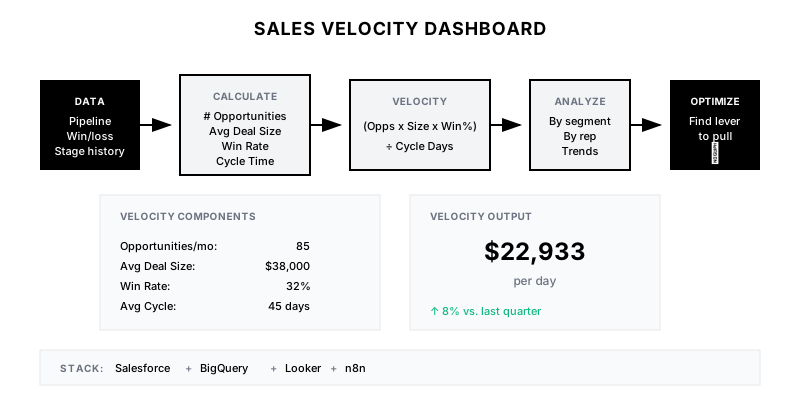
A comprehensive dashboard that calculates and visualizes sales velocity—the speed at which revenue moves through your pipeline—broken down by segment, team, and time period to identify improvement opportunities.
Why It Matters
Sales velocity (# Opps × Deal Size × Win Rate ÷ Sales Cycle) is the master metric for revenue growth. Understanding which lever to pull—more pipeline, bigger deals, higher win rates, or faster cycles—drives focused improvement efforts.
Who It's For
- RevOps teams optimizing revenue engine
- Sales leadership setting strategy
- Individual reps benchmarking performance
- Finance teams modeling growth
Preconditions
Required Tools
- Salesforce (or CRM)
- BigQuery/Snowflake (data warehouse)
- Looker/Tableau (visualization)
- n8n/Fivetran (ETL)
Required Fields/Properties
- Opportunity created date
- Opportunity close date
- Amount
- Stage + stage history
- Win/loss outcome
Definitions Required
- Qualified opportunity definition
- Sales cycle start point (created vs. qualified)
- Segment definitions (enterprise, mid-market, SMB)
- Time period for rolling calculations
Step-by-Step Workflow
Define Velocity Calculation
Goal: Establish consistent velocity formula and component definitions
Actions:
- Define qualified opportunity criteria
- Set cycle time start point (created or qualified date)
- Determine rolling period (30/60/90 days)
- Document formula and definitions
Implementation Notes: Sales Velocity = (# Qualified Opps × Avg Deal Size × Win Rate) ÷ Avg Sales Cycle Days. Use rolling 90 days for stable trends.
Build Component Trend Analysis
Goal: Track each velocity component over time to identify changes
Actions:
- Calculate weekly/monthly component values
- Create time series for each component
- Calculate period-over-period change rates
- Identify component contributing most to velocity change
Implementation Notes: Break down velocity changes into component contributions. If velocity dropped 10%, was it fewer opps, smaller deals, lower win rate, or longer cycles?
Segment Velocity Analysis
Goal: Compare velocity across segments to identify optimization opportunities
Actions:
- Calculate velocity by segment (enterprise, mid-market, SMB)
- Compare velocity by team/rep
- Analyze velocity by product line
- Identify top performers and their patterns
Implementation Notes: Segment comparison reveals where to focus. If SMB has 2x velocity but 50% of investment, consider rebalancing.
Build Stage Conversion Funnel
Goal: Analyze where deals stall or drop off in the pipeline
Actions:
- Calculate conversion rate between each stage
- Track time spent in each stage
- Identify stages with biggest drop-off
- Compare funnel by segment/rep/source
Implementation Notes: Stage-level analysis reveals process bottlenecks. If 40% of deals die at 'Technical Validation', that's where to focus enablement.
Create Velocity Improvement Recommendations
Goal: Generate actionable insights from velocity data
Actions:
- Identify lowest-performing velocity component
- Calculate impact of 10% improvement in each component
- Generate specific recommendations
- Link to related playbooks for implementation
Implementation Notes: Make recommendations specific: 'Improving win rate from 32% to 35% would add $X/month in velocity' is actionable; 'improve win rate' is not.
Automate Dashboard Refresh and Alerts
Goal: Keep dashboard current and alert on significant changes
Actions:
- Schedule daily data refresh
- Set up alerts for velocity drops >10%
- Create weekly summary for leadership
- Enable self-service exploration
Implementation Notes: Alert on both absolute drops and trend breaks. A gradual 2%/week decline is as concerning as a sudden 10% drop.
Templates
Weekly Velocity Summary
📈 *Weekly Sales Velocity Report*

*Overall Velocity:* ${{velocity}}/day ({{velocity_change}} vs. last week)

*Component Breakdown:*
| Component | Current | Prior Week | Change |
|-----------|---------|------------|--------|
| Opportunities | {{opps}} | {{opps_prior}} | {{opps_change}} |
| Win Rate | {{win_rate}}% | {{wr_prior}}% | {{wr_change}} |
| Avg Deal Size | ${{deal_size}} | ${{ds_prior}} | {{ds_change}} |
| Cycle Time | {{cycle}} days | {{cycle_prior}} | {{cycle_change}} |

*Top Improvement Opportunity:*
{{recommendation}}

<{{dashboard_link}}|View Full Dashboard>
Velocity Lever Impact Analysis
| Improvement | Current | +10% Target | Monthly Revenue Impact |
|-------------|---------|-------------|------------------------|
| More Opportunities | 85/mo | 94/mo | +$42,000 |
| Higher Win Rate | 32% | 35.2% | +$42,000 |
| Larger Deals | $38K | $41.8K | +$42,000 |
| Faster Cycles | 45 days | 40.5 days | +$47,000 |
Stage Conversion Benchmark
| Stage Transition | Our Rate | Benchmark | Gap |
|------------------|----------|-----------|-----|
| Lead → Discovery | 42% | 45% | -3% |
| Discovery → Evaluation | 68% | 65% | +3% |
| Evaluation → Proposal | 55% | 60% | -5% |
| Proposal → Negotiation | 72% | 70% | +2% |
| Negotiation → Won | 65% | 68% | -3% |
QA + Edge Cases
Test Cases Checklist
- Verify velocity formula produces expected results on sample data
- Confirm segment breakdowns sum to company total
- Test trend calculations show correct period-over-period changes
- Validate conversion funnel math (each stage ≤ prior stage)
- Verify alerts fire on significant velocity changes
Common Failure Modes
- Inconsistent cycle time calculation: Using created date vs. qualified date inconsistently. Standardize and document calculation method.
- Small sample size volatility: Weekly velocity swings wildly with few deals. Use rolling 90-day periods for stability.
- Segment definition changes: Historical comparisons break when segment rules change. Version segment definitions and apply consistently.
Troubleshooting Tips
- If velocity seems too high, check for outlier deals skewing averages (use medians)
- For conversion funnel gaps, verify stage history capture is complete
- If rep comparisons seem unfair, normalize by opportunity quality/source
KPIs and Reporting
KPIs to Track
- Sales Velocity: Increase 5% quarter-over-quarter
- Win Rate: >30% for qualified opportunities
- Average Sales Cycle: <45 days for mid-market
- Stage Conversion Rates: Meet or exceed benchmarks
Suggested Dashboard Widgets
- Velocity Trend (52 weeks): Line chart of daily velocity rolling average
- Component Breakdown: Four gauge charts showing each velocity component
- Segment Comparison: Bar chart comparing velocity across segments
- Conversion Funnel: Funnel visualization of stage progression