Overview
What It Is
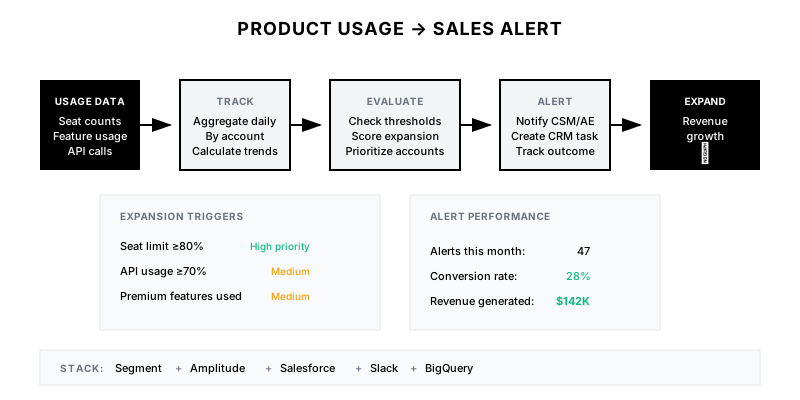
An automated pipeline that monitors product usage data to identify expansion opportunities (approaching limits, new feature adoption, team growth), generate sales alerts, and surface accounts ready for upsell—turning product telemetry into revenue triggers.
Why It Matters
Product usage is the strongest predictor of expansion and churn. Accounts approaching seat limits want more. Teams adopting new features are ready for premium tiers. Usage-based alerts let you reach out at the perfect moment.
Who It's For
- Account executives identifying upsell opportunities
- Customer success managers monitoring adoption
- RevOps building expansion playbooks
- Product teams tracking feature monetization
Preconditions
Required Tools
- Product analytics (Segment, Amplitude, Mixpanel)
- Data warehouse (BigQuery, Snowflake)
- CRM with usage fields
- Alerting (Slack, email)
Required Fields/Properties
- User/seat count by account
- Feature usage events
- API call volumes
- Storage/resource consumption
Definitions Required
- Expansion triggers (% of limit, growth rate)
- Feature adoption milestones
- Account tier thresholds
- Alert routing rules
Step-by-Step Workflow
Instrument Product Usage Tracking
Goal: Capture granular usage data per account
Actions:
- Define key usage events to track
- Implement event tracking in product
- Associate events with account/user IDs
- Set up data pipeline to warehouse
- Create account-level aggregations
Implementation Notes: Track events that indicate value realization and expansion potential. Include metadata (account, tier, user role) with every event. Aggregate daily at minimum.
Define Expansion Triggers
Goal: Identify usage patterns that signal upsell readiness
Actions:
- Define seat-based triggers (% of limit)
- Define feature-based triggers (premium feature usage)
- Define consumption-based triggers (API, storage)
- Define growth-based triggers (MoM increase)
- Set confidence thresholds
Implementation Notes: Start with high-confidence triggers (>80% of seat limit) and expand. Study what usage patterns preceded past expansions. Different products need different triggers.
Build Trigger Evaluation Pipeline
Goal: Continuously check accounts against triggers
Actions:
- Schedule daily trigger evaluation
- Process accounts in batches
- Deduplicate alerts (don't repeat same trigger)
- Score and prioritize opportunities
- Store trigger history
Implementation Notes: Run evaluation after daily metrics aggregation. Implement cooldown periods to avoid alert spam. Track trigger → outcome correlation to improve over time.
Create Alert Routing System
Goal: Deliver alerts to right people at right time
Actions:
- Route to account owner (AE or CSM)
- Send high-priority to Slack immediately
- Batch medium/low priority to daily digest
- Create CRM task for follow-up
- Build escalation for unworked alerts
Implementation Notes: Don't overwhelm reps with alerts. High-priority = immediate, others = daily digest. Create accountability by tracking if alerts are worked.
Build Usage Dashboard
Goal: Visualize usage across accounts for proactive management
Actions:
- Create account usage overview
- Build usage health scoring
- Show expansion potential pipeline
- Track usage trends over time
- Add drill-down to individual accounts
Implementation Notes: Dashboard should show both tactical (who to call today) and strategic (portfolio health). Let users filter by segment, tier, and CSM. Show predicted expansion value.
Track Alert Outcomes
Goal: Measure effectiveness and improve triggers
Actions:
- Track alert → action → outcome
- Calculate conversion rates by trigger
- Identify most predictive signals
- Tune trigger thresholds based on data
- Report on usage-driven revenue
Implementation Notes: This closes the loop. If a trigger never converts, retire it. If one converts highly, lower the threshold. Show leadership ROI from this system.
Templates
Expansion Trigger Thresholds
| Trigger | Threshold | Priority | Confidence | Expected Conversion |
|---------|-----------|----------|------------|--------------------|
| Seat limit approaching | ≥80% used | High | 85% | 35-45% |
| Rapid seat growth | +20% or +5 in 30d | High | 80% | 30-40% |
| Premium feature adoption | ≥3 features, non-premium tier | Medium | 75% | 25-35% |
| API limit approaching | ≥70% projected | Medium | 70% | 20-30% |
| Storage limit approaching | ≥75% used | Medium | 80% | 25-35% |
| High engagement growth | +30% DAU in 30d | Medium | 70% | 20-25% |
Alert Response Playbook
**When You Receive a High-Priority Usage Alert:**

1. **Review the Data (5 min)**
   - Check current usage vs limits
   - Review usage trend over 90 days
   - Note any recent support tickets

2. **Prepare Your Approach**
   - Seat limit: Lead with value delivered, growth they've seen
   - Feature usage: Ask what outcomes they're achieving
   - API limit: Discuss integration success and scaling

3. **Reach Out (Same Day)**
   - Email or Slack message to champion
   - Don't lead with "I see you're hitting your limit"
   - Lead with: "Wanted to check in on how things are going—looks like you've had great adoption"

4. **Log Outcome**
   - Document response in CRM
   - Mark alert as worked
   - Create expansion opportunity if appropriate
Usage Health Score Formula
**Usage Health Score (0-100)**

Components:
- Seat Utilization (30%): seats_used / seat_limit
- Engagement Rate (30%): WAU / total_seats
- Feature Breadth (20%): features_used / total_features
- Depth (20%): power_actions / total_actions

Score Calculation:
```
seat_score = min(seat_utilization / 0.8, 1) * 30
engagement_score = min(engagement_rate / 0.7, 1) * 30
breadth_score = feature_breadth * 20
depth_score = action_depth * 20

total_score = seat_score + engagement_score + breadth_score + depth_score
```

Interpretation:
- 80-100: Expansion ready
- 60-79: Healthy adoption
- 40-59: Developing
- 0-39: At risk
QA + Edge Cases
Test Cases Checklist
- Verify triggers fire at correct thresholds
- Test alert routing reaches correct owners
- Confirm deduplication prevents repeat alerts
- Validate dashboard shows accurate metrics
- Test outcome tracking updates correctly
Common Failure Modes
- Alert fatigue: Too many alerts desensitize reps. Tune thresholds, batch low-priority alerts, and retire low-converting triggers.
- Missing account mapping: Usage events not tied to accounts. Ensure account_id is on all events.
- Stale metrics: Dashboard shows old data. Verify daily aggregation job is running.
Troubleshooting Tips
- If alerts aren't firing, check trigger thresholds and data freshness
- For wrong owners receiving alerts, verify account ownership mapping
- If conversion rates are low, analyze trigger patterns with sales team
KPIs and Reporting
KPIs to Track
- Expansion Revenue from Alerts: >$500K ARR/quarter
- Alert to Conversion Rate: >25%
- Time to Action: <24 hours for high priority
- Trigger Accuracy: >75% relevant signals
Suggested Dashboard Widgets
- Expansion Pipeline: Value of triggered alerts by status
- Usage Health Distribution: Accounts by health category
- Trigger Effectiveness: Conversion rate by trigger type
- Revenue Attribution: Expansion revenue from usage alerts