Overview
What It Is
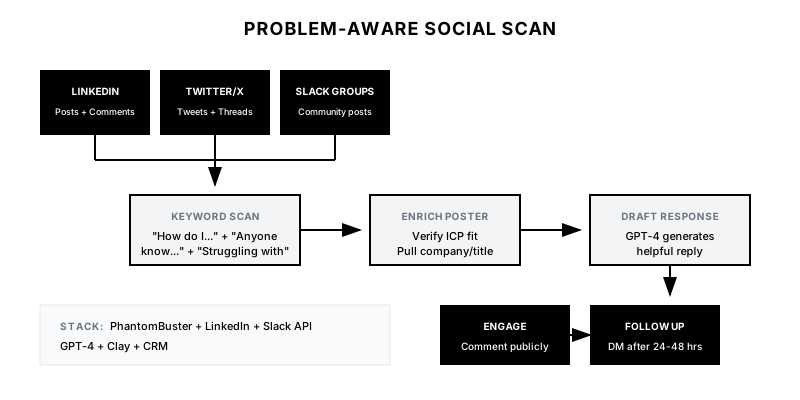
The Problem-Aware Social Scan monitors social media and professional communities for posts that explicitly express pain points your product solves. Unlike brand monitoring (mentions of your company) or competitor monitoring (mentions of competitors), this playbook focuses on problem-aware intent—people asking questions like 'Why is forecasting so hard?' or 'Anyone have a solution for X?' These are golden opportunities for helpful, non-salesy engagement.
Why It Matters
When someone publicly asks for help with a problem you solve, they've done your prospecting for you. They've self-identified as having the pain, being in buying mode, and being open to solutions. The key is reaching them with genuine value—not a pitch—while the question is still fresh. Most companies miss these signals entirely or respond too late. This playbook systematizes the capture and response.
Who It's For
- Companies solving problems that people actively discuss online
- SDR teams with social selling components to their workflow
- Marketers building thought leadership in professional communities
- Brands active in Slack communities, Discord, Reddit, or LinkedIn
Preconditions
Required Tools
- PhantomBuster or similar (for social scraping)
- LinkedIn Sales Navigator (for LinkedIn monitoring)
- Slack API access (for community monitoring, if applicable)
- GPT-4 (for response drafting)
- Clay (for enrichment and workflow)
Required Fields/Properties
- Pain Point Keyword Library (phrases that indicate your problem space)
- Target Persona Titles (to filter for relevant posters)
- Platform Priority List (LinkedIn, Twitter, Slack communities, etc.)
- Response guidelines by platform
Definitions Required
- Which pain points are strong vs. weak buying signals
- Engagement rules: comment vs. DM vs. connection request
- Response tone: helpful expert vs. friendly peer
- Handoff criteria: when does marketing engagement become sales lead
Step-by-Step Workflow
Build Pain Point Keyword Library
Goal: Create a comprehensive list of phrases that indicate someone is experiencing a problem you solve.
Actions:
- List 3-5 core problems your product addresses
- For each problem, brainstorm 10-20 ways someone might express it
- Include question formats ('How do I…', 'Anyone know how to…')
- Include frustration formats ('Struggling with…', 'So tired of…')
- Include recommendation requests ('Looking for a tool that…', 'Any suggestions for…')
- Test keywords against historical social posts to validate relevance
Implementation Notes: Be specific. 'CRM' is too broad—you'll get thousands of irrelevant results. 'CRM data hygiene' or 'CRM integration headaches' is actionable.
Automation Logic:
PAIN POINT KEYWORD LIBRARY EXAMPLE

PROBLEM: Sales Forecasting Accuracy

Question Keywords:
• "How do you forecast accurately"
• "Anyone have a forecasting model that works"
• "Best practices for pipeline forecasting"
• "How to improve forecast accuracy"

Frustration Keywords:
• "Forecasting is a nightmare"
• "Our forecast is always wrong"
• "Tired of sandbagging reps"
• "Pipeline reviews are useless"

Recommendation Keywords:
• "Looking for forecasting tool"
• "Recommend a sales analytics platform"
• "What's better than Excel for forecasting"
• "Anyone use [competitor] for forecasting"
Configure Platform Monitoring
Goal: Set up automated scanning across target platforms.
Actions:
- LinkedIn: Configure PhantomBuster to search posts containing keywords
- Twitter/X: Set up search streams for keyword combinations
- Slack Communities: Join relevant communities and set up keyword alerts
- Reddit: Monitor relevant subreddits (r/sales, r/startups, etc.)
- Filter by: persona title, follower count, engagement, recency
Implementation Notes: Prioritize LinkedIn for B2B—it's where decision-makers post about work problems. Twitter is faster but noisier. Slack communities are gold but require membership.
Automation Logic:
{
  "monitoring_config": {
    "linkedin": {
      "tool": "phantombuster",
      "search_type": "posts",
      "keywords": ["{{keyword_list}}"],
      "filters": {
        "posted_within": "7_days",
        "author_title_contains": ["VP", "Director", "Head of", "Manager"],
        "min_connections": 500
      },
      "schedule": "daily"
    },
    "twitter": {
      "tool": "phantombuster",
      "search_query": "({{keywords}}) -is:retweet lang:en",
      "filters": {
        "min_followers": 1000,
        "is_verified": "any"
      },
      "schedule": "twice_daily"
    }
  }
}
Enrich & Qualify Posters
Goal: Turn social posters into qualified leads with full context.
Actions:
- Push detected posts to Clay
- Enrich poster: LinkedIn profile, company, title, company size
- Apply ICP filter: company size, industry, title seniority
- Score by: pain point strength, persona fit, company fit
- Capture: original post text, post URL, platform, timestamp
Implementation Notes: Not every poster is a buyer. A consultant asking for tools to recommend to clients is different from a VP asking for their own team. Filter accordingly.
Draft Value-First Responses
Goal: Create response templates that lead with helpfulness, not pitch.
Actions:
- For public comments: keep responses short, helpful, no pitch
- For DMs/connection requests: personalize based on their specific question
- Use GPT-4 to draft contextual responses based on post content
- Include: acknowledge their pain, share insight/resource, soft offer to help
- Never: pitch in public replies, send generic 'let's connect' messages
Implementation Notes: The goal is to be the helpful expert who showed up with value. If you're helpful enough, they'll ask about your product. If you pitch too early, you're just another vendor.
Automation Logic:
GPT-4 PROMPT FOR RESPONSE DRAFTING

You are a helpful revenue operations expert engaging on LinkedIn.

Post you're responding to:
"{{original_post}}"

Poster context:
- Name: {{first_name}}
- Title: {{title}} at {{company}}
- Pain point detected: {{pain_category}}

Write a helpful LinkedIn comment (under 100 words) that:
1. Acknowledges their specific challenge
2. Shares one actionable insight or framework
3. Does NOT pitch any product
4. Optionally offers to share more if they're interested

Tone: Helpful peer, not salesy vendor. Casual but professional.
Build Engagement Workflow
Goal: Systematize the response and follow-up process.
Actions:
- Create Slack channel for new problem-aware signals
- Assign to SDR/community manager for response
- Set SLA: respond within 24 hours while post is fresh
- After public response, wait 24-48 hours before DM follow-up
- Log all engagements in CRM with post context
- Create task for SDR follow-up if engagement is positive
Implementation Notes: Speed matters but so does not looking stalker-ish. Respond publicly first, then follow up privately after they've seen your helpful comment.
Measure & Optimize
Goal: Track what's working and refine the keyword library.
Actions:
- Track: signals detected, responses sent, engagements, DM replies, meetings
- Measure by keyword: which pain points drive highest engagement
- Measure by platform: where are your buyers most active
- A/B test response styles: question vs. statement, short vs. detailed
- Prune keywords that generate noise, expand those that convert
Implementation Notes: Your keyword library should evolve. As you engage with more people, you'll learn new ways they express problems. Add new phrases continuously.
Templates
LinkedIn Comment: Forecasting Pain
Great question—forecasting accuracy is one of those problems that seems simple but gets complicated fast.

One thing that helped teams I've worked with: separating "pipeline coverage" from "weighted forecast." They measure different things but often get conflated.

If you're open to it, I can share a one-pager on the framework. No strings attached—just dealt with this a lot and happy to help.
LinkedIn Comment: Tool Recommendation Ask
Saw your question about [tool category]. A few things to consider before picking:

1. Integration depth with your existing stack (CRM, etc.)
2. Whether you need flexibility or opinionated workflows
3. Implementation support—some tools are DIY, some aren't

Happy to share what I've seen work for teams at similar stage if helpful. What's the biggest pain point driving the search?
DM Follow-up Template
Hi {{first_name}},

I commented on your post about {{pain_point}} yesterday—hope the suggestion was helpful.

I work with {{persona_type}} teams on exactly this kind of challenge. Not trying to sell you anything, but I put together a quick resource on {{topic}} that might be relevant based on what you described.

Want me to send it over?

{{sender_name}}
Pain Point Keyword Categories
| Pain Category | Example Keywords | Signal Strength | Response Type |
|---------------|------------------|-----------------|---------------|
| Explicit Need | "looking for a tool", "need a solution" | Very High | Comment + DM |
| Frustration | "so tired of", "why is X so hard" | High | Comment first |
| Question | "how do you handle", "best practice for" | Medium-High | Helpful comment |
| Discussion | "what do you think about", "debate: X vs Y" | Medium | Add perspective |
| Mention | mentions problem keyword in passing | Low | Monitor only |
Slack Alert Format
💬 *Problem-Aware Signal Detected*

*Platform:* {{platform}}
*Posted:* {{time_ago}}

*Poster:*
• {{poster_name}} ({{title}} at {{company}})
• {{company_size}} employees | {{industry}}
• LinkedIn: {{linkedin_url}}

*Original Post:*
> "{{post_excerpt}}"

*Pain Category:* {{pain_category}}
*Signal Strength:* {{signal_strength}}

*Suggested Response:*
{{ai_generated_response}}

<{{post_url}}|View Post> | <{{crm_link}}|View in CRM>

⏰ *SLA:* Respond within 24 hours
QA + Edge Cases
Test Cases Checklist
- Post containing pain keyword detected → pushed to Slack with full context
- Poster enriched with LinkedIn profile and company info
- Non-ICP poster (wrong company size/title) → filtered out
- AI-generated response is contextual and non-salesy
- CRM lead created with post URL and pain category logged
- Duplicate posts from same person → deduplicated
- Old posts (>7 days) → excluded from alerts
Common Failure Modes
- Generic responses: If your response could apply to any post, it's too generic. AI responses should reference specific language from their post.
- Pitching in public: Never mention your product in a public comment on their problem post. It looks desperate and damages trust.
- Delayed response: Responding to a post from 2 weeks ago is weird. Set freshness limits and prioritize recency.
- Keyword false positives: Keywords like 'pipeline' catch both sales ops and DevOps posts. Add persona filters to reduce noise.
Troubleshooting Tips
- If too few signals: Expand keyword library, add more platforms, loosen persona filters
- If too much noise: Tighten persona filters, require multiple keywords, exclude common false positives
- If low engagement: Review response quality—are they genuinely helpful? Test different tones
- If no DM replies: Wait longer before DM, ensure your profile looks credible, soften the ask
KPIs and Reporting
KPIs to Track
- Signals Detected: 20-50 qualified signals per week across platforms
- Response Rate: >90% of signals receive response within SLA
- Engagement Rate: >25% of responses get likes/replies/follows
- DM Reply Rate: >30% of follow-up DMs receive reply
- Meeting Book Rate: >10% of engaged leads book meetings
Suggested Dashboard Widgets
- Signals by Pain Category: Bar chart showing volume of detected signals by problem type
- Engagement Funnel: Funnel: Signals → Responded → Engaged → DM'd → Meeting
- Platform Performance: Table comparing engagement rates across LinkedIn, Twitter, Slack
- Top Performing Keywords: List of keywords with highest engagement-to-meeting conversion