Overview
What It Is
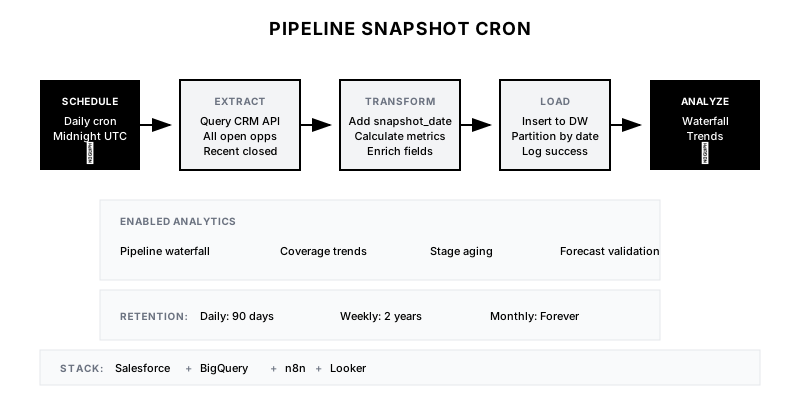
An automated system that captures point-in-time snapshots of your entire sales pipeline, storing historical data for trend analysis, waterfall reporting, and pipeline movement tracking.
Why It Matters
CRM data is inherently temporal—without snapshots, you can't answer questions like 'What was our pipeline on the first of the month?' or 'How much pipeline did we create vs. close vs. lose?' Historical data enables accurate forecasting and identifies pipeline health trends.
Who It's For
- RevOps teams building pipeline analytics
- Sales leadership tracking pipeline health
- Finance teams needing forecast validation
- Data teams building revenue dashboards
Preconditions
Required Tools
- Salesforce (or CRM with API access)
- BigQuery/Snowflake/data warehouse
- n8n/Airflow (scheduling)
- Looker/Tableau (visualization)
Required Fields/Properties
- Opportunity ID
- Amount
- Stage
- Close date
- Owner
- Created date
Definitions Required
- Pipeline stages and order
- Active vs. closed definitions
- Fiscal period boundaries
- Snapshot cadence requirements
Step-by-Step Workflow
Design Snapshot Schema
Goal: Create a data warehouse table structure for historical pipeline data
Actions:
- Define snapshot_date as primary partition key
- Include all relevant opportunity fields
- Add computed fields (days_in_stage, coverage_bucket)
- Plan for query optimization (indexing strategy)
Implementation Notes: Use append-only design—never modify historical records. Partition by snapshot_date for efficient querying.
Build Extraction Query
Goal: Create a CRM query that captures all relevant pipeline data
Actions:
- Query all open opportunities + recently closed
- Join to account and user tables
- Calculate derived fields (days in stage, age)
- Include forecast category and probability
Implementation Notes: Include opportunities closed in the last 90 days for waterfall analysis. Filter out test/internal opportunities.
Configure Cron Schedule
Goal: Set up automated execution at consistent intervals
Actions:
- Configure daily snapshot at midnight (UTC or local)
- Add weekly snapshot for longer retention
- Set up error alerting for failed runs
- Configure retry logic for transient failures
Implementation Notes: Run daily snapshots for granular analysis; archive to weekly after 90 days to manage storage costs.
Build Insert Pipeline
Goal: Automate the data extraction and loading process
Actions:
- Extract data from CRM via API
- Transform and enrich with calculated fields
- Insert into data warehouse with snapshot_date
- Log success/failure for monitoring
Implementation Notes: Use streaming inserts for near-real-time loading, or batch load for cost optimization depending on data volume.
Create Movement Analysis Views
Goal: Build SQL views for pipeline waterfall and movement reports
Actions:
- Create period-over-period comparison view
- Build pipeline waterfall (created, moved, won, lost)
- Calculate stage conversion rates over time
- Add coverage ratio trends
Implementation Notes: Pipeline waterfall shows: Starting pipeline + Created - Won - Lost - Pushed out + Pulled in = Ending pipeline
Build Dashboards and Alerts
Goal: Visualize pipeline trends and alert on anomalies
Actions:
- Create pipeline trend dashboard (week-over-week)
- Build coverage ratio tracker by segment
- Set up alerts for significant pipeline drops
- Add stage aging analysis
Implementation Notes: Alert when pipeline drops more than 15% week-over-week or coverage falls below 3x quota.
Templates
Daily Pipeline Summary Slack Message
📊 *Daily Pipeline Snapshot - {{date}}*

*Total Open Pipeline:* ${{total_pipeline}}
*vs. Yesterday:* {{delta}} ({{delta_pct}}%)

*By Stage:*
• Discovery: ${{stage_1}} ({{stage_1_count}} opps)
• Evaluation: ${{stage_2}} ({{stage_2_count}} opps)
• Proposal: ${{stage_3}} ({{stage_3_count}} opps)
• Negotiation: ${{stage_4}} ({{stage_4_count}} opps)

*Coverage Ratio:* {{coverage}}x
*Deals >30 days in stage:* {{stale_count}}

<{{dashboard_link}}|View Full Dashboard>
Weekly Pipeline Waterfall Report
| Category | Amount | Count |
|----------|--------|-------|
| Starting Pipeline | $X | X opps |
| + Created | +$X | +X opps |
| - Closed Won | -$X | -X opps |
| - Closed Lost | -$X | -X opps |
| - Pushed Out | -$X | -X opps |
| + Pulled In | +$X | +X opps |
| = Ending Pipeline | $X | X opps |
BigQuery Snapshot Table DDL
CREATE TABLE `project.dataset.pipeline_snapshots` (
  snapshot_date DATE NOT NULL,
  snapshot_type STRING, -- 'daily' or 'weekly'
  opportunity_id STRING NOT NULL,
  opportunity_name STRING,
  account_id STRING,
  account_name STRING,
  owner_id STRING,
  owner_name STRING,
  team STRING,
  segment STRING,
  amount NUMERIC,
  weighted_amount NUMERIC,
  stage STRING,
  stage_order INT64,
  probability FLOAT64,
  close_date DATE,
  created_date DATE,
  days_in_current_stage INT64,
  days_open INT64,
  forecast_category STRING,
  is_closed BOOLEAN,
  is_won BOOLEAN,
  next_step STRING,
  last_activity_date DATE,
  inserted_at TIMESTAMP DEFAULT CURRENT_TIMESTAMP()
)
PARTITION BY snapshot_date
CLUSTER BY owner_id, stage;
QA + Edge Cases
Test Cases Checklist
- Verify snapshot runs successfully at scheduled time
- Confirm all open opportunities are captured
- Validate calculated fields (days_in_stage, etc.)
- Test waterfall math: starting + delta = ending
- Verify historical queries return correct point-in-time data
Common Failure Modes
- Missing opportunities: API pagination not handled correctly. Ensure all pages are fetched for large pipelines (>2000 opps).
- Timezone misalignment: Snapshot date doesn't match CRM timezone. Standardize on UTC or align to business timezone consistently.
- Duplicate records: Re-running snapshot creates duplicates. Use upsert or delete-then-insert for idempotency.
Troubleshooting Tips
- If waterfall doesn't balance, check for opportunities created and closed same day
- For performance issues, add date range filters to queries
- If storage grows too fast, implement tiered retention (daily→weekly→monthly)
KPIs and Reporting
KPIs to Track
- Pipeline Coverage Ratio: >3x quota
- Pipeline Creation Rate: Track week-over-week trend
- Pipeline Velocity: Days to move through stages
- Snapshot Reliability: 99.9% successful runs
Suggested Dashboard Widgets
- Pipeline Trend (13 weeks): Line chart showing total pipeline value over time
- Weekly Waterfall: Bar chart showing pipeline adds, wins, losses, movements
- Coverage by Segment: Coverage ratio broken down by enterprise/mid-market/SMB
- Stage Aging Distribution: Histogram of days in stage by stage