Overview
What It Is
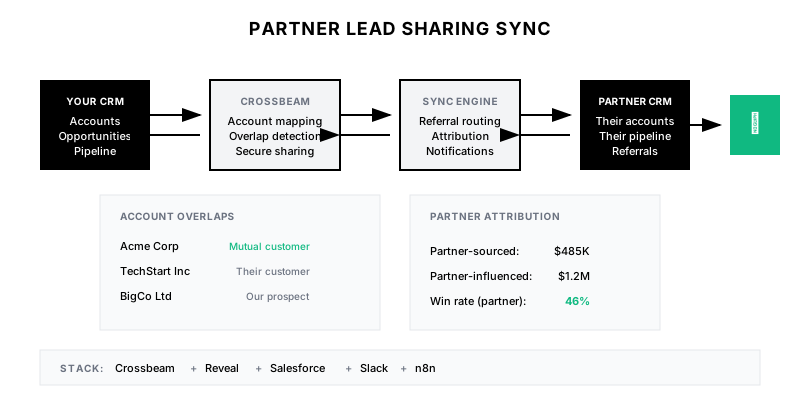
An automated system for bi-directional lead and opportunity sharing between your company and partners—using account overlap tools like Crossbeam/Reveal to identify mutual customers and prospects, then syncing referrals with proper attribution tracking.
Why It Matters
Partner ecosystems drive 30%+ of revenue for top SaaS companies, but manual lead sharing is slow and error-prone. Automation ensures partners receive leads quickly, attribution is accurate, and no joint opportunities are missed.
Who It's For
- Partnership managers coordinating referrals
- Sales reps working partner-influenced deals
- RevOps tracking partner attribution
- Channel teams managing reseller relationships
Preconditions
Required Tools
- Crossbeam or Reveal (account mapping)
- Salesforce (or HubSpot)
- Partner portal (optional)
- n8n or Tray.io (automation)
Required Fields/Properties
- Partner account/contact on opportunities
- Lead source with partner values
- Partner referral status field
- Partner attribution percentage
Definitions Required
- Partner tiers and lead sharing rules
- Attribution models (sourced vs influenced)
- Referral SLAs (response times)
- Data sharing permissions per partner
Step-by-Step Workflow
Set Up Account Mapping
Goal: Identify overlap between your accounts and partners
Actions:
- Connect CRM to Crossbeam/Reveal
- Define which fields to share
- Set overlap matching rules
- Configure partner-specific sharing
- Establish data refresh cadence
Implementation Notes: Start with customer overlaps before prospect overlaps. Be thoughtful about what data you share—some partners are also competitors. Use allowlists for strategic partners.
Build Referral Submission Workflow
Goal: Create frictionless way for partners to submit leads
Actions:
- Create partner referral form
- Auto-create lead in CRM with attribution
- Notify assigned rep instantly
- Send confirmation to partner
- Track referral in partner record
Implementation Notes: Make submission as easy as possible—fewer fields = more referrals. Auto-enrich submitted leads. Give partners visibility into referral status.
Automate Outbound Lead Sharing
Goal: Send relevant leads to partners proactively
Actions:
- Define lead sharing criteria per partner
- Build automation to identify shareable leads
- Create partner notification workflow
- Track shared lead outcomes
- Implement opt-out handling
Implementation Notes: Don't share every lead—be selective based on partner fit. Consider partner capacity and responsiveness. Track which partners convert shared leads best.
Build Attribution Tracking
Goal: Accurately track partner influence on revenue
Actions:
- Define attribution models (sourced, influenced, resold)
- Track attribution on opportunities
- Calculate partner commission/credit
- Build attribution reports
- Handle multi-partner attribution
Implementation Notes: Clear attribution rules prevent disputes. Track both sourced (partner brought the lead) and influenced (partner helped close). Consider time-decay for influenced attribution.
Create Partner Pipeline Visibility
Goal: Give partners appropriate visibility into shared deals
Actions:
- Build partner portal dashboard
- Show referral status and outcomes
- Display mutual pipeline (with permissions)
- Enable partner activity logging
- Provide performance metrics
Implementation Notes: Partners need to see ROI from the relationship. Show them referral status, deal progress, and payouts. Balance transparency with data protection.
Implement Alert and Notification System
Goal: Keep all parties informed of lead/deal progress
Actions:
- Alert partner manager on new overlaps
- Notify partners on referral status changes
- Alert reps when partner can help
- Send weekly partner pipeline digest
- Escalate stale referrals
Implementation Notes: Timely notifications build trust. Alert both sides when there's overlap. Escalate when referrals aren't being worked quickly.
Templates
Partner Referral Form Fields
**Required Fields:**
- Contact First Name
- Contact Last Name
- Contact Email
- Company Name

**Optional Fields:**
- Contact Phone
- Contact Title
- Company Website
- Estimated Deal Size
- Timeline/Urgency
- Use Case/Pain Point
- How did you meet them?
- Anything else we should know?

**Auto-Populated:**
- Partner Name (from login)
- Submitter Name (from login)
- Submission Date (system)
- Partner Tier (from profile)
Partner Attribution Report
| Partner | Referrals (QTD) | Pipeline | Won | Revenue | Commission | Win Rate |
|---------|-----------------|----------|-----|---------|------------|----------|
| Partner A | 15 | $450K | $180K | 4 | $18K | 45% |
| Partner B | 8 | $280K | $95K | 2 | $9.5K | 38% |
| Partner C | 22 | $320K | $210K | 6 | $21K | 55% |
| **Total** | **45** | **$1.05M** | **$485K** | **12** | **$48.5K** | **46%** |
Partner Referral Email Template
Subject: Your referral to {Company} - Status Update

Hi {Partner Contact},

Quick update on your referral to {Company Name}:

**Status:** {Stage}
**Assigned To:** {Rep Name}
**Last Activity:** {Last Activity Date}
**Next Steps:** {Next Steps}

{If Won}
Great news! This deal closed for ${Amount}. Your commission of ${Commission} will be processed in the next cycle.
{/If}

{If Lost}
Unfortunately, this opportunity didn't move forward. The primary reason was {Loss Reason}. We appreciate you sending this our way.
{/If}

You can always check the status of your referrals in your partner portal: {Portal Link}

Thank you for the partnership!

{Partner Manager Name}
Partner Manager
QA + Edge Cases
Test Cases Checklist
- Verify referrals create leads with correct attribution
- Test duplicate detection on referral submission
- Confirm partner notifications fire on status changes
- Validate attribution calculations for multi-partner deals
- Test partner portal shows accurate data
Common Failure Modes
- Attribution disputes: Partners claim credit for deals they didn't source. Implement clear rules and timestamp all touchpoints.
- Stale referrals: Referrals sit untouched too long. Implement SLAs and escalation paths.
- Data mismatch: Crossbeam data doesn't match CRM. Ensure regular sync and data hygiene.
Troubleshooting Tips
- If overlaps aren't showing, verify Crossbeam connection and field mapping
- For missing attributions, check lead source field is populated correctly
- If partner portal is slow, cache partner data and refresh async
KPIs and Reporting
KPIs to Track
- Partner-Sourced Revenue: >20% of total revenue
- Referral to Closed Won: >40% win rate
- Time to First Contact: <4 hours
- Active Partner Referrers: >50% of partners refer monthly
Suggested Dashboard Widgets
- Partner Pipeline: Open pipeline by partner
- Referral Funnel: Referrals by stage
- Attribution Breakdown: Sourced vs influenced revenue
- Partner Leaderboard: Top referrers by revenue