Overview
What It Is
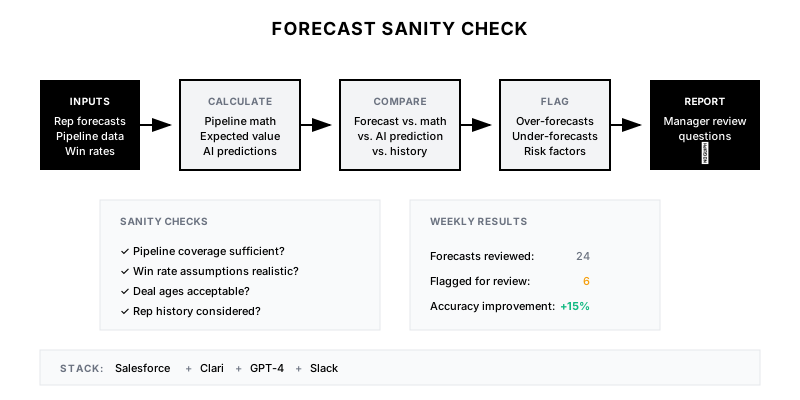
An automated system that validates sales forecasts against multiple data sources—historical win rates, pipeline composition, deal aging, and AI predictions—to flag unrealistic forecasts before they become surprises.
Why It Matters
Forecast inaccuracy creates planning chaos—too low leads to missed growth opportunities, too high leads to budget overruns and layoffs. Catching sanity issues early allows for course correction while there's still time to act.
Who It's For
- RevOps teams responsible for forecast accuracy
- Sales leadership managing team forecasts
- Finance teams dependent on revenue predictions
- CEO/board needing reliable projections
Preconditions
Required Tools
- Salesforce (or CRM)
- Clari/forecasting tool (optional)
- GPT-4 API
- Slack/email for alerts
Required Fields/Properties
- Rep forecast submissions
- Pipeline by stage
- Historical close rates
- Deal ages and close dates
Definitions Required
- Forecast categories (commit, best case, pipeline)
- Historical win rates by stage/segment
- Acceptable variance thresholds
- Escalation paths for flagged forecasts
Step-by-Step Workflow
Calculate Baseline Expectations
Goal: Establish what pipeline math says should close
Actions:
- Pull current pipeline by stage
- Apply historical stage-to-close rates
- Calculate expected value per stage
- Sum to get mathematically expected close
Implementation Notes: Use trailing 6-month conversion rates by segment. Adjust for seasonality if significant.
Compare Rep Forecasts to Baseline
Goal: Identify significant deviations from expected values
Actions:
- Pull each rep's forecast submission
- Compare commit to pipeline math expectation
- Calculate variance percentage
- Flag forecasts outside acceptable range (±20%)
Implementation Notes: Allow some variance—reps have context data doesn't capture. Flag extreme outliers for discussion, not automatic rejection.
Apply Historical Pattern Analysis
Goal: Check forecast against rep's historical accuracy
Actions:
- Pull rep's historical forecast accuracy
- Identify consistent over/under forecasters
- Apply adjustment factor based on track record
- Flag reps with poor historical accuracy
Implementation Notes: Some reps consistently sandbag, others are perpetual optimists. Use historical data to calibrate expectations.
Run AI Confidence Scoring
Goal: Use GPT-4 to analyze deal-level risks and opportunities
Actions:
- Feed deal details to GPT-4 (notes, emails, activities)
- Ask for close probability and risk factors
- Aggregate AI predictions for total expected close
- Compare AI view to rep forecast
Implementation Notes: AI adds qualitative analysis—detecting stalled deals, missing stakeholders, or competitive threats that affect close probability.
Generate Sanity Check Report
Goal: Compile findings into actionable report for managers
Actions:
- Summarize team-level forecast vs. expectation
- List flagged deals and reps with explanations
- Provide specific questions for manager follow-up
- Include confidence interval for total forecast
Implementation Notes: Make the report actionable—don't just flag issues, provide the questions managers should ask in 1:1s.
Automate Distribution and Tracking
Goal: Ensure reports reach the right people and drive action
Actions:
- Send report to sales managers via Slack/email
- Track which flags get addressed
- Log forecast adjustments post-sanity check
- Measure improvement in forecast accuracy over time
Implementation Notes: Track sanity check → action rate. If flags aren't driving changes, adjust thresholds or escalation paths.
Templates
Weekly Forecast Sanity Check Report
📊 *Forecast Sanity Check - {{period}}*

*Team Forecast Summary:*
• Rep Forecasts Total: ${{total_forecast}}
• Pipeline Math Expectation: ${{pipeline_math}}
• Variance: {{variance}}%
• AI Confidence Score: {{ai_confidence}}/100

*Flags for Review:*
{{#each flags}}
🚩 *{{rep_name}}*: {{issue}}
   Forecast: ${{forecast}} | Expected: ${{expected}}
   Suggested Question: "{{question}}"
{{/each}}

*Deals with Low AI Confidence:*
{{#each low_confidence_deals}}
⚠️ {{deal_name}} (${{amount}})
   AI Probability: {{ai_prob}}% | Rep Stage: {{stage}}
   Risk: {{risk_factor}}
{{/each}}
Manager Follow-Up Questions
| Rep | Flag Type | Suggested Question |
|-----|-----------|--------------------|
| Sarah | Over-forecast | "Walk me through deal X—what gives you confidence it closes this quarter?" |
| Mike | Under-forecast | "You have $2M at negotiation stage not in commit—what's holding these back?" |
| Lisa | Stale deals | "Deal Y hasn't had activity in 3 weeks—is this still active?" |
| Tom | Close date clustering | "You have 5 deals all closing on the 30th—are these real or placeholder dates?" |
Forecast Accuracy Tracker
// Track forecast accuracy over time
const forecastAccuracy = {
  period: 'Q4-2024',
  weeks: [
    { week: 1, forecast: 2500000, actual: null, pipeline: 8200000 },
    { week: 2, forecast: 2600000, actual: null, pipeline: 7900000 },
    { week: 3, forecast: 2550000, actual: null, pipeline: 7400000 },
    // ... continues through quarter
  ],
  sanityCheckImpact: {
    flagsRaised: 12,
    forecastsAdjusted: 8,
    correctFlags: 7,
    falsePositives: 1
  }
};
QA + Edge Cases
Test Cases Checklist
- Verify pipeline math calculation matches manual spot check
- Test that over-forecasters are correctly identified
- Confirm AI analysis runs without errors for sample deals
- Validate report distribution reaches correct recipients
- Test flag thresholds catch known inaccurate forecasts
Common Failure Modes
- Stale historical data: Win rates from different market conditions (pre/post product changes). Refresh rates quarterly and segment by time period.
- Insufficient deal context for AI: AI analysis only as good as data provided. Ensure recent notes and activities are synced to CRM before running.
- Over-flagging fatigue: Too many false positives cause managers to ignore report. Tune thresholds to flag only significant issues.
Troubleshooting Tips
- If pipeline math is always higher than forecasts, win rates may need segment adjustment
- For persistent over-forecasters, implement deal-level probability requirements
- If AI confidence doesn't correlate with outcomes, review prompt and data inputs
KPIs and Reporting
KPIs to Track
- Forecast Accuracy (MAPE): <10% mean absolute percentage error
- Flag-to-Action Rate: >60% of flags investigated
- Forecast Bias: <5% consistent over/under
- AI Prediction Accuracy: >75% correlation with outcomes
Suggested Dashboard Widgets
- Forecast vs. Actual Trend: Line chart comparing weekly forecast to eventual actual by quarter
- Rep Accuracy Heatmap: Grid showing historical accuracy by rep and period
- Sanity Check Flag Breakdown: Pie chart of flag types (over-forecast, stale deals, close date clustering)
- Confidence Score Distribution: Histogram of AI confidence scores across pipeline