Overview
What It Is
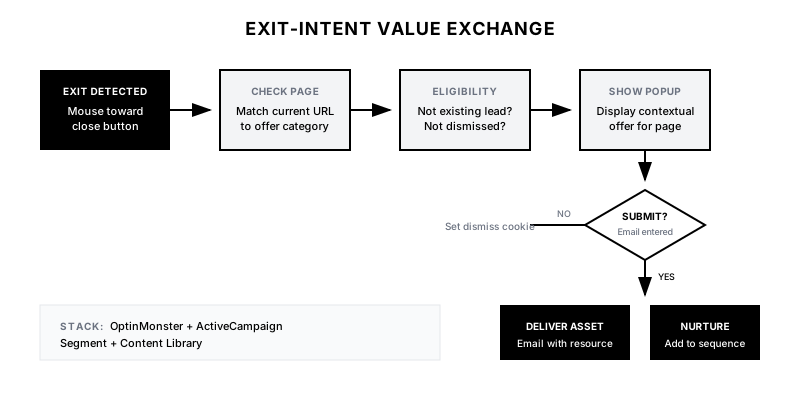
The Exit-Intent Value Exchange detects when a visitor is about to leave your site and presents a contextual offer matched to what they were reading. Instead of a generic 'Subscribe to our newsletter' popup, visitors see resources directly relevant to their browsing session—turning abandoned visits into captured leads.
Why It Matters
Average website bounce rates are 40-60%. Every visitor who leaves without converting represents lost opportunity. By matching exit offers to content context, you dramatically increase the perceived value of the exchange and conversion rates can jump from sub-1% to 3-5%.
Who It's For
- Content marketing teams with robust resource libraries
- Demand gen teams looking to increase form conversions
- Companies with high traffic but low capture rates
- B2B marketers wanting to maximize content investment ROI
Preconditions
Required Tools
- OptinMonster or Sumo (for exit-intent detection)
- ActiveCampaign, HubSpot, or Mailchimp (for email capture)
- Segment or GTM (for page tracking)
- Content library with gated assets
Required Fields/Properties
- Page-to-offer mapping (which asset for which page category)
- Popup copy variations by page type
- Email nurture sequences by content topic
- Exclusion rules (don't show to existing leads)
Definitions Required
- Content categories and their relevant gated assets
- Minimum time on page before popup triggers
- Frequency capping (how often to show popups)
- Mobile vs desktop behavior differences
Step-by-Step Workflow
Map Content to Offers
Goal: Create a mapping between page categories and relevant gated assets.
Actions:
- Audit your content library for downloadable assets
- Categorize blog posts and pages by topic/funnel stage
- Match each category to the most relevant gated asset
- Create fallback offers for pages without specific matches
- Document the complete page-to-offer mapping
Implementation Notes: The offer must feel like a natural extension of what they were reading. If they're on a case study, offer the data behind it. If they're on a how-to blog, offer the template.
Configure Exit-Intent Detection
Goal: Set up behavioral triggers for desktop and mobile exit detection.
Actions:
- Install OptinMonster or equivalent on your site
- Configure desktop exit-intent (mouse toward top of viewport)
- Configure mobile exit-intent (rapid scroll up or back button tap)
- Set minimum time-on-page threshold (15-30 seconds)
- Set scroll depth requirement (at least 25% of page)
Implementation Notes: Don't trigger immediately. Visitors who bounce in 5 seconds weren't going to convert anyway. Require at least some engagement before showing the popup.
Automation Logic:
// OptinMonster exit-intent configuration
OptinMonster.campaign({
  slug: 'exit-intent-value-exchange',
  rules: {
    exitIntent: true,
    scrollDepth: 25,
    timeOnPage: 15,
    device: 'all'
  },
  callback: function(campaign) {
    // Dynamic content based on page
    var pageCategory = getPageCategory();
    campaign.updateContent(offerMapping[pageCategory]);
  }
});
Build Dynamic Popup Templates
Goal: Create popup designs that update content based on page context.
Actions:
- Design popup template with placeholder for offer title/description
- Create image slots for offer thumbnails
- Build copy variations for each content category
- Add urgency elements where appropriate ('Limited time', 'Exclusive')
- Ensure mobile-responsive design
Implementation Notes: Keep the popup simple: compelling headline, 1-sentence value prop, email field, submit button. Don't ask for phone, company, or title at this stage—you can enrich later.
Set Up Exclusion Rules
Goal: Avoid annoying existing leads and customers with popups.
Actions:
- Exclude visitors who already submitted email (cookie check)
- Exclude logged-in users/customers
- Exclude visitors who dismissed popup in last 7 days
- Exclude visitors from pages like pricing, demo request, checkout
- Set frequency cap (max 1 popup per session)
Implementation Notes: Nothing kills trust faster than showing a popup to someone who just filled out your demo form. Be aggressive with exclusions.
Connect to Email Platform
Goal: Route captured emails to the right nurture sequence based on content interest.
Actions:
- Create email list segments by content category
- Build landing page for asset delivery
- Set up welcome email with promised asset
- Create nurture sequence matched to topic
- Tag contacts with content interest for future segmentation
Implementation Notes: The first email should deliver the promised asset within seconds. Any delay and you've broken trust. Then nurture based on their demonstrated interest area.
Test & Optimize
Goal: Launch with A/B testing to improve conversion rates over time.
Actions:
- Set up A/B tests for popup copy and offers
- Test timing variations (15s vs 30s delay)
- Test different value propositions for same content
- Monitor conversion rates by page category
- Iterate based on data every 2 weeks
Implementation Notes: Some page categories will convert better than others. Double down on what works and reconsider offers for low-performing categories.
Templates
Popup Template: Case Study Page
🎯 Before you go...

Want the raw data behind this case study?

Get the spreadsheet showing exactly how {{company_name}} achieved {{result}} — including the timeline, metrics, and mistakes to avoid.

[Email Field]
[Download the Data →]
Popup Template: How-To Blog Post
📋 Save hours with this template

Liked this guide? Get the ready-to-use template that makes implementation a breeze.

No more starting from scratch — just fill in the blanks.

[Email Field]
[Get the Template →]
Popup Template: Pricing Page
💰 Not ready to commit?

Get our ROI Calculator to see exactly what you'd save before making a decision.

No sales call required — just plug in your numbers.

[Email Field]
[Get the Calculator →]
Page-to-Offer Mapping Table
| Page Category | Exit Offer | Offer Type | Nurture Sequence |
|---------------|------------|------------|------------------|
| Case Studies | Raw data spreadsheet | Template | Customer Success |
| How-To Blogs | Implementation template | Template | Product Education |
| Industry Pages | Industry benchmark report | Report | Industry-Specific |
| Pricing Page | ROI calculator | Tool | Sales Enablement |
| Comparison Pages | Feature comparison matrix | Checklist | Competitive |
| Product Pages | Product demo video | Video | Product Demo |
QA + Edge Cases
Test Cases Checklist
- Desktop user moves mouse toward close button → popup fires
- Mobile user scrolls up rapidly → popup fires
- User who already submitted email → no popup shown
- User on pricing page → appropriate offer displayed (ROI calc)
- User on case study page → case study data offer displayed
- User who dismissed popup yesterday → no popup shown
Common Failure Modes
- Generic offers kill conversion: A popup offering 'Subscribe to our newsletter' when they were reading a case study feels irrelevant. Always match offer to content context.
- Trigger too aggressive: Showing popup in first 5 seconds annoys visitors who haven't engaged. Require minimum time and scroll depth before triggering.
- Mobile exit-intent unreliable: Mobile exit-intent detection is less accurate than desktop. Consider alternative triggers like scroll-up velocity or time-based delay.
- Promise/delivery mismatch: If the popup promises a 'template' but delivers a 'whitepaper', you've broken trust. Ensure offers match exactly what's promised.
Troubleshooting Tips
- If conversion rates are under 1%: Test different offers—the current one may not be compelling enough
- If popup isn't triggering: Check exclusion rules and timing settings—may be too restrictive
- If mobile performance is poor: Consider replacing exit-intent with timed popup for mobile
- If bounces still high: The popup helps but content quality and page experience matter more
KPIs and Reporting
KPIs to Track
- Exit Popup Conversion Rate: >3% of popup impressions result in email capture
- Impression-to-Submit Rate: >2% across all page categories
- Bounce Rate Impact: 5-10% reduction in bounce rate on pages with popups
- Lead Quality Score: Exit-intent leads should qualify at similar rate to form fills
- Email Engagement: >30% open rate on follow-up nurture sequence
Suggested Dashboard Widgets
- Conversion by Page Category: Bar chart showing popup conversion rate by content category
- Daily Email Captures: Trend line of emails captured via exit-intent per day
- Top Performing Offers: Ranked list of offers by conversion rate
- Device Breakdown: Pie chart showing popup performance on desktop vs mobile