Overview
What It Is
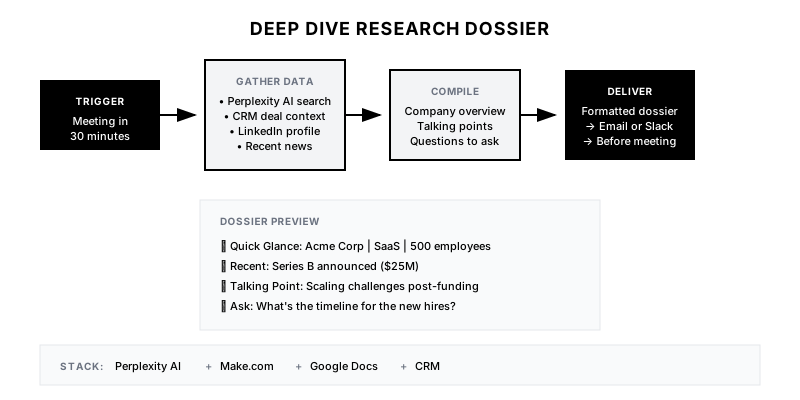
The Deep Dive Research Dossier automatically generates a comprehensive prep document before every external meeting. Using AI research agents, it pulls company news, financial data, competitive intelligence, and personal insights about attendees—then formats it into an actionable brief delivered before the call starts.
Why It Matters
Sales reps spend 20-30 minutes researching before calls—or worse, they don't prep at all. This playbook eliminates manual research, ensures consistent quality, and makes every conversation feel like a consulting session. Prospects notice when you've done your homework.
Who It's For
- Sales teams with high call volumes
- Account Executives managing complex deals
- SDRs who need quick context for discovery calls
- Customer Success teams prepping for renewal conversations
Preconditions
Required Tools
- Perplexity AI or similar research AI
- Make.com or n8n for workflow orchestration
- Google Docs or Notion for document output
- Calendar access (Google Calendar or Outlook)
- CRM integration for deal context
Required Fields/Properties
- Attendee email domain for company identification
- Deal/opportunity data from CRM
- Research prompt templates
- Document formatting template
Definitions Required
- What information should be included in dossier
- How far before meeting to generate
- Which meetings should trigger (external only, certain deal stages)
- Distribution method (email, Slack, embedded in CRM)
Step-by-Step Workflow
Define Research Components
Goal: Determine what information makes a useful pre-meeting dossier.
Actions:
- List core research areas: company overview, recent news, financial health
- Add competitive intelligence: tech stack, recent vendor changes
- Include personal context: attendee background, mutual connections
- Define deal-specific context: past conversations, current stage, known objections
- Create priority tiers (must-have vs. nice-to-have)
Implementation Notes: Start with 5-7 core sections. Too much information overwhelms. The dossier should be scannable in 2 minutes, not require 10 minutes of reading.
Build Calendar Trigger
Goal: Detect external meetings and extract attendee information.
Actions:
- Connect to Google Calendar or Outlook API
- Filter for external attendees (not your domain)
- Extract: attendee email, company domain, meeting title, time
- Set trigger timing (30-60 minutes before meeting)
- Exclude internal meetings and recurring 1:1s
Implementation Notes: Use the attendee's email domain as the primary company identifier. Handle cases where attendees use personal email domains (gmail) by checking CRM for existing records.
Automation Logic:
// Calendar event filter logic
const isExternalMeeting = (event) => {
  const myDomain = 'mycompany.com';
  return event.attendees.some(
    attendee => !attendee.email.endsWith(myDomain)
  );
};

const getExternalDomain = (event) => {
  const external = event.attendees.find(
    a => !a.email.endsWith('mycompany.com')
  );
  return external?.email.split('@')[1];
};
Configure AI Research Agent
Goal: Set up Perplexity or similar to gather comprehensive company intelligence.
Actions:
- Create research prompt template for company information
- Add prompts for recent news and press releases
- Include financial research for public companies
- Set up LinkedIn research for attendee background
- Configure error handling for thin-data companies
Implementation Notes: Perplexity works well for web research. For LinkedIn data, you may need PhantomBuster or similar. Always include source URLs for verification.
Automation Logic:
Research Prompt Template:

"Research the company [COMPANY_NAME] ([DOMAIN]).

1. Company Overview: What do they do? Who are their customers?
   Key products/services?
2. Recent News: Any announcements, funding, or leadership
   changes in the last 90 days?
3. Competitive Landscape: Who are their main competitors?
   Any recent wins or losses?
4. Tech Stack: What technologies do they use? (Check BuiltWith)
5. Challenges: What problems might they be facing based on
   industry trends?

Format as bullet points. Include source URLs."
Integrate CRM Context
Goal: Pull deal history and conversation notes into the dossier.
Actions:
- Query CRM for existing deal/opportunity
- Extract: deal stage, value, close date, notes
- Pull recent activity: emails, calls, meetings
- Identify known objections or concerns
- Flag any at-risk indicators
Implementation Notes: CRM context is crucial for follow-up calls. Knowing what was discussed last time prevents embarrassing 'we already covered that' moments.
Generate and Format Document
Goal: Compile research into a scannable, actionable document.
Actions:
- Create document template in Google Docs or Notion
- Format sections: Company, Person, Deal Context, Talking Points
- Add 'Quick Glance' summary at top (5 bullet points)
- Include recommended questions to ask
- Add 'Watch Outs' section for potential risks
Implementation Notes: Put the most actionable items first. Reps should get value from just the top 5 lines if they're running late.
Deliver and Track
Goal: Get the dossier to the rep and measure usage.
Actions:
- Email dossier to meeting organizer 30-60 min before
- Optionally send to Slack or embed link in CRM
- Track open rates to measure adoption
- Collect feedback for improvement
- Log dossier generation for ROI measurement
Implementation Notes: Delivery timing matters. 30 minutes before gives time to read; 5 minutes before is useless. Consider sending night before for early morning calls.
Templates
Research Dossier Template
📋 PRE-MEETING DOSSIER
━━━━━━━━━━━━━━━━━━━━━━━━━━━━━━━━━━━━━

🎯 QUICK GLANCE (30 seconds)
• Company: {{company_name}} | {{industry}} | {{employee_count}} employees
• Meeting with: {{contact_name}}, {{contact_title}}
• Deal Stage: {{deal_stage}} | Value: {{deal_amount}}
• Last Contact: {{last_activity_date}} - {{last_activity_summary}}
• Top Priority: {{recommended_focus}}

━━━━━━━━━━━━━━━━━━━━━━━━━━━━━━━━━━━━━

🏢 COMPANY OVERVIEW
{{company_description}}

📰 RECENT NEWS (Last 90 Days)
{{#each recent_news}}
• {{headline}} ({{date}}) - {{source_url}}
{{/each}}

👤 ABOUT {{contact_name}}
• Role: {{contact_title}} ({{tenure_in_role}})
• Background: {{career_summary}}
• Mutual Connections: {{shared_connections}}

💬 TALKING POINTS
1. {{talking_point_1}}
2. {{talking_point_2}}
3. {{talking_point_3}}

❓ QUESTIONS TO ASK
• {{question_1}}
• {{question_2}}
• {{question_3}}

⚠️ WATCH OUTS
• {{risk_or_objection}}

🔗 Links: {{crm_link}} | {{linkedin_link}} | {{company_website}}
Slack Delivery Message
📋 *Prep ready for your call with {{company_name}}*

*Meeting:* {{meeting_title}}
*Time:* {{meeting_time}} ({{time_until}} from now)
*With:* {{contact_name}}, {{contact_title}}

*Quick Context:*
• {{key_insight_1}}
• {{key_insight_2}}
• {{key_insight_3}}

<{{dossier_link}}|Open Full Dossier> | <{{crm_link}}|View in CRM>
Perplexity Research Prompt
Research {{company_name}} (website: {{company_domain}}).

Provide:
1. One-paragraph company description (what they do, who they serve)
2. Recent news from the last 90 days (funding, leadership changes, product launches)
3. Their main competitors
4. Any visible challenges or opportunities based on public information
5. Notable customers or case studies

Also research {{contact_name}}, {{contact_title}} at {{company_name}}:
- Career background (previous roles)
- Any recent LinkedIn posts or articles
- Mutual connections with anyone at {{my_company}}

Format as clean bullet points. Include source URLs where available.
CRM Context Query Fields
| CRM Field | Dossier Section | Priority |
|-----------|-----------------|----------|
| Deal Stage | Quick Glance | High |
| Deal Amount | Quick Glance | High |
| Last Activity Date | Quick Glance | High |
| Recent Notes | Deal History | High |
| Known Objections | Watch Outs | High |
| Competitor Mentioned | Competitive Intel | Medium |
| Champion Contact | Key Relationships | Medium |
| Decision Timeline | Deal Context | Medium |
QA + Edge Cases
Test Cases Checklist
- External meeting scheduled → dossier generated 30 min before
- Internal meeting → no dossier generated (filtered out)
- Company with limited public data → graceful handling with 'limited data' note
- Existing CRM deal → deal context included in dossier
- New prospect (no CRM record) → basic web research only
Common Failure Modes
- Research returns irrelevant company: Common company names (Delta, Apple) may return wrong results. Use domain as primary identifier and validate company name matches.
- Stale or outdated information: AI research can return old news. Filter for recency and always include dates on news items so reps can judge relevance.
- Dossier not read: If dossiers are too long or arrive too late, reps ignore them. Keep it scannable and time delivery appropriately.
- Personal email domains break lookup: If prospect uses gmail, domain lookup fails. Fall back to CRM company field or meeting title parsing.
Troubleshooting Tips
- If dossiers aren't generating: Check calendar API connection and filter logic
- If research quality is poor: Review and tune AI prompts; try more specific queries
- If adoption is low: Survey reps on format, timing, and content needs
- If AI returns wrong company: Add domain verification step before research
KPIs and Reporting
KPIs to Track
- Dossier Generation Rate: 100% of external meetings receive dossier
- Rep Open Rate: >80% of dossiers opened before meeting
- Prep Time Reduction: Manual research time reduced by 80%
- Meeting Progression Rate: Track if dossier-supported meetings progress faster
- Rep Satisfaction: >8/10 helpfulness rating from sales team
Suggested Dashboard Widgets
- Weekly Dossiers Generated: Count of dossiers generated per week by rep
- Open Rate Trend: Percentage of dossiers opened over time
- Research Quality Score: Average completeness score (sections successfully populated)
- Feedback Summary: Aggregated rep feedback on dossier usefulness