Overview
What It Is
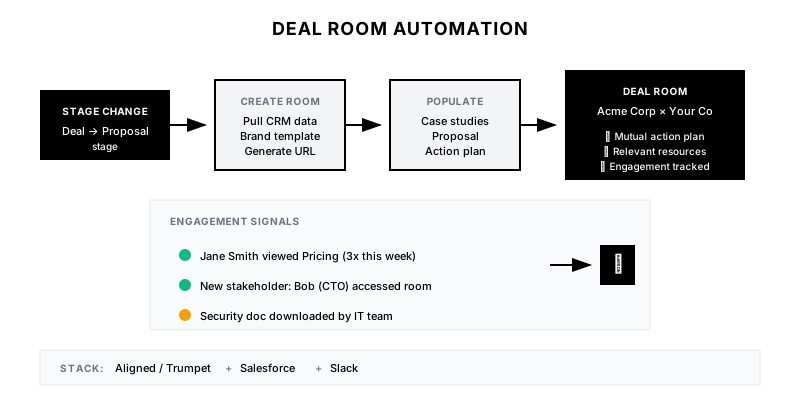
Deal Room Automation creates personalized buyer portals when deals reach key stages. Instead of manually assembling documents, links, and next steps, the system auto-generates a branded deal room populated with relevant case studies, proposal documents, pricing, and a mutual action plan—all trackable.
Why It Matters
Buyers juggle multiple vendors and stakeholders. A professional, organized deal room makes you easy to buy from. Plus, engagement tracking shows who's viewing what, when—giving sales visibility into buyer behavior between calls.
Who It's For
- Account Executives managing mid-market to enterprise deals
- Sales teams with multi-stakeholder buying processes
- Companies with complex solution sales
- Sales leaders wanting visibility into buyer engagement
Preconditions
Required Tools
- Deal room platform (Aligned, Trumpet, GetAccept, or Notion)
- CRM with stage-based triggers
- Content library with tagged resources
- Zapier or native integrations
- Analytics for engagement tracking
Required Fields/Properties
- Opportunity data (company, contacts, value, stage)
- Industry/vertical for content matching
- Primary use case or pain point
- Decision timeline
Definitions Required
- Which stages trigger room creation
- What content to include by deal type
- Room structure and sections
- Engagement thresholds for alerts
Step-by-Step Workflow
Design Room Template
Goal: Create a standard structure for deal rooms that can be personalized.
Actions:
- Define room sections (Overview, Resources, Pricing, Next Steps)
- Create branded template with company styling
- Build mutual action plan template
- Add stakeholder tracking section
- Include Q&A or discussion area
Implementation Notes: Keep rooms clean and scannable. Buyers don't want to dig through 50 documents. Curate the 5-10 most relevant resources and make navigation obvious.
Automation Logic:
Deal Room Structure:

1. WELCOME & OVERVIEW
   - Personalized intro message
   - Company logos (yours + theirs)
   - Deal summary

2. YOUR TEAM
   - Account team photos + contact info
   - Roles (AE, SE, CSM)
   - Calendly links for booking

3. MUTUAL ACTION PLAN
   - Timeline with milestones
   - Owner assignments (buyer + seller)
   - Status tracking

4. RESOURCES
   - Product overview/demo
   - Relevant case studies (matched to industry)
   - Technical documentation
   - Security/compliance docs

5. PRICING & PROPOSAL
   - Proposal document
   - ROI calculator
   - Pricing breakdown

6. Q&A / DISCUSSION
   - Threaded Q&A
   - Document comments enabled

7. NEXT STEPS
   - Clear call-to-action
   - Contract/signature portal
Configure Trigger Automation
Goal: Auto-create rooms when deals reach the right stage.
Actions:
- Identify trigger stage(s) in CRM
- Set up Zapier or native webhook
- Map CRM fields to room personalization
- Configure room creation API call
- Test with sample opportunities
Implementation Notes: Common triggers: after discovery (to share proposal) or after demo (to provide resources). Too early creates rooms that aren't useful; too late misses the window.
Automation Logic:
// Example: Salesforce → Aligned deal room creation
const createDealRoom = async (opportunity) => {
  const roomData = {
    name: `${opportunity.Account.Name} x ${YOUR_COMPANY}`,
    template: 'standard-deal-room',
    fields: {
      company_name: opportunity.Account.Name,
      contact_name: opportunity.Contact.Name,
      deal_value: opportunity.Amount,
      use_case: opportunity.Use_Case__c,
      industry: opportunity.Account.Industry
    },
    content: {
      case_studies: getCaseStudiesByIndustry(opportunity.Account.Industry),
      proposal: opportunity.Proposal_Link__c
    },
    stakeholders: opportunity.OpportunityContactRoles
  };

  const room = await aligned.createRoom(roomData);
  return room.url;
};
Build Content Matching Logic
Goal: Automatically include relevant content based on deal attributes.
Actions:
- Tag content library by industry, use case, company size
- Create content matching rules
- Set fallback content for unmatched deals
- Include standard content (security, about us)
- Build content refresh logic for long deals
Implementation Notes: The goal is relevance. A healthcare company shouldn't see fintech case studies. Match 2-3 highly relevant case studies rather than including everything.
Automation Logic:
Content Matching Rules:

1. Case Studies (pick top 2)
   - Primary match: Same industry
   - Secondary match: Similar company size
   - Fallback: Top-performing universal case study

2. Product Content
   - If Use Case = 'Marketing' → Marketing demo video
   - If Use Case = 'Sales' → Sales demo video
   - Always include: Product overview one-pager

3. Technical Content
   - If Evaluator includes 'Engineering' → API docs, architecture
   - If Security concern flagged → SOC2, security whitepaper
   - If Integration specified → Relevant integration guide

4. Always Include
   - Company overview
   - Customer logos
   - Team contact information
Set Up Engagement Tracking
Goal: Monitor buyer behavior in the deal room.
Actions:
- Enable view tracking for all content
- Track time spent per document
- Identify which stakeholders are engaging
- Set up engagement alerts for sales
- Create engagement score for deal room
Implementation Notes: Engagement data is gold. If the CFO viewed the pricing 3 times this week, that's a buying signal. Alert reps to hot engagement so they can follow up.
Integrate Mutual Action Plan
Goal: Create a shared roadmap that both sides update.
Actions:
- Define standard milestones by deal type
- Auto-populate timeline based on close date
- Assign owners (buyer and seller) to each step
- Enable status updates from buyer side
- Send reminders for upcoming milestones
Implementation Notes: The mutual action plan (MAP) is the heart of the deal room. It creates accountability and keeps the deal on track. Make it editable by buyers so they feel ownership.
Templates
Deal Room Welcome Message
Welcome, {{contact_first_name}}! 👋

We've put together this space to make your evaluation of {{your_company}} as easy as possible.

Inside you'll find:
✅ Relevant case studies from {{industry}} companies
✅ Our proposal and pricing details
✅ Technical documentation for your team
✅ A shared action plan to keep us on track

Feel free to share this room with anyone on your team who should be involved. We can see who's accessing what, which helps us answer questions proactively.

**Your Team:**
- {{ae_name}} (Account Executive) - {{ae_email}}
- {{se_name}} (Solutions Engineer) - {{se_email}}

Questions? Just drop them in the Q&A section or reply here.

Looking forward to working together,
{{ae_first_name}}
Mutual Action Plan Template
📋 MUTUAL ACTION PLAN

Target Close Date: {{close_date}}

| Milestone | Owner | Target Date | Status |
|-----------|-------|-------------|--------|
| Discovery complete | {{buyer}} + {{seller}} | {{date_1}} | ✅ Done |
| Technical evaluation | {{buyer_tech}} | {{date_2}} | 🔄 In Progress |
| Security review | {{buyer_security}} | {{date_3}} | ⏳ Pending |
| Executive sponsor alignment | {{buyer_exec}} | {{date_4}} | ⏳ Pending |
| Proposal review | {{buyer}} | {{date_5}} | ⏳ Pending |
| Legal/procurement | {{buyer_legal}} | {{date_6}} | ⏳ Pending |
| Contract signed | {{buyer}} | {{close_date}} | ⏳ Pending |

*Click any milestone to add notes or update status*
Engagement Alert Template
🔥 *Deal Room Activity Alert*

**{{company_name}}** deal room is heating up!

*Recent Activity:*
{{#each activities}}
• {{contact_name}} ({{title}}) viewed {{document_name}} for {{duration}}
{{/each}}

*Engagement Score:* {{engagement_score}}/100 (up {{change}} from last week)

*Hot Signals:*
{{#if pricing_views}}
💰 Pricing viewed {{pricing_views}} times this week
{{/if}}
{{#if new_stakeholder}}
👤 New stakeholder: {{new_stakeholder_name}} ({{new_stakeholder_title}})
{{/if}}

<{{deal_room_link}}|Open Deal Room> | <{{crm_link}}|View in CRM>
Content Matching Matrix
| Industry | Primary Case Study | Secondary Case Study | Product Video |
|----------|-------------------|---------------------|---------------|
| Healthcare | Acme Health | Beta Medical | Healthcare Demo |
| Financial Services | Finance Corp | Investment Inc | FinServ Demo |
| Technology | TechStart | SaaS Global | Tech Demo |
| Retail | RetailCo | E-Commerce Inc | Retail Demo |
| Manufacturing | MfgCorp | Industrial Inc | General Demo |
QA + Edge Cases
Test Cases Checklist
- Opportunity hits trigger stage → deal room created within 5 minutes
- Healthcare deal → healthcare case studies auto-populated
- Buyer views proposal → engagement alert sent to AE
- New stakeholder added → tracked in engagement dashboard
- Room engagement score drops → alert for rep follow-up
Common Failure Modes
- Room created too early: Sharing a deal room before discovery is complete feels presumptuous. Trigger after meaningful qualification.
- Too much content: 50 documents overwhelms buyers. Curate 5-10 relevant resources. Quality over quantity.
- No personalization: Generic rooms with wrong industry case studies hurt credibility. Ensure content matching works properly.
- Engagement tracking ignored: The data is useless if reps don't act on it. Surface insights in Slack/CRM where they work.
Troubleshooting Tips
- If rooms aren't being created: Check trigger configuration and API permissions
- If content matching is wrong: Review tagging in content library; rules may need updating
- If buyers don't engage: Room may be too complex; simplify structure and navigation
- If reps don't share rooms: Make sharing easier; consider auto-sending link to primary contact
KPIs and Reporting
KPIs to Track
- Room Creation Rate: Deal room created for 100% of qualified opportunities
- Buyer Engagement Rate: >70% of rooms accessed by buyer within 48 hours
- Multi-Stakeholder Visibility: Average 3+ stakeholders engaging per room
- Content View Rate: >60% of included content viewed
- Win Rate with Rooms: Track win rate for deals with vs. without rooms
Suggested Dashboard Widgets
- Room Engagement Heatmap: Which content types get most engagement
- Stakeholder Discovery: New stakeholders identified through room access
- Engagement by Stage: How engagement changes through deal stages
- Hot Rooms Alert: Rooms with spike in recent activity