Overview
What It Is
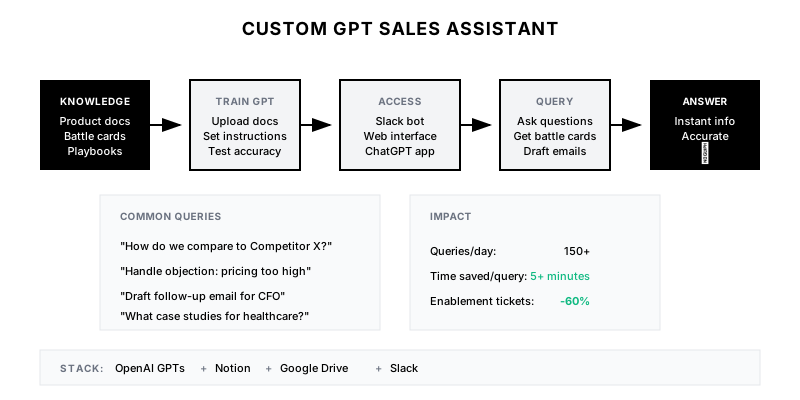
A custom-trained GPT assistant that knows your products, pricing, competitors, processes, and playbooks intimately, enabling sales reps to get instant answers to any question without searching through documentation or waiting for enablement.
Why It Matters
Sales reps spend 30%+ of time on non-selling activities, much of it searching for information. A custom GPT provides instant, accurate answers—reducing time to information from minutes to seconds and ensuring consistency across the team.
Who It's For
- Sales reps needing quick answers mid-call
- New reps ramping on product knowledge
- Sales leaders ensuring consistent messaging
- Enablement teams scaling their impact
Preconditions
Required Tools
- OpenAI GPTs (or similar platform)
- Notion/Confluence (knowledge base)
- Google Drive (documents)
- Slack (optional, for integration)
Required Fields/Properties
- Product documentation
- Pricing and packaging
- Competitive intelligence
- Sales playbooks and methodologies
- Case studies and proof points
Definitions Required
- Scope of assistant (what it should/shouldn't answer)
- Escalation path for unknown questions
- Confidentiality rules
- Update frequency for knowledge base
Step-by-Step Workflow
Gather and Structure Knowledge Base
Goal: Compile all sales knowledge into assistant-ready format
Actions:
- Export product documentation
- Compile competitive battle cards
- Gather objection handling guides
- Include pricing and packaging details
- Add sales process and methodology docs
Implementation Notes: Quality of assistant depends on quality of inputs. Structure documents clearly with headers. Remove outdated content. Mark confidential information.
Configure Custom GPT
Goal: Create and configure the GPT with proper instructions
Actions:
- Create new GPT in OpenAI
- Upload knowledge base documents
- Write detailed system instructions
- Configure conversation style and boundaries
Implementation Notes: System instructions are critical. Be explicit about what assistant should and shouldn't do. Include examples of good responses.
Build Common Use Case Prompts
Goal: Create quick-access prompts for frequent scenarios
Actions:
- Objection handling prompts
- Competitive comparison prompts
- Email drafting prompts
- Call prep prompts
- Demo customization prompts
Implementation Notes: Provide conversation starters that guide reps to effective queries. Include variables for context (prospect name, competitor, objection).
Integrate with Slack
Goal: Enable assistant access without leaving Slack
Actions:
- Create Slack app/bot
- Connect to GPT API
- Set up DM and channel access
- Configure response formatting for Slack
Implementation Notes: Slack integration makes assistant available in the flow of work. Support both DM (private questions) and channel mentions (team questions).
Implement Knowledge Base Updates
Goal: Keep assistant current with latest information
Actions:
- Set up automated knowledge sync
- Create update process for new content
- Build feedback loop for incorrect answers
- Schedule regular knowledge audits
Implementation Notes: Stale information is worse than no information. Automate syncs from source documents. Have process for reps to flag outdated content.
Launch and Train Team
Goal: Roll out assistant and ensure adoption
Actions:
- Create user guide and quick prompts
- Run training session with team
- Set up feedback collection
- Monitor usage and iterate
Implementation Notes: Adoption requires change management. Show concrete time savings. Celebrate early wins. Iterate based on feedback.
Templates
Sales Assistant User Guide
# Sales Assistant Quick Guide

## How to Access
- **Slack:** DM @SalesAssistant or mention in any channel
- **Web:** chat.company.com/sales-assistant
- **ChatGPT:** Search 'Company Sales Assistant' in GPT store

## Best Practices
1. Be specific with your question
2. Include context (company, industry, competitor)
3. Ask for format you need (bullets, email, table)
4. Follow up if answer doesn't address your need

## Example Prompts
- "How do we compare to Competitor X for enterprise security?"
- "Draft a follow-up email after a demo with a CFO"
- "What case studies do we have for healthcare?"
- "Handle objection: 'Your pricing is too high'"

## What It Can't Do
- Access CRM data (use CRM directly)
- Provide legal/compliance advice
- Share confidential strategy docs
- Make pricing commitments
Feedback Collection Form
**Sales Assistant Feedback**

1. What question did you ask?
_______________

2. Was the answer:
[ ] Accurate and helpful
[ ] Accurate but incomplete
[ ] Inaccurate
[ ] Didn't have the information

3. If inaccurate or incomplete, what was wrong/missing?
_______________

4. Rate usefulness (1-5): ___

5. Additional feedback:
_______________

[Submit to #sales-assistant-feedback]
Weekly Assistant Usage Report
| Metric | This Week | Last Week | Trend |
|--------|-----------|-----------|-------|
| Total Queries | 342 | 298 | +15% |
| Unique Users | 24/30 | 22/30 | +9% |
| Avg Queries/User | 14.3 | 13.5 | +6% |
| Satisfaction Score | 4.3/5 | 4.1/5 | +5% |
| Feedback Submitted | 18 | 12 | +50% |
| Knowledge Gaps Found | 3 | 5 | -40% |
QA + Edge Cases
Test Cases Checklist
- Verify assistant answers product questions accurately
- Test competitive comparisons against battle cards
- Confirm assistant refuses to make up information
- Validate Slack integration responds correctly
- Test edge cases (ambiguous questions, out of scope)
Common Failure Modes
- Hallucination: GPT makes up features or facts. Add explicit instruction to say 'I don't know' and cite sources.
- Stale information: Knowledge base not updated, answers outdated. Automate sync and add last-updated dates.
- Low adoption: Team doesn't use it. Run training, share success stories, integrate into daily workflows.
Troubleshooting Tips
- If answers are too long, add instruction for concise responses
- For inconsistent answers, improve document structure and reduce ambiguity
- If reps don't use it, embed in Slack where they already work
KPIs and Reporting
KPIs to Track
- Daily Active Users: >80% of sales team
- Queries per User per Week: >10
- Answer Accuracy: >95% accurate
- Time Saved per Query: >5 minutes
Suggested Dashboard Widgets
- Usage Trend: Queries per day over time
- Top Query Categories: What reps ask most about
- User Adoption: Active users vs. total team
- Satisfaction Score: Average rating from feedback