Overview
What It Is
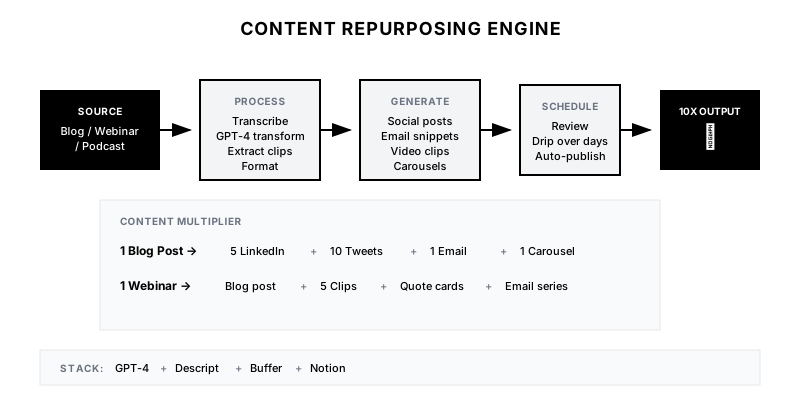
The Content Repurposing Engine automatically transforms every piece of long-form content into a suite of derivative assets. A single webinar becomes blog posts, LinkedIn carousels, tweet threads, email snippets, and video clips—all maintaining consistent messaging and brand voice.
Why It Matters
Creating content is expensive. Most teams publish once and move on, leaving value on the table. Repurposing maximizes ROI on content investment and meets audiences where they are—different people prefer different formats.
Who It's For
- Content marketers managing editorial calendars
- Marketing teams with limited resources
- Social media managers needing consistent content
- Founders doing their own content marketing
Preconditions
Required Tools
- GPT-4 or Claude for content transformation
- Video editing tool (Descript, Opus Clip) for clips
- Social scheduling (Buffer, Hootsuite)
- Content management system
- Automation platform (Make.com, Zapier)
Required Fields/Properties
- Source content (text, transcript, recording)
- Brand voice guidelines
- Platform character limits and specs
- Target audience for each platform
- Publishing schedule
Definitions Required
- Content formats to generate per source type
- Brand voice rules and prohibited phrases
- Quality review workflow
- Platform-specific optimization rules
- Publishing cadence
Step-by-Step Workflow
Define Repurposing Matrix
Goal: Map source content types to derivative formats.
Actions:
- List all source content types (blog, webinar, podcast, etc.)
- Define output formats for each source
- Set platform requirements (character limits, dimensions)
- Create quality criteria for each format
- Build publishing schedule template
Implementation Notes: Not every source becomes every format. A podcast naturally becomes social quotes; a data-heavy blog becomes infographics. Match format to content type.
Automation Logic:
Repurposing Matrix:

BLOG POST →
• 5-7 LinkedIn posts (key points)
• 10-15 tweets (quotes, stats)
• 1 email newsletter snippet
• 1 carousel (if how-to)
• Podcast talking points

WEBINAR →
• Full blog post (transcript → article)
• 3-5 video clips (60-90 sec)
• Quote graphics (speaker highlights)
• LinkedIn posts (key insights)
• Email follow-up content

PODCAST →
• Full transcript blog
• Quote cards (pull quotes)
• Audiogram clips (60 sec)
• LinkedIn posts (insights)
• Tweet thread (episode summary)
Build Content Processing Pipeline
Goal: Automate content ingestion and transformation.
Actions:
- Create triggers for new content (webhook, RSS, manual)
- Build transcription workflow for audio/video
- Set up GPT-4 prompts for each output format
- Configure brand voice injection
- Create quality review queue
Implementation Notes: Process content immediately after publish. Momentum matters—social content about a new blog should go out same day or next day, not a week later.
Automation Logic:
GPT-4 Content Transformation Prompt:

Transform this {{source_type}} into {{output_format}}.

Source Content:
{{content}}

Brand Voice Guidelines:
- Tone: {{tone}} (e.g., professional but approachable)
- Avoid: {{prohibited_words}}
- Always include: {{required_elements}}

Platform Requirements:
- Platform: {{platform}}
- Character limit: {{char_limit}}
- Hashtag strategy: {{hashtag_rules}}
- CTA preference: {{cta_style}}

Generate {{count}} variations that:
1. Capture the core insight/value
2. Are native to {{platform}} style
3. Drive engagement (question, controversy, or value)
4. Include a clear CTA or engagement hook

Return as JSON array with: content, hook_type, suggested_image
Configure Video/Audio Clipping
Goal: Extract shareable clips from long-form media.
Actions:
- Set up Descript or Opus Clip integration
- Define clip selection criteria (highlights, quotes)
- Configure caption styling and branding
- Create thumbnail templates
- Build clip approval workflow
Implementation Notes: AI clip selection is good but not perfect. Have a human review suggested clips before publishing. The best clips often have emotion, controversy, or a surprising insight.
Set Up Distribution Queue
Goal: Schedule repurposed content across platforms.
Actions:
- Connect to social scheduling tools
- Build platform-specific queues
- Configure optimal posting times
- Set up approval workflow for each platform
- Create drip schedule (don't post everything at once)
Implementation Notes: Spread content over time. A webinar can fuel a week of social content. Create a drip schedule that maximizes shelf life without overwhelming your audience.
Track and Optimize
Goal: Measure repurposing effectiveness and improve.
Actions:
- Track engagement by content type and platform
- Identify top-performing formats
- A/B test transformation prompts
- Build feedback loop for quality improvement
- Calculate content ROI multiplier
Implementation Notes: Measure which derivative formats drive the most engagement. If LinkedIn carousels consistently outperform text posts, prioritize carousel generation.
Templates
LinkedIn Post Transformation
Transform this insight into a LinkedIn post:

Original: {{insight}}

---

**Hook:** {{hook}} ← Stop the scroll

{{body}} ← Key value in 3-5 lines

{{list_format}} ← If applicable:
• Point 1
• Point 2
• Point 3

{{cta}} ← Engagement driver

---

Example Output:

Most sales teams waste 4+ hours per week on call notes.

Here's what top performers do differently:

→ They automate transcription
→ They use AI for summaries
→ They push insights directly to CRM

The result? More selling time. Better data. Higher win rates.

What's your biggest time sink in the sales process? 👇
Tweet Thread Format
Transform blog post into tweet thread:

1/ {{hook}} ← Curiosity driver or bold claim

2/ {{context}} ← Why this matters

3-7/ {{key_points}} ← One insight per tweet

8/ {{summary}} ← Recap or takeaway

9/ {{cta}} ← Follow, share, or resource link

---

Thread Rules:
• Each tweet must stand alone
• Use specific numbers and examples
• Include a mid-thread hook (tweet 4-5)
• End with clear value and CTA
Email Newsletter Snippet
## This Week's Insight: {{title}}

{{hook_sentence}}

**The Key Takeaway:**
{{main_insight}}

**Why It Matters:**
{{relevance_to_reader}}

**Quick Win You Can Implement Today:**
{{actionable_tip}}

[Read the full post →]({{link}})

---

Length: 100-150 words
Tone: Conversational, value-forward
CTA: Single, clear action
Content Output Tracker
| Source | Published | LinkedIn | Twitter | Email | Video Clips | Status |
|--------|-----------|----------|---------|-------|-------------|--------|
| Q4 Webinar | Dec 5 | 5 posts | 10 tweets | 1 snippet | 4 clips | Complete |
| AI Blog Post | Dec 8 | 3 posts | 8 tweets | 1 snippet | 0 | In Review |
| Podcast Ep 42 | Dec 10 | 4 posts | 6 tweets | 1 snippet | 3 clips | Scheduled |
| Case Study | Dec 12 | 2 posts | 5 tweets | 1 snippet | 1 clip | Processing |
QA + Edge Cases
Test Cases Checklist
- New blog published → 5+ LinkedIn posts generated within 2 hours
- Webinar recording uploaded → video clips extracted and captioned
- Generated content matches brand voice guidelines
- Social posts scheduled across next 5-7 days (not all at once)
- Quality review completed before any content goes live
Common Failure Modes
- Generic output: AI-generated content sounds robotic. Inject brand voice examples and edit outputs before publishing.
- Missing context: Derivative content loses nuance from original. Include key context in transformation prompts.
- Overwhelming audience: Publishing all derivatives at once. Space content over days/weeks for sustained presence.
- Quality slip: Automation without review leads to errors. Always have human review before publish.
Troubleshooting Tips
- If content sounds generic: Add more brand voice examples to prompts
- If engagement is low: Test different hook styles and formats
- If clips miss the best moments: Adjust AI selection criteria or manual review
- If workflow is slow: Check for bottlenecks in transcription or review steps
KPIs and Reporting
KPIs to Track
- Content Multiplier: 10+ derivative pieces per source content
- Time to Repurpose: All derivatives ready within 24 hours of source publish
- Engagement Rate: Repurposed content matches or exceeds organic averages
- Publishing Consistency: Daily social presence from repurposed content
- Content ROI: Track reach/engagement per hour of original content creation
Suggested Dashboard Widgets
- Repurposing Pipeline: Source content and derivative status
- Output by Format: Count of derivatives by type
- Engagement Comparison: Original vs. derivative performance
- Publishing Calendar: Scheduled content across platforms