Overview
What It Is
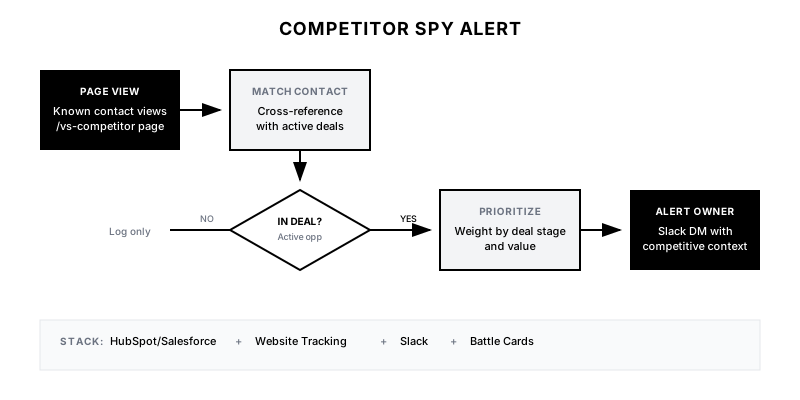
The Competitor Spy Alert monitors website behavior of contacts already in your pipeline or active deals. When they visit comparison pages, competitor content, or 'how to cancel' pages, the deal owner gets an immediate alert with context to intervene. It's your early warning system for competitive threats.
Why It Matters
By the time a prospect tells you they're evaluating a competitor, they're already 70% decided. This playbook catches them in the research phase—when you can still shape their evaluation criteria and address concerns before they harden into objections.
Who It's For
- Sales teams in competitive markets
- Account Executives managing multiple deals
- Customer Success teams monitoring renewal risk
- Companies with comparison or competitor content on their site
Preconditions
Required Tools
- CRM with contact tracking (HubSpot/Salesforce)
- Website tracking with contact identification
- Slack or email for alerts
- Comparison/competitor pages on your site
Required Fields/Properties
- Contact-to-deal mapping in CRM
- Page URL patterns for competitive content
- Deal owner assignments
- Alert thresholds and priority rules
Definitions Required
- Which pages indicate competitive evaluation
- Which pages indicate churn risk (for customers)
- Alert priority levels by deal stage
- Response playbooks for different scenarios
Step-by-Step Workflow
Identify Competitive Signal Pages
Goal: Catalog all pages that indicate competitive evaluation or churn risk.
Actions:
- List all comparison pages (Us vs. Competitor X)
- List all competitor-mention pages
- Identify 'how to cancel' or 'downgrade' pages
- Include pricing page (may indicate re-evaluation)
- Create URL pattern matching rules
Implementation Notes: Include your own competitor content (why we're better than X), third-party comparison pages if hosted on your site, and any migration/cancellation content.
Automation Logic:
URL Pattern Matching:
/compare/* → Competitive Evaluation
/vs-* → Competitive Evaluation
/alternative-to-* → Competitive Evaluation
/cancel* → Churn Risk
/pricing* (from known customer) → Renewal Risk
Set Up Contact Matching
Goal: Connect website visitors to their CRM records and active deals.
Actions:
- Ensure website tracking passes HubSpot/Salesforce contact ID
- Configure cookie-based identification for return visitors
- Set up IP-to-company matching as fallback
- Cross-reference with active deals in CRM
- Include account/company level matching (not just individual)
Implementation Notes: Not all visitors will be identified. For enterprise deals, IP matching can catch visits from people not in your CRM but at the same company.
Build Deal Stage Prioritization
Goal: Prioritize alerts based on deal value and stage.
Actions:
- Define alert priority by deal stage (negotiation > discovery)
- Weight by deal value (higher value = higher priority)
- Set thresholds for 'at risk' deals (late stage + competitive pages)
- Create different alert templates by urgency level
- Configure immediate vs. digest alerts by priority
Implementation Notes: A prospect in negotiation visiting a competitor page is a 🔴 fire. A prospect in discovery visiting a comparison page is normal due diligence. Calibrate urgency accordingly.
Configure Real-Time Alerts
Goal: Set up instant notifications to deal owners.
Actions:
- Create Slack alert workflow triggered by page visit
- Include: contact name, company, deal stage, page visited
- Add direct link to CRM record and deal
- Include recommended response based on scenario
- Set up mobile push for highest-priority alerts
Implementation Notes: Highest priority alerts should interrupt—use Slack @mention or SMS. Lower priority can go to a channel. The goal is action within minutes.
Create Response Playbooks
Goal: Give reps clear guidance on how to respond to each signal.
Actions:
- Write response script for 'prospect viewing competitor page'
- Create competitive battle cards linked from alerts
- Build objection handling snippets for common competitors
- Define escalation path for high-value at-risk deals
- Set response SLAs by priority level
Implementation Notes: The alert should tell the rep exactly what to do: 'Call now with competitive positioning' or 'Send case study comparison email.' Don't leave them guessing.
Track and Measure Impact
Goal: Prove that these alerts are saving deals and improving win rates.
Actions:
- Log all alerts with outcomes (responded, ignored, deal result)
- Track time-from-alert-to-response
- Measure win rate on deals with competitive alerts vs. without
- Calculate 'deals saved' from intervention
- Review weekly for pattern detection
Implementation Notes: This data is gold for sales coaching. Which reps respond fastest? Which competitive scenarios are hardest to win? Use alerts as learning opportunities.
Templates
Slack Alert: Prospect Viewing Competitor Page
🚨 *COMPETITIVE ALERT*

*Contact:* {{contact_name}}
*Company:* {{company_name}}
*Deal:* {{deal_name}} ({{deal_stage}})
*Deal Value:* ${{deal_amount}}

*Page Viewed:* {{page_title}}
*URL:* {{page_url}}
*Time:* Just now

⚠️ *Priority:* {{priority_level}}

💡 *Recommended Action:* Call immediately with competitive positioning. Reference our advantages in {{competitive_area}}.

📋 <{{battle_card_url}}|View Battle Card> | <{{crm_link}}|Open Deal>
Slack Alert: Customer Viewing Cancel Page
🔴 *CHURN RISK DETECTED*

*Customer:* {{company_name}}
*Contact:* {{contact_name}} ({{contact_title}})
*ARR:* ${{contract_value}}
*Renewal Date:* {{renewal_date}}

*Page Viewed:* How to Cancel / Downgrade
*Time:* Just now

🚨 *Action Required:* Immediate CSM outreach. Do not wait.

💡 *Suggested Approach:* Call to check in on their experience. Do not mention you saw the page visit.

<{{crm_link}}|View Account> | <{{cs_notes_link}}|Recent CS Notes>
Response Script: Competitive Intervention Call
Hi {{first_name}}, it's {{your_name}} from {{your_company}}.

I wanted to check in on your evaluation. I know you're doing your due diligence—which is exactly what you should do—and I wanted to make sure I'm answering the right questions.

[If they admit to evaluating competitor:]

Totally understand. A lot of our customers evaluated {{competitor}} before choosing us. The main difference they found was [key differentiator]. Would it be helpful if I walked you through that comparison?

[If they deny or deflect:]

No problem—just wanted to make sure you have everything you need. Any questions come up that I can help clarify?
Competitive Page Priority Matrix
| Page Type | Deal Stage | Priority | Alert Channel | Response SLA |
|-----------|------------|----------|---------------|-------------|
| Competitor Comparison | Negotiation | Critical | Slack DM + SMS | 15 min |
| Competitor Comparison | Proposal | High | Slack DM | 1 hour |
| Competitor Comparison | Discovery | Medium | Slack Channel | 4 hours |
| Pricing Page | Customer | High | CSM Slack | 2 hours |
| Cancel Page | Customer | Critical | CSM DM + Manager | 15 min |
| Downgrade Page | Customer | High | CSM Slack | 1 hour |
QA + Edge Cases
Test Cases Checklist
- Known contact in active deal visits /vs-competitor → deal owner receives Slack DM
- Identified company (not contact) visits comparison page → alert to territory rep
- Customer visits cancel page → CSM receives critical alert
- Contact not in any deal visits comparison page → no alert (or low priority)
- Multiple pages viewed in session → single consolidated alert
Common Failure Modes
- Alert fatigue from low-intent signals: Not every comparison page view is a red flag. Weight by deal stage and contact role. A SDR in discovery viewing comparison is normal research.
- Reps not responding to alerts: If reps ignore alerts, the system fails. Track response rates and coach underperformers. Consider gamification or manager visibility.
- Visitor not identified: Many visitors won't be matched to contacts. Focus on high-value deals where tracking is more complete. Use IP matching as supplement.
- Awkward outreach revealing surveillance: Never say 'I saw you visited our competitor page.' Focus on 'checking in' or 'making sure you have what you need.' Be helpful, not creepy.
Troubleshooting Tips
- If alerts aren't firing: Verify website tracking is passing contact IDs correctly
- If too many alerts: Tighten deal stage and page filters to reduce noise
- If response rates low: Review alert formatting and recommended actions—make it easier to act
- If win rate impact unclear: Ensure outcomes are being logged against alerts
KPIs and Reporting
KPIs to Track
- Alert Response Rate: >80% of high-priority alerts receive response within SLA
- Win Rate on Alerted Deals: Track win rate on deals with competitive alerts vs. baseline
- Churn Save Rate: >25% of cancel-page alerts result in retention
- Time-to-Response: <15 minutes for critical alerts, <1 hour for high priority
- Competitive Intel Gathered: Log insights from competitive conversations for product team
Suggested Dashboard Widgets
- Weekly Competitive Alerts: Count of alerts fired by competitor mentioned and outcome
- Rep Response Leaderboard: Ranking of reps by alert response rate and speed
- At-Risk Deal Monitor: Real-time list of deals with recent competitive activity
- Competitor Trend Analysis: Which competitor pages are being viewed most frequently