Overview
What It Is
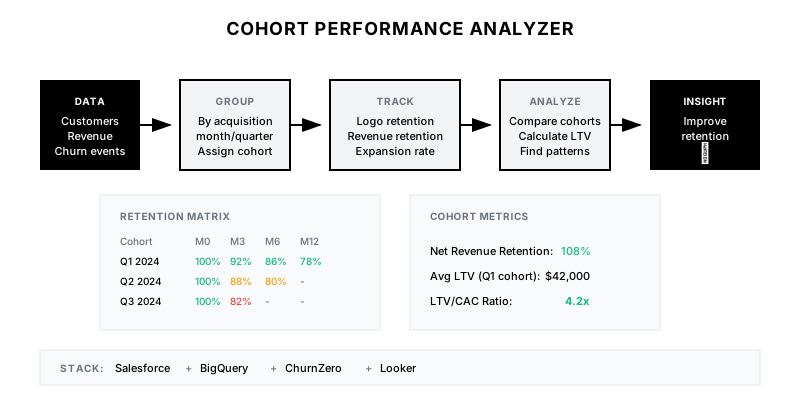
An automated analysis system that groups customers by acquisition period (cohort) and tracks their behavior over time—retention rates, revenue retention, expansion, and churn—to reveal patterns invisible in aggregate metrics.
Why It Matters
Aggregate metrics hide critical trends. 90% retention sounds great until you discover Q1 cohorts retain at 95% while Q4 cohorts retain at 75%. Cohort analysis reveals whether your business is actually improving or masking problems with growth.
Who It's For
- Finance teams modeling LTV and unit economics
- CS leaders understanding retention drivers
- RevOps building customer analytics
- Executives evaluating business health
Preconditions
Required Tools
- Salesforce/CRM (customer data)
- BigQuery/Snowflake (data warehouse)
- Looker/Tableau (visualization)
- Billing system (revenue data)
Required Fields/Properties
- Customer acquisition date
- Monthly/quarterly revenue by customer
- Churn date (if applicable)
- Expansion/contraction events
- Acquisition source/channel
Definitions Required
- Cohort period (monthly/quarterly)
- Revenue recognition rules
- Churn definition (cancellation vs. non-payment)
- Expansion vs. new business classification
Step-by-Step Workflow
Define Cohort Structure
Goal: Establish how customers are grouped into cohorts
Actions:
- Define cohort period (month of first purchase)
- Handle edge cases (upgrades, reactivations)
- Document acquisition date source of truth
- Set up cohort assignment logic
Implementation Notes: Monthly cohorts work for high-volume businesses. Quarterly cohorts better for enterprise with fewer customers. Ensure acquisition date is immutable once set.
Build Revenue by Cohort and Period
Goal: Track revenue for each cohort over time
Actions:
- Calculate revenue per customer per period
- Sum by cohort and period offset (month 0, month 1, etc.)
- Handle partial periods appropriately
- Support multiple revenue types (MRR, ARR, usage)
Implementation Notes: Period offset (months since acquisition) is key. This allows comparing cohorts at the same 'age' regardless of when they were acquired.
Calculate Retention Metrics
Goal: Compute logo retention and revenue retention by cohort
Actions:
- Calculate logo retention (customers remaining)
- Calculate gross revenue retention (GRR)
- Calculate net revenue retention (NRR) including expansion
- Generate retention curves by cohort
Implementation Notes: Logo retention counts customers. Revenue retention is more nuanced—a churned small customer with an expanding large customer can net positive.
Build Cohort Retention Matrix
Goal: Create the classic cohort retention triangle visualization
Actions:
- Pivot data into matrix format
- Color-code by retention performance
- Add period-over-period comparisons
- Enable drill-down to customer lists
Implementation Notes: The retention matrix (cohorts as rows, periods as columns) is the canonical cohort visualization. Heat map coloring makes patterns immediately visible.
Calculate Cohort LTV
Goal: Determine lifetime value by cohort for unit economics
Actions:
- Sum cumulative revenue per cohort
- Project LTV for incomplete cohorts
- Calculate payback period
- Compare LTV by acquisition source
Implementation Notes: For newer cohorts, project LTV using retention curves from mature cohorts. This assumes similar behavior—validate periodically.
Automate Insights and Alerts
Goal: Generate automated insights from cohort analysis
Actions:
- Compare cohort retention to benchmarks
- Alert on cohorts performing significantly worse
- Identify high-LTV acquisition sources
- Generate monthly cohort report
Implementation Notes: Alert when a cohort's 3-month retention is >10% below the historical average. This catches problems early while there's time to intervene.
Templates
Monthly Cohort Report
📊 *Monthly Cohort Analysis - {{month}}*

*Latest Cohort ({{latest_cohort}}):*
• Starting customers: {{starting_customers}}
• M1 retention: {{m1_retention}}% (benchmark: {{m1_benchmark}}%)
• Initial ACV: ${{initial_acv}}
• Acquisition source mix: {{source_mix}}

*Cohort Performance Highlights:*
{{#each highlights}}
• {{cohort}}: {{metric}} at {{value}}% ({{vs_benchmark}})
{{/each}}

*Concerns:*
{{#each concerns}}
⚠️ {{cohort}} showing {{issue}} - {{recommended_action}}
{{/each}}

*LTV Trends:*
| Cohort | LTV to Date | LTV/CAC | Status |
|--------|-------------|---------|--------|
{{#each ltv_data}}
| {{cohort}} | ${{ltv}} | {{ltv_cac}}x | {{status}} |
{{/each}}

<{{dashboard_link}}|View Full Cohort Dashboard>
Cohort Retention Matrix (Sample)
| Cohort | M0 | M1 | M2 | M3 | M6 | M12 |
|--------|-----|-----|-----|-----|-----|-----|
| Jan 24 | 100% | 95% | 92% | 90% | 85% | 78% |
| Feb 24 | 100% | 94% | 91% | 88% | 82% | - |
| Mar 24 | 100% | 93% | 89% | 86% | - | - |
| Apr 24 | 100% | 92% | 88% | - | - | - |
| May 24 | 100% | 91% | - | - | - | - |
| Jun 24 | 100% | - | - | - | - | - |
Cohort Analysis Questions to Answer
**Key Questions for Cohort Analysis:**

1. **Retention Trends**
   - Are recent cohorts retaining better or worse than older cohorts?
   - At what month do we see the biggest drop-off?
   - Which cohorts have the best long-term retention?

2. **Acquisition Quality**
   - Which acquisition sources produce the highest-LTV customers?
   - Are paid channels bringing in lower-quality customers?
   - Has a recent campaign brought in unusually good/bad cohorts?

3. **Product/Pricing Changes**
   - Did the January pricing change improve or hurt retention?
   - Are customers on the new plan retaining better?
   - Did the feature launch in Q2 affect expansion rates?

4. **Segment Analysis**
   - Do enterprise cohorts retain differently than SMB?
   - Which industry vertical has the best cohort performance?
   - Are annual customers more stable than monthly?
QA + Edge Cases
Test Cases Checklist
- Verify cohort assignment uses consistent acquisition date
- Confirm retention calculation matches manual spot check
- Test that partial-period cohorts are handled correctly
- Validate LTV calculation sums correctly
- Check alerts fire for under-performing cohorts
Common Failure Modes
- Acquisition date inconsistency: Different systems use different dates (contract signed vs. first payment). Establish single source of truth.
- Revenue timing mismatch: Billing dates don't align with service periods. Use service period start, not billing date, for cohort revenue.
- Small cohort volatility: Monthly cohorts with <20 customers produce noisy data. Consider quarterly cohorts or rolling averages.
Troubleshooting Tips
- If retention exceeds 100%, check for expansion revenue being double-counted
- For missing cohort data, verify all customers have acquisition dates
- If LTV seems too high, ensure you're using revenue not bookings
KPIs and Reporting
KPIs to Track
- Logo Retention (M12): >80% for SaaS
- Net Revenue Retention: >100% (expansion > churn)
- LTV/CAC Ratio: >3x for healthy unit economics
- Cohort Improvement: Each cohort better than prior
Suggested Dashboard Widgets
- Retention Matrix Heatmap: Classic cohort triangle with color-coded retention
- Retention Curves by Cohort: Line chart overlaying retention curves for comparison
- LTV by Acquisition Source: Bar chart comparing LTV across acquisition channels
- NRR Trend: Line chart of net revenue retention over time