Overview
What It Is
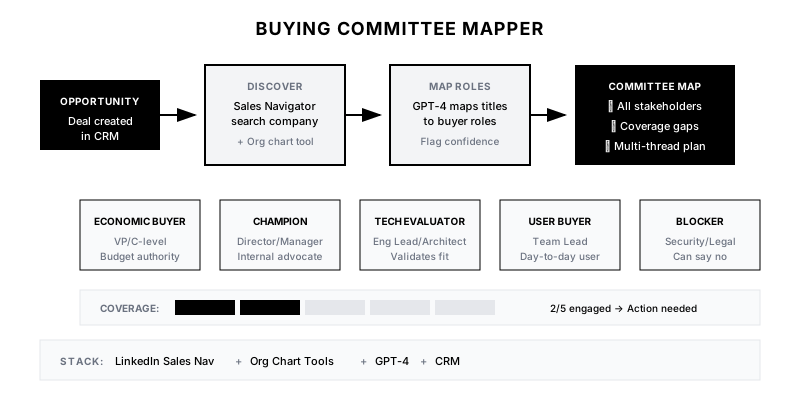
The Buying Committee Mapper automatically identifies all likely stakeholders in a B2B purchase decision by analyzing org structure, job titles, and historical patterns. Instead of relying solely on your initial contact, you get a map of everyone who might influence the deal—budget holders, technical evaluators, end users, and potential blockers.
Why It Matters
68% of B2B deals involve 6+ stakeholders. If you only know one, you're flying blind. Single-threaded deals die when your contact leaves, gets overruled, or can't champion internally. Multi-threading from day one dramatically increases win rates and deal control.
Who It's For
- Enterprise Account Executives managing complex deals
- SDRs qualifying opportunities for AEs
- Sales managers forecasting deal health
- Customer Success teams identifying expansion champions
Preconditions
Required Tools
- LinkedIn Sales Navigator
- Org chart tool (OrgChartHub, The Org, or similar)
- CRM with contact role tracking
- GPT-4 for analysis (optional)
- Enrichment tool (Clay, Clearbit)
Required Fields/Properties
- Target company name and domain
- Known contact(s) and their roles
- Deal type/size for committee pattern matching
- Industry context
Definitions Required
- Standard buying committee roles (Champion, Economic Buyer, Technical Evaluator, etc.)
- Title-to-role mapping for your product
- Minimum stakeholders to qualify as multi-threaded
- How to surface and track committee in CRM
Step-by-Step Workflow
Define Buying Committee Roles
Goal: Establish the typical stakeholders involved in your deal type.
Actions:
- List standard roles: Champion, Economic Buyer, Technical Evaluator, User Buyer
- Add your product-specific roles (Security Review, Procurement, Legal)
- Define title patterns that map to each role
- Identify historical patterns from won deals
- Create role descriptions for sales team reference
Implementation Notes: Start with your last 10 won deals. Who was involved? What were their titles? This gives you the pattern for mapping future deals.
Automation Logic:
Standard Buying Committee Roles:

1. CHAMPION - Your internal advocate
   Titles: Director, Sr. Manager in relevant function
   Signs: Responds quickly, shares info, introduces others

2. ECONOMIC BUYER - Controls budget
   Titles: VP, SVP, C-level in relevant function
   Signs: Asks about ROI, TCO, business impact

3. TECHNICAL EVALUATOR - Validates capabilities
   Titles: Engineering Lead, Architect, IT Director
   Signs: Asks about integrations, security, performance

4. USER BUYER - Day-to-day users
   Titles: Manager, Team Lead in using function
   Signs: Asks about workflow, ease of use, training

5. BLOCKER (potential) - Can say no
   Titles: Security, Legal, Procurement, IT Governance
   Signs: Focus on risk, compliance, process
Build Org Chart Discovery
Goal: Automatically pull relevant contacts from the target organization.
Actions:
- Configure LinkedIn Sales Navigator search by company
- Set up org chart tool integration
- Define title filters for relevant departments
- Create enrichment workflow to pull contact details
- Handle companies with limited public org data
Implementation Notes: LinkedIn Sales Nav + an org chart tool covers most cases. For private companies, use your champion to validate the map. For large enterprises, focus on the relevant division, not the whole company.
Automation Logic:
// Example: LinkedIn Sales Navigator search config
const findCommitteeMembers = {
  company: '{{company_name}}',
  titleFilters: [
    // Economic Buyers
    'VP', 'SVP', 'Chief', 'Head of',
    // Technical Evaluators
    'Director Engineering', 'Architect', 'IT Director',
    // Champions/Users
    'Director', 'Senior Manager', 'Manager'
  ],
  departments: [
    '{{primary_department}}',  // e.g., 'Sales', 'Marketing'
    'IT', 'Engineering',        // Technical evaluation
    'Finance', 'Procurement'    // Budget/purchasing
  ],
  excludeTitles: ['Intern', 'Associate', 'Coordinator']
};
Map Contacts to Roles
Goal: Assign each discovered contact to a buying committee role.
Actions:
- Match titles to predefined role patterns
- Use AI to handle ambiguous titles
- Flag contacts that could fill multiple roles
- Identify gaps in committee coverage
- Score confidence of each mapping
Implementation Notes: Not every mapping is obvious. 'Director of Digital Transformation' could be Champion or Technical Evaluator depending on context. Flag ambiguous cases for rep validation.
Automation Logic:
Role Mapping Prompt for GPT-4:

Given these contacts at {{company_name}} and their titles, map each to a buying committee role for a {{product_category}} purchase:

Contacts:
{{contact_list}}

Roles to assign:
- Economic Buyer (budget authority)
- Champion (internal advocate)
- Technical Evaluator (validates tech fit)
- User Buyer (end user perspective)
- Potential Blocker (security, legal, procurement)

For each contact, provide:
1. Likely role(s)
2. Confidence (High/Medium/Low)
3. Recommended engagement approach

Consider: {{deal_context}}
Generate Committee Map
Goal: Create a visual and actionable map of the buying committee.
Actions:
- Build committee visualization in CRM
- Show relationships between stakeholders
- Highlight known vs. unknown contacts
- Flag coverage gaps by role
- Include engagement recommendations per person
Implementation Notes: The map should answer: Who do we know? Who do we need to know? Who might block us? Make gaps visually obvious so reps take action.
Create Multi-Threading Plan
Goal: Generate specific actions to engage the full committee.
Actions:
- Prioritize outreach by role importance
- Suggest warm paths (mutual connections, events)
- Recommend content for each persona
- Create sequence of introductions to request
- Set milestone for 'fully multi-threaded' status
Implementation Notes: Multi-threading isn't just knowing names—it's having relationships. The plan should guide reps from 'identified' to 'engaged' for each stakeholder.
Templates
Buying Committee Map Template
🗺️ BUYING COMMITTEE MAP
━━━━━━━━━━━━━━━━━━━━━━━━━━━━━━━━━━━━━

🏢 Company: {{company_name}}
💰 Deal Value: {{deal_amount}}
📊 Coverage Score: {{coverage_percentage}}%

━━━━━━━━━━━━━━━━━━━━━━━━━━━━━━━━━━━━━

💵 ECONOMIC BUYER
{{#if economic_buyer}}
✅ {{economic_buyer.name}}, {{economic_buyer.title}}
   Status: {{economic_buyer.engagement_status}}
   Last Contact: {{economic_buyer.last_contact}}
{{else}}
⚠️ NOT IDENTIFIED - Gap to fill
{{/if}}

⭐ CHAMPION
{{#if champion}}
✅ {{champion.name}}, {{champion.title}}
   Status: {{champion.engagement_status}}
   Strength: {{champion.champion_score}}/10
{{else}}
⚠️ NOT IDENTIFIED - Critical gap
{{/if}}

🔧 TECHNICAL EVALUATOR
{{#if technical_evaluator}}
✅ {{technical_evaluator.name}}, {{technical_evaluator.title}}
   Status: {{technical_evaluator.engagement_status}}
{{else}}
⚠️ NOT IDENTIFIED - Gap to fill
{{/if}}

👤 USER BUYER
{{#if user_buyer}}
✅ {{user_buyer.name}}, {{user_buyer.title}}
   Status: {{user_buyer.engagement_status}}
{{else}}
⚠️ NOT IDENTIFIED - Gap to fill
{{/if}}

🚫 POTENTIAL BLOCKERS
{{#each blockers}}
⚡ {{name}}, {{title}} ({{blocker_type}})
   Risk Level: {{risk_level}}
   Mitigation: {{mitigation_strategy}}
{{/each}}

━━━━━━━━━━━━━━━━━━━━━━━━━━━━━━━━━━━━━

📋 MULTI-THREADING ACTIONS
{{#each action_items}}
{{number}}. {{action}} → {{target_person}}
   Path: {{warm_path}}
{{/each}}
Champion Introduction Request
Subject: Quick intro request - {{target_name}}

Hi {{champion_name}},

As we progress toward {{milestone}}, it would be helpful to loop in {{target_name}} ({{target_title}}) to {{reason}}.

I know {{target_name}} will likely want to understand {{their_priorities}} - I've prepared {{relevant_content}} to make the conversation productive.

Would you be open to making an intro, or would it be easier if I reached out directly and mentioned we're working together?

Either way works - just want to make sure we're covering all bases.

Best,
{{sender_name}}
Title to Role Mapping
| Title Pattern | Likely Role | Confidence | Engagement Priority |
|--------------|-------------|------------|--------------------|
| VP/SVP/C-level + Function | Economic Buyer | High | Critical |
| Director + Function | Champion/User Buyer | Medium | High |
| Engineering/IT Lead | Technical Evaluator | High | High |
| Security/Compliance | Potential Blocker | High | Medium |
| Procurement/Purchasing | Potential Blocker | High | Medium-Late |
| Manager + Function | User Buyer | Medium | Medium |
Committee Coverage Checklist
📋 MULTI-THREADING CHECKLIST

Deal: {{opportunity_name}}
Target Coverage: 80%+ of key roles engaged

□ Economic Buyer identified
□ Economic Buyer engaged (meeting or email exchange)
□ Champion identified and validated
□ Champion actively selling internally
□ Technical Evaluator identified
□ Technical evaluation complete or scheduled
□ User Buyer(s) identified
□ User requirements gathered
□ Potential Blockers identified
□ Blocker concerns addressed/mitigated

Current Score: {{engaged_count}}/{{total_roles}} roles engaged
Status: {{coverage_status}}
QA + Edge Cases
Test Cases Checklist
- New opportunity created → committee mapping initiated
- Company with public org chart → contacts populated automatically
- Private company → manual champion validation prompted
- All roles filled → 100% coverage score displayed
- Missing Economic Buyer → gap alert triggered
Common Failure Modes
- Over-relying on titles: Titles don't always reflect actual influence. A 'Director' might have budget authority at one company but not another. Validate mappings with your champion.
- Missing hidden influencers: Some key people don't have obvious titles. The CEO's chief of staff, a trusted advisor, or a board member might be critical. Ask your champion who else weighs in.
- Mapping without engaging: A complete map is useless if you haven't actually built relationships. Track engagement status, not just identification.
- Ignoring blockers: Security, Legal, and Procurement can kill deals at the last minute. Identify them early and start building relationships before they're asked to review.
Troubleshooting Tips
- If org data is sparse: Use your champion to validate and fill gaps; they know their org
- If mappings seem wrong: Review recent won/lost deals; your patterns may need updating
- If reps aren't multi-threading: Make coverage score visible in forecasting; tie it to deal health
- If deals stall despite coverage: Check champion strength; weak champions can't push deals forward
KPIs and Reporting
KPIs to Track
- Committee Coverage Rate: >80% of key roles identified on qualified opportunities
- Multi-Threaded Deals: >70% of deals have 3+ engaged stakeholders
- Win Rate by Threading: Multi-threaded deals win 2x single-threaded
- Gap Closure Time: Coverage gaps filled within 2 weeks of identification
- Blocker Identification: >90% of blockers identified before proposal stage
Suggested Dashboard Widgets
- Pipeline by Coverage Score: Deal value bucketed by committee coverage percentage
- Threading Trend: Average stakeholders engaged over deal lifecycle
- Coverage Gaps by Role: Most common missing roles across pipeline
- Win Rate Correlation: Win rate by number of engaged stakeholders