Overview
What It Is
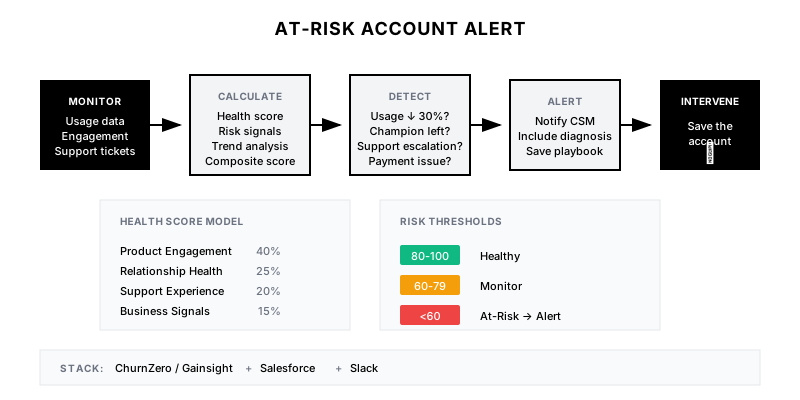
The At-Risk Account Alert monitors customer health signals across multiple dimensions—product usage, engagement, support interactions, and payment behavior—to identify accounts showing early warning signs of churn. When risk thresholds are crossed, it alerts the CS team with a diagnosis and recommended save actions.
Why It Matters
Churn is rarely sudden. Customers give signals weeks or months before they leave—declining usage, missed meetings, support escalations. Early detection gives you time to intervene. A 10% improvement in churn prediction can translate to millions in retained revenue.
Who It's For
- Customer Success teams managing account health
- Account Managers with renewal responsibility
- CS leaders focused on retention
- RevOps teams building health scores
Preconditions
Required Tools
- Customer Success platform (ChurnZero, Gainsight, Vitally)
- Product analytics (Mixpanel, Amplitude, Pendo)
- Support ticketing system (Zendesk, Intercom)
- CRM with account/opportunity data
- Slack for alerts
Required Fields/Properties
- Product usage metrics (DAU, feature adoption, sessions)
- Engagement data (email opens, meeting attendance)
- Support ticket volume and sentiment
- Payment/billing status
- Contract value and renewal date
Definitions Required
- Health score components and weights
- Risk threshold definitions
- What constitutes 'declining usage'
- Escalation path for high-risk accounts
- Save playbook by risk type
Step-by-Step Workflow
Define Health Score Model
Goal: Create a composite score that predicts churn.
Actions:
- Identify leading indicators of churn from historical data
- Weight factors by predictive power
- Define score thresholds (healthy, warning, critical)
- Validate against historical churn data
- Set up real-time score calculation
Implementation Notes: Start simple—3-5 factors. Complexity doesn't equal accuracy. Usage decline is almost always the strongest signal. Validate your model against actual churn before trusting it.
Automation Logic:
Health Score Model (Example):

1. PRODUCT ENGAGEMENT (40%)
   - Daily/Weekly Active Users vs. baseline
   - Feature adoption breadth
   - Key action completion
   - Login frequency trend

2. RELATIONSHIP HEALTH (25%)
   - Meeting attendance rate
   - Email response rate
   - Executive engagement level
   - NPS/CSAT scores

3. SUPPORT EXPERIENCE (20%)
   - Open ticket count
   - Ticket sentiment trend
   - Time to resolution
   - Escalation frequency

4. BUSINESS SIGNALS (15%)
   - Payment status
   - Contract utilization
   - Expansion vs. contraction requests
   - Renewal timeline proximity

Score Thresholds:
- 80-100: Healthy (green)
- 60-79: Monitor (yellow)
- 40-59: At-Risk (orange)
- 0-39: Critical (red)
Build Risk Signal Detection
Goal: Identify specific events that indicate risk.
Actions:
- Define discrete risk events (not just score)
- Set detection logic for each signal
- Configure composite triggers (multiple signals)
- Build signal confidence scoring
- Test against known churned accounts
Implementation Notes: A health score dropping is one thing; knowing WHY is another. Discrete signals like 'champion left' or 'usage dropped 50%' are more actionable than a number.
Automation Logic:
// Example: Risk signal definitions
const riskSignals = [
  {
    name: 'usage_decline',
    trigger: (account) => {
      const current = account.usage_30d;
      const previous = account.usage_60_30d;
      return current / previous < 0.7; // 30%+ decline
    },
    severity: 'high',
    weight: 3
  },
  {
    name: 'champion_departed',
    trigger: (account) => account.champion_left_recently,
    severity: 'critical',
    weight: 5
  },
  {
    name: 'support_escalation',
    trigger: (account) => account.escalated_tickets > 0,
    severity: 'high',
    weight: 3
  },
  {
    name: 'missed_meetings',
    trigger: (account) => account.missed_qbr ||
      account.no_shows_last_30d >= 2,
    severity: 'medium',
    weight: 2
  },
  {
    name: 'payment_issue',
    trigger: (account) => account.payment_failed ||
      account.invoice_overdue_days > 30,
    severity: 'high',
    weight: 4
  }
];
Create Alert Automation
Goal: Notify the right people when risk is detected.
Actions:
- Configure alert triggers by threshold and signals
- Route to appropriate owner (CSM, manager, exec)
- Include context and recommended actions
- Set alert frequency (avoid spam)
- Enable acknowledgment and action tracking
Implementation Notes: Don't alert on every score fluctuation. Alert on meaningful thresholds crossing or multiple signals firing. One well-crafted alert beats ten noisy ones.
Build Save Playbooks
Goal: Give CSMs specific actions for each risk type.
Actions:
- Create playbooks by risk signal type
- Include talk tracks for common situations
- Define escalation paths
- Build re-engagement email sequences
- Track playbook effectiveness
Implementation Notes: A risk alert without a save playbook just creates anxiety. Every alert should answer: 'Here's what to do.' Match playbooks to specific signals.
Implement Tracking and Iteration
Goal: Measure effectiveness and improve the model.
Actions:
- Track alert-to-save conversion
- Measure false positive rate
- Compare predicted vs. actual churn
- Refine weights based on outcomes
- A/B test save playbooks
Implementation Notes: Your model will be wrong at first. The goal is to be less wrong over time. Track every prediction against reality and adjust.
Templates
At-Risk Alert Message
🚨 *AT-RISK ACCOUNT ALERT*
━━━━━━━━━━━━━━━━━━━━━━━━━━━━━━━━━━━━━

**Account:** {{company_name}}
**ARR:** {{arr}} | **Renewal:** {{days_to_renewal}} days
**CSM:** {{csm_name}}

**Health Score:** {{health_score}}/100 ({{score_change}} from last week)
**Risk Level:** {{risk_level}} 🔴

━━━━━━━━━━━━━━━━━━━━━━━━━━━━━━━━━━━━━

## 🚩 Risk Signals Detected

{{#each risk_signals}}
**{{signal_name}}** ({{severity}})
{{description}}
{{/each}}

## 📉 Key Metrics

| Metric | Current | 30d Ago | Change |
|--------|---------|---------|--------|
| DAU | {{dau_current}} | {{dau_30d}} | {{dau_change}}% |
| Logins | {{logins_current}} | {{logins_30d}} | {{logins_change}}% |
| Support Tickets | {{tickets_open}} | {{tickets_30d}} | {{tickets_change}} |

## 🎯 Recommended Actions

{{#each recommended_actions}}
{{number}}. {{action}}
{{/each}}

<{{account_link}}|View Account> | <{{playbook_link}}|Save Playbook> | <{{schedule_link}}|Schedule Call>

*Alert triggered: {{timestamp}}*
Weekly At-Risk Summary
📊 *WEEKLY AT-RISK SUMMARY*
{{week_of}}
━━━━━━━━━━━━━━━━━━━━━━━━━━━━━━━━━━━━━

**Portfolio Health Overview**
- 🟢 Healthy: {{healthy_count}} accounts ({{healthy_arr}})
- 🟡 Monitor: {{monitor_count}} accounts ({{monitor_arr}})
- 🟠 At-Risk: {{at_risk_count}} accounts ({{at_risk_arr}})
- 🔴 Critical: {{critical_count}} accounts ({{critical_arr}})

**This Week's Movement**
- ⬆️ Improved: {{improved_count}} accounts
- ⬇️ Declined: {{declined_count}} accounts
- 🆕 New at-risk: {{new_risk_count}} accounts

━━━━━━━━━━━━━━━━━━━━━━━━━━━━━━━━━━━━━

## 🚨 Priority Accounts (Top 5 by Risk)

{{#each priority_accounts}}
**{{rank}}. {{company_name}}** | {{arr}}
Score: {{score}}/100 | Signals: {{signal_summary}}
CSM: {{csm_name}} | Renewal: {{renewal_date}}

{{/each}}

## 📈 Save Success This Week

- Accounts saved: {{saves_count}}
- ARR protected: {{arr_saved}}
- Avg. time to intervention: {{avg_intervention_days}} days

<{{dashboard_link}}|Full Dashboard>
Save Playbook - Usage Decline
## Save Playbook: Usage Decline

**Trigger:** Product usage dropped 30%+ over 30 days

### Immediate Actions (Day 1-3)

1. **Check for technical issues**
   - Review support tickets for blockers
   - Check for failed integrations or syncs
   - Verify no access/login problems

2. **Reach out to champion**
   - Use the re-engagement template below
   - Offer value (not 'checking in')
   - Propose a quick health check call

### Re-Engagement Email

Subject: Quick check-in on {{company_name}}'s {{product}} usage

Hi {{first_name}},

I noticed your team's usage of {{key_feature}} has slowed down recently. I wanted to reach out to make sure everything's working as expected.

A few things that might help:
- {{relevant_tip_1}}
- {{relevant_tip_2}}
- {{new_feature_mention}}

Would you have 15 minutes this week for a quick sync? I'd love to share some insights from similar customers who've been successful with {{use_case}}.

[Book time here: {{scheduling_link}}]

Best,
{{csm_name}}

### Escalation Triggers

- No response in 5 days → Manager escalation
- Usage drops further → Executive outreach
- Champion unreachable → Map new contacts
Health Score Components
| Component | Weight | Healthy | Warning | Critical | Data Source |
|-----------|--------|---------|---------|----------|-------------|
| Daily Active Users | 25% | >80% of seats | 50-80% | <50% | Product analytics |
| Feature Adoption | 15% | >5 features | 3-5 | <3 | Product analytics |
| Meeting Attendance | 15% | >80% | 50-80% | <50% | Calendar |
| Email Response Rate | 10% | <24h avg | 24-72h | >72h | Email |
| Support Sentiment | 15% | Positive | Neutral | Negative | Support platform |
| Payment Status | 10% | Current | 1-30 days late | >30 days | Billing |
| NPS Score | 10% | 9-10 | 7-8 | <7 | Surveys |
QA + Edge Cases
Test Cases Checklist
- Usage drops 30% → at-risk alert fires within 24 hours
- Champion marks as 'left company' → critical alert with save playbook
- Multiple low-severity signals → composite alert triggered
- Account score drops from 80 to 55 → alert sent to CSM and manager
- Save actions taken → tracked and attributed to intervention
Common Failure Modes
- Alert fatigue: Too many alerts desensitize the team. Tune thresholds aggressively and use tiered severity.
- False positives: Alerting on accounts that were never at risk. Validate model against historical churn before trusting it.
- Missing data: Health scores inaccurate due to incomplete data. Identify gaps and fix integrations before launch.
- No save capacity: CSMs too busy to act on alerts. Build triage process and executive escalation for highest-value accounts.
Troubleshooting Tips
- If too many false positives: Raise thresholds or add confirming signal requirements
- If missing churns: Lower thresholds or add new leading indicators
- If alerts ignored: Simplify format, reduce frequency, add manager visibility
- If save rate is low: Review playbooks, train team, add resources for at-risk accounts
KPIs and Reporting
KPIs to Track
- Churn Prediction Accuracy: >75% of critical alerts result in churn if unaddressed
- Save Rate: >60% of at-risk accounts saved after intervention
- Time to Intervention: Action taken within 48 hours of alert
- False Positive Rate: <20% of alerts are false positives
- ARR Protected: Track total ARR saved through interventions
Suggested Dashboard Widgets
- Portfolio Health Distribution: Accounts by health score band
- At-Risk Account List: Sortable list with key metrics and actions
- Risk Signal Frequency: Which signals fire most often
- Save Rate by CSM: Intervention success by team member