Overview
What It Is
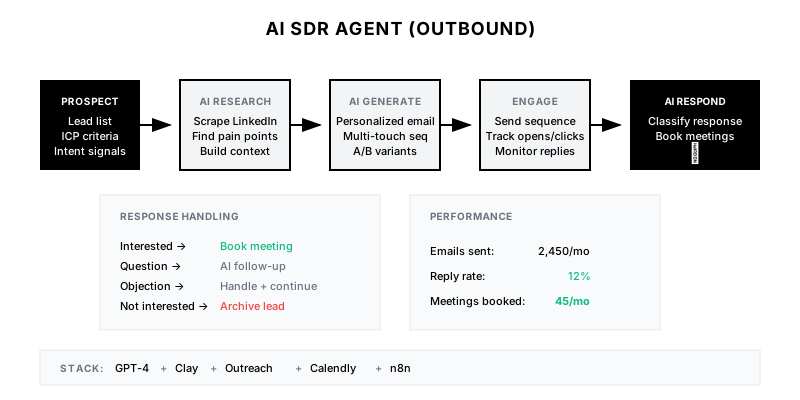
An AI-powered system that acts as an autonomous SDR—identifying prospects, researching their context, crafting personalized multi-touch sequences, executing outreach, and handling responses until a meeting is booked or the prospect disqualifies.
Why It Matters
Outbound at scale is impossible with purely human SDRs. AI SDR agents can research and personalize 1000x more sequences than humans, while maintaining quality. This enables true personalization at scale, not mail-merge mediocrity.
Who It's For
- Sales teams scaling outbound without proportional headcount
- SDR leaders automating repetitive research and writing
- Companies testing outbound without dedicated SDR hire
- Growth teams running multi-channel campaigns
Preconditions
Required Tools
- GPT-4/Claude API (reasoning)
- Clay (data enrichment)
- Apollo/ZoomInfo (contact data)
- Outreach/SalesLoft (sequencing)
- n8n (orchestration)
Required Fields/Properties
- ICP definition
- Target account list or criteria
- Value proposition by persona
- Case studies and proof points
- Meeting booking link
Definitions Required
- Email sending limits and warm-up
- Response classification rules
- Human escalation triggers
- Compliance requirements (opt-out, GDPR)
Step-by-Step Workflow
Build Prospect Research Agent
Goal: Create AI agent that gathers relevant prospect context
Actions:
- Define research sources (LinkedIn, company site, news, 10-K)
- Build research prompt template
- Extract key insights (priorities, challenges, initiatives)
- Structure output for personalization use
Implementation Notes: Research agent should produce a 'prospect brief' with: recent news, company priorities, tech stack, potential pain points, and personalization hooks.
Create Sequence Generation Agent
Goal: Build AI that crafts personalized multi-touch sequences
Actions:
- Define sequence structure (3-5 emails, touchpoint mix)
- Create persona-specific email templates as examples
- Build sequence generation prompt
- Include company voice and compliance requirements
Implementation Notes: Provide 3-5 high-performing email examples for few-shot learning. Include specific instructions about length, CTA, and what NOT to do (no 'hope this finds you well').
Build Response Classification System
Goal: Automatically categorize and route prospect responses
Actions:
- Define response categories (positive, objection, OOO, unsubscribe, etc.)
- Create classification prompt
- Build routing rules per category
- Set up human escalation for edge cases
Implementation Notes: Use GPT-4 for nuanced classification. 'Let me check with my team' is different from 'Not interested.' Route positive intent to human SDR immediately.
Implement Objection Handling Agent
Goal: Enable AI to respond to common objections autonomously
Actions:
- Catalog common objections and approved responses
- Create objection handling prompt
- Build contextual response generator
- Set confidence threshold for human escalation
Implementation Notes: Only auto-respond to well-understood objections with high confidence. Pricing discussions and complex objections should go to humans.
Create Meeting Booking Flow
Goal: Enable AI to book meetings when prospect shows interest
Actions:
- Integrate with calendar system
- Build availability checking
- Create booking confirmation flow
- Handle timezone and rescheduling
Implementation Notes: Use Calendly or similar for actual booking. AI proposes times based on both parties' availability. Send calendar invite automatically on confirmation.
Build Monitoring and Feedback Loop
Goal: Track performance and improve AI over time
Actions:
- Log all AI decisions and outputs
- Track outcome metrics (opens, replies, meetings)
- Build feedback mechanism for human corrections
- Use feedback to refine prompts
Implementation Notes: When humans override AI decisions, capture why. Use these corrections to improve classification accuracy and response quality over time.
Templates
AI SDR Performance Dashboard
| Metric | This Week | Last Week | Trend |
|--------|-----------|-----------|-------|
| Sequences Generated | 450 | 380 | +18% |
| Emails Sent | 1,800 | 1,520 | +18% |
| Open Rate | 52% | 48% | +4% |
| Reply Rate | 18% | 15% | +3% |
| Positive Responses | 82 | 68 | +21% |
| Meetings Booked | 24 | 18 | +33% |
| AI-Handled Replies | 78% | 72% | +6% |
| Human Escalations | 45 | 52 | -13% |
Response Classification Rules
**Response Routing Rules:**

**Immediate Human Escalation:**
- Prospect asks to speak with someone
- Mentions specific competitor
- Requests pricing information
- Expresses security/compliance concerns
- AI confidence <70%

**AI Auto-Handle:**
- Requests more information (send collateral)
- Asks about specific feature (match to documentation)
- Out of office (reschedule sequence)
- Unsubscribe request (remove + update CRM)
- Referral to colleague (research + add to sequence)

**AI Follow-Up:**
- Soft positive ("interesting, but busy")
- Timing objection ("not right now")
- No response after 3 touches (try different angle)
Weekly AI SDR Review Checklist
**Weekly AI SDR Health Check:**

[ ] Review emails flagged as low-confidence
[ ] Check human override rate (target: <20%)
[ ] Review meeting quality scores from AEs
[ ] Audit 10 random sequences for quality
[ ] Check bounce rate (indicates data quality)
[ ] Review unsubscribe rate (should be <1%)
[ ] Update objection responses if new patterns emerge
[ ] Verify calendar integration working correctly
[ ] Check email deliverability metrics
[ ] Review and approve new prospects added to queue
QA + Edge Cases
Test Cases Checklist
- Verify research agent produces accurate company information
- Test sequence generation maintains brand voice
- Confirm response classification accuracy >85%
- Validate objection handling follows approved playbook
- Test meeting booking creates correct calendar events
Common Failure Modes
- Hallucinated research: AI invents company facts that don't exist. Always verify research against source data, especially recent news claims.
- Generic personalization: Emails feel templated despite AI. Improve research prompts and add more specific personalization requirements.
- Misclassified responses: Positive intent missed or negative escalated unnecessarily. Review classification prompt and add examples.
Troubleshooting Tips
- If reply rates are low, audit email quality and personalization depth
- For high escalation rate, expand objection handling coverage
- If meetings no-show, review meeting booking confirmation flow
KPIs and Reporting
KPIs to Track
- Sequences Generated per Day: 100+ (per account)
- Reply Rate: >15%
- Positive Response Rate: >5%
- Meetings Booked per Week: 20+ per 500 prospects
Suggested Dashboard Widgets
- AI SDR Funnel: Prospects → Emails → Opens → Replies → Meetings
- Classification Accuracy: AI classification vs. human override rate
- Sequence Performance: Reply rates by sequence variant
- Cost per Meeting: Total AI costs / meetings booked