Overview
What It Is
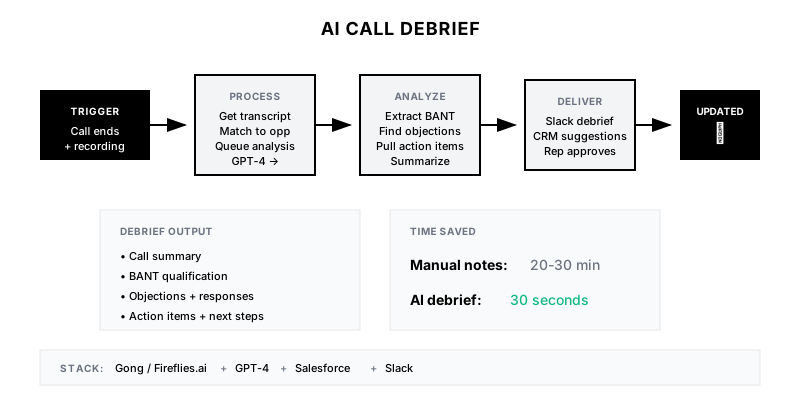
The AI Call Debrief automatically processes sales call recordings to generate structured summaries, extract action items, identify key moments, and update CRM fields. Instead of reps spending 15-30 minutes after each call on notes and data entry, they review a pre-populated summary and approve updates.
Why It Matters
Reps spend 4+ hours weekly on call notes and CRM updates. This time doesn't sell. Worse, rushed notes are incomplete, making forecasting and coaching harder. AI debriefs ensure consistent, comprehensive capture while freeing reps to focus on selling.
Who It's For
- Account Executives with multiple calls daily
- SDRs needing quick qualification summaries
- Sales managers wanting consistent call documentation
- RevOps teams needing reliable CRM data
Preconditions
Required Tools
- Gong, Chorus, or Fireflies.ai for recording/transcription
- GPT-4 for analysis and summarization
- CRM with field update API
- Slack or email for delivery
- Workflow automation (Zapier, Make.com)
Required Fields/Properties
- Call recording and transcript
- Opportunity ID for CRM linkage
- Debrief template structure
- CRM fields to update
Definitions Required
- Summary format and length
- Which CRM fields to auto-populate
- Action item extraction rules
- Approval workflow (auto or manual)
Step-by-Step Workflow
Define Debrief Structure
Goal: Create a consistent format for call summaries.
Actions:
- Define summary sections (overview, key points, objections)
- List CRM fields to extract (BANT, next steps, decision criteria)
- Create action item categories
- Design output format for rep consumption
- Build approval/edit workflow
Implementation Notes: Keep summaries scannable—bullet points, not paragraphs. Focus on what's actionable: next steps, commitments, concerns raised. Avoid recapping every word.
Automation Logic:
Debrief Structure:

1. CALL OVERVIEW (2-3 sentences)
   What happened, key outcome

2. KEY DISCUSSION POINTS
   • Budget: [status/amount discussed]
   • Authority: [decision makers identified]
   • Need: [pain points confirmed]
   • Timeline: [decision timeline]

3. OBJECTIONS RAISED
   • [Objection] → [How handled]

4. COMPETITOR MENTIONS
   • [Competitor] - [Context]

5. ACTION ITEMS
   • [Owner] - [Action] - [Due date]

6. NEXT STEPS
   • Agreed next meeting/call
   • Who to loop in

7. CRM UPDATE SUGGESTIONS
   • Stage: [recommendation]
   • Close date: [recommendation]
   • Fields to update: [list]
Configure Call Processing
Goal: Set up automatic processing when calls end.
Actions:
- Connect to Gong/Fireflies webhook for call completion
- Fetch transcript and recording link
- Link to CRM opportunity via attendee matching
- Queue for GPT-4 analysis
- Handle failed matches gracefully
Implementation Notes: Match calls to opportunities via attendee email domain. Fall back to manual linking if automatic match fails. Process calls within minutes of completion.
Automation Logic:
// Example: Post-call processing trigger
const processCall = async (callData) => {
  // Get transcript
  const transcript = await gong.getTranscript(callData.call_id);

  // Find matching opportunity
  const externalDomain = getExternalDomain(callData.participants);
  const opportunity = await salesforce.findOpportunity({
    accountDomain: externalDomain,
    owner: callData.internal_participant
  });

  // Generate debrief
  const debrief = await generateDebrief(transcript, opportunity);

  // Send for review
  await sendDebriefToRep({
    rep: callData.internal_participant,
    debrief: debrief,
    opportunity: opportunity
  });
};
Build AI Analysis Pipeline
Goal: Extract structured insights from call transcripts.
Actions:
- Create GPT-4 prompt for call analysis
- Extract BANT qualification data
- Identify objections and how they were handled
- Pull action items with owners and dates
- Generate summary narrative
Implementation Notes: Chain multiple prompts if needed—one for extraction, one for summarization. Include opportunity context in prompt so AI knows what to look for.
Automation Logic:
GPT-4 Debrief Prompt:

Analyze this sales call transcript and create a structured debrief.

Call Context:
- Opportunity: {{opportunity_name}}
- Current Stage: {{stage}}
- Deal Value: {{amount}}
- Previous Notes: {{last_notes}}

Transcript:
{{transcript}}

Extract:
1. SUMMARY: 2-3 sentence overview of what happened
2. BANT:
   - Budget: What was discussed about budget/pricing?
   - Authority: Who are the decision makers?
   - Need: What pain points were confirmed?
   - Timeline: What's the decision timeline?
3. OBJECTIONS: List objections raised and how handled
4. COMPETITORS: Any competitor mentions and context
5. ACTION ITEMS: Extract all commitments with owner and timeline
6. NEXT STEPS: Agreed follow-up actions
7. STAGE RECOMMENDATION: Should stage change? Why?
8. RISK FLAGS: Any concerns about the deal?

Format as structured JSON.
Configure CRM Updates
Goal: Auto-populate CRM fields from call analysis.
Actions:
- Map extracted data to CRM fields
- Build update suggestions (not forced updates)
- Allow rep approval before commit
- Log call summary as activity
- Update opportunity stage if warranted
Implementation Notes: Don't auto-update fields without rep review—AI can misinterpret. Present suggested updates for one-click approval. Always let reps override.
Deliver and Iterate
Goal: Get debriefs to reps and improve based on feedback.
Actions:
- Send debrief via Slack DM immediately after call
- Include approve/edit buttons for CRM updates
- Track which suggestions are accepted/rejected
- Collect feedback on summary quality
- Tune prompts based on patterns
Implementation Notes: Delivery speed matters—debrief should arrive within 5 minutes of call end. Reps can review while context is fresh.
Templates
Slack Debrief Message
📞 *Call Debrief: {{opportunity_name}}*

**Summary:** {{summary}}

**Key Takeaways:**
• Budget: {{budget_status}}
• Authority: {{authority_status}}
• Need: {{need_confirmed}}
• Timeline: {{timeline}}

**Objections:**
{{#each objections}}
• {{objection}} → {{response}}
{{/each}}

**Action Items:**
{{#each action_items}}
☐ {{owner}}: {{action}} ({{due_date}})
{{/each}}

**Next Steps:** {{next_steps}}

*CRM Updates Suggested:*
• Stage → {{suggested_stage}}
• Close Date → {{suggested_close_date}}
• Notes → [Auto-populated]

[✅ Approve All] [✏️ Edit] [❌ Dismiss]
CRM Activity Note Template
📞 CALL SUMMARY - {{call_date}}

Attendees: {{attendees}}
Duration: {{duration}}

SUMMARY:
{{summary}}

KEY DISCUSSION:
{{key_points}}

OBJECTIONS:
{{objections}}

ACTION ITEMS:
{{action_items}}

NEXT STEPS:
{{next_steps}}

---
Generated by AI Call Debrief | Recording: {{recording_link}}
Follow-Up Email Draft
Subject: Following up from our call - {{key_topic}}

Hi {{contact_name}},

Thanks for the time today. Here's a quick recap of what we discussed:

**Key Points:**
{{#each key_points}}
• {{point}}
{{/each}}

**Action Items:**
{{#each our_actions}}
• We'll {{action}} by {{date}}
{{/each}}

{{#each their_actions}}
• You mentioned {{action}} by {{date}}
{{/each}}

**Next Steps:**
{{next_steps}}

Let me know if I missed anything!

Best,
{{sender_name}}
CRM Field Mapping
| Extracted Data | CRM Field | Auto-Update | Notes |
|----------------|-----------|-------------|-------|
| Budget amount | Budget__c | Suggest | Only if discussed |
| Decision maker | Decision_Maker__c | Suggest | Add to contacts |
| Timeline | Close_Date | Suggest | If changed |
| Next meeting | Next_Step_Date__c | Suggest | From action items |
| Pain points | Pain_Points__c | Auto | Append |
| Competitor | Competitor__c | Suggest | If mentioned |
| Stage recommendation | StageName | Suggest | Never auto |
QA + Edge Cases
Test Cases Checklist
- Call ends → debrief delivered within 5 minutes
- Call with clear BANT → all fields extracted correctly
- Call with objections → objections and responses captured
- Rep approves updates → CRM updated immediately
- Rep edits suggestion → edited version saved, feedback logged
Common Failure Modes
- Inaccurate extraction: AI misinterprets context or pulls wrong data. Always require rep review before CRM updates.
- Missing opportunity match: Can't link call to CRM record. Build fallback for manual linking or queue for review.
- Too verbose summaries: Long summaries don't get read. Keep to bullet points and key facts only.
- Delayed delivery: Debriefs arriving hours later lose value. Optimize for <5 minute delivery.
Troubleshooting Tips
- If extraction quality is poor: Review prompts and add more context about your sales process
- If matching fails: Check attendee email parsing and CRM account domain data
- If reps ignore debriefs: Survey for format feedback; may need to simplify
- If CRM data is still incomplete: Review approval rates; may need to auto-update more fields
KPIs and Reporting
KPIs to Track
- Debrief Generation Rate: 100% of recorded calls get debrief within 5 min
- Approval Rate: >80% of suggested CRM updates approved by reps
- Time Saved: 20+ minutes saved per call on admin tasks
- CRM Completeness: >90% of key fields populated after calls
- Rep Satisfaction: >8/10 rating on debrief helpfulness
Suggested Dashboard Widgets
- Debriefs Generated: Daily/weekly count by rep
- Approval vs. Edit Rate: How often suggestions are approved vs. modified
- Time to Debrief: Average time from call end to debrief delivery
- Extraction Accuracy: Based on rep feedback and edit patterns