Overview
What It Is
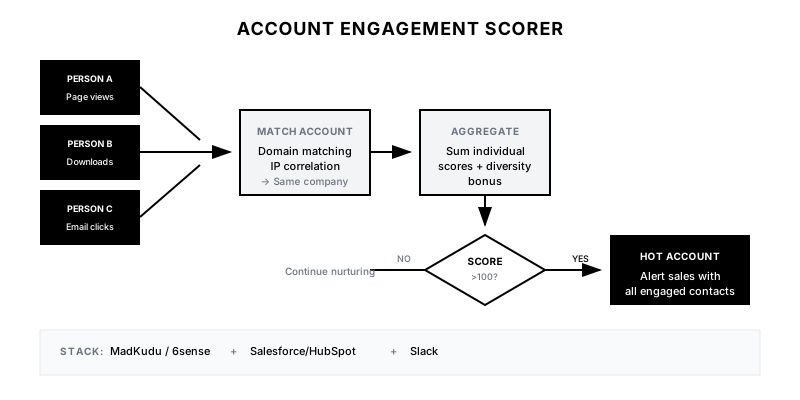
The Account Engagement Scorer aggregates engagement signals from multiple individuals at the same company to create an account-level buying signal. Instead of treating each lead independently, it recognizes that B2B buying is a team sport—when 4 people from Acme Corp visit your site in the same week, that's a stronger signal than 4 individuals from different companies.
Why It Matters
Enterprise deals involve 6-10 decision makers on average. Individual lead scoring misses the 'swarming' behavior that indicates real evaluation. Account-level scoring catches buying committees in motion and enables sales to engage at the right moment with the right message.
Who It's For
- B2B companies targeting mid-market and enterprise accounts
- ABM teams wanting better prioritization signals
- Sales teams overwhelmed by individual lead notifications
- Companies where deals involve multiple stakeholders
Preconditions
Required Tools
- MadKudu, 6sense, or custom scoring solution
- CRM with account hierarchy (Salesforce, HubSpot)
- Website visitor tracking with company identification
- Marketing automation for engagement tracking
Required Fields/Properties
- Lead-to-account matching logic
- Individual engagement scoring model
- Account aggregation rules
- Alert thresholds and routing
Definitions Required
- Which engagement signals to include
- How to weight different signal types
- Time window for aggregation
- Threshold for sales notification
Step-by-Step Workflow
Define Engagement Signals
Goal: Identify all individual signals that contribute to account-level interest.
Actions:
- List all trackable engagement types (page views, downloads, emails)
- Assign point values to each signal type
- Weight high-intent actions higher (demo request, pricing)
- Include negative signals (unsubscribe, bounce)
- Define time decay for older signals
Implementation Notes: Not all signals are equal. A pricing page view from an executive is worth more than a blog view from an intern. Weight by action type and, where possible, by contact role.
Automation Logic:
Engagement Signal Points:
+20  Demo request form submitted
+15  Pricing page viewed
+10  Case study downloaded
+8   Multiple pages in single session (3+)
+5   Email clicked
+3   Email opened
+2   Blog post viewed
+1   Page visited
-10  Email unsubscribed

Time Decay:
Last 7 days: 100%
8-14 days: 75%
15-30 days: 50%
31-60 days: 25%
>60 days: 0%
Configure Lead-to-Account Matching
Goal: Ensure all individual engagement rolls up to the correct account.
Actions:
- Set up email domain matching to company accounts
- Configure IP-to-company matching for anonymous visitors
- Handle personal email domains (gmail, yahoo) separately
- Create manual override capability for mismatches
- Set up de-duplication rules for merged companies
Implementation Notes: Match quality is critical. A person with a gmail address visiting from Acme Corp's IP should still roll up to Acme. Use multiple matching signals and prioritize accuracy over speed.
Build Account-Level Aggregation
Goal: Create the formula that combines individual scores into account score.
Actions:
- Sum individual lead scores per account
- Add 'diversity bonus' for multiple engaged people
- Apply role weighting (executive engagement > analyst)
- Set recency bonus for recent activity bursts
- Create rolling 30-day and 7-day scores
Implementation Notes: The diversity bonus is key. Three people engaging is more meaningful than one person visiting three times. Consider multiplying score by unique engaged contacts.
Automation Logic:
Account Score Formula:
Base = SUM(individual_lead_scores)
Diversity Bonus = 1 + (unique_contacts * 0.15)
7-Day Velocity = recent_7_day_score / rolling_30_day_avg

Final Score = Base * Diversity Bonus * Velocity Multiplier

Thresholds:
>100 = Hot (Sales alert immediately)
50-99 = Warm (Sales notification, review within 24h)
20-49 = Engaged (Continue nurturing)
<20 = Early (Awareness stage)
Set Up Sales Alerts
Goal: Notify sales when accounts cross engagement thresholds.
Actions:
- Configure alert triggers at threshold crossings
- Include all engaged contacts in the alert
- Show engagement timeline and activity breakdown
- Recommend primary contact for outreach
- Link to account record in CRM
Implementation Notes: The alert should answer: Why now? (score crossed threshold), Who to contact? (most engaged + most senior), and What to say? (based on content consumed).
Create Account Intelligence View
Goal: Give sales a dashboard to see account engagement at a glance.
Actions:
- Build CRM dashboard showing top accounts by score
- Show trend line (score increasing/decreasing)
- Display engaged contact list with individual activity
- Include recommended talking points based on content
- Add account ICP fit score for qualification
Implementation Notes: Sales should be able to open one view and know exactly which accounts to call today and why. Don't make them dig through multiple systems.
Integrate with ABM Campaigns
Goal: Use account scores to personalize advertising and outreach.
Actions:
- Sync high-score accounts to ABM ad platforms
- Trigger personalized direct mail for hot accounts
- Adjust email send times based on account activity
- Create 'account surge' campaigns for sudden score spikes
- Feed scores into sales territory prioritization
Implementation Notes: Account scores aren't just for alerting sales. Use them to allocate marketing spend. A high-scoring account is worth more ad budget than a cold one.
Templates
Slack Alert: Hot Account Detected
🔥 *HOT ACCOUNT ALERT*

*Account:* {{account_name}}
*Score:* {{account_score}} (+{{score_change}} this week)
*ICP Fit:* {{icp_score}}/100

*Engaged Contacts ({{contact_count}}):*
{{#each engaged_contacts}}
• {{name}} ({{title}}) - {{individual_score}} pts
  Last activity: {{last_activity}} - {{last_activity_date}}
{{/each}}

*Top Content Consumed:*
{{#each top_content}}
• {{title}} (viewed {{view_count}}x)
{{/each}}

💡 *Recommended Contact:* {{recommended_contact}}
💡 *Suggested Approach:* {{outreach_suggestion}}

<{{crm_link}}|View Account> | <{{linkedin_link}}|Find on LinkedIn>
Slack Digest: Weekly Hot Accounts
📊 *Weekly Account Engagement Report*

*New Hot Accounts (5):*
{{#each hot_accounts}}
{{rank}}. {{name}} - Score: {{score}} | Contacts: {{contact_count}}
{{/each}}

*Rising Accounts (Score +50%):*
{{#each rising_accounts}}
• {{name}}: {{previous_score}} → {{current_score}}
{{/each}}

*Cooling Accounts (Action Needed):*
{{#each cooling_accounts}}
• {{name}}: No activity in {{days_inactive}} days
{{/each}}

<{{dashboard_link}}|View Full Dashboard>
CRM Field Reference
| CRM Field | Description | Update Frequency |
|-----------|-------------|------------------|
| Account Engagement Score | Aggregated score from all contacts | Real-time |
| Engaged Contact Count | Number of unique contacts with activity | Real-time |
| Score Trend | 30-day trend (Rising/Stable/Cooling) | Daily |
| Last Engagement Date | Most recent activity from any contact | Real-time |
| Primary Interest | Top content category consumed | Weekly |
| Recommended Contact | Best contact for outreach | Weekly |
| Days Since Last Activity | Staleness indicator | Daily |
Account Tier Definitions
| Score Range | Tier | Sales Action | Marketing Action |
|-------------|------|--------------|------------------|
| 100+ | Hot | Immediate outreach (same day) | Pause ads, enable sales |
| 50-99 | Warm | Review and prioritize (24h) | Increase ad frequency |
| 20-49 | Engaged | Monitor, continue nurture | Standard nurture + retargeting |
| 10-19 | Aware | No action, in nurture | Awareness campaigns |
| <10 | Cold | No action | Broad awareness only |
QA + Edge Cases
Test Cases Checklist
- 3 people from same account visit pricing page → account score increases significantly
- Account crosses 100 threshold → sales alert fires immediately
- Single person high activity → score increases but not as much as multi-person
- Engagement > 30 days old → score decays appropriately
- Account owner receives alert (not wrong rep)
Common Failure Modes
- Poor lead-to-account matching: If leads aren't properly associated with accounts, scores will be understated. Invest in match quality and manual review processes.
- Score inflation from bots/crawlers: Bot traffic can inflate page view counts. Filter known bots and require minimum engagement depth before counting.
- Threshold too low causing alert fatigue: If alerts fire constantly, sales ignores them. Start with high thresholds and lower based on capacity and conversion data.
- Stale scores misleading sales: An account that was hot 6 months ago but quiet since shouldn't show high score. Ensure time decay is working properly.
Troubleshooting Tips
- If scores seem too low: Check lead-to-account matching and verify all engagement sources are feeding the model
- If alerts aren't actionable: Review what's included in alert—may need more context
- If conversion is low on hot accounts: Validate score components—may be weighting wrong signals
- If sales ignores alerts: Reduce volume, increase quality, add accountability
KPIs and Reporting
KPIs to Track
- Hot Account-to-Opportunity Rate: >15% of hot accounts convert to qualified opportunity
- Sales Acceptance Rate: >70% of alerts accepted by sales as legitimate
- Alert-to-Response Time: <4 hours for hot accounts, <24 hours for warm
- Score Accuracy: Hot accounts should close at 2x rate of non-hot
- Pipeline Influenced: Track $$ of pipeline where account score was factor
Suggested Dashboard Widgets
- Account Score Distribution: Histogram showing accounts by score tier
- Hot Accounts List: Real-time list of accounts above threshold
- Score Velocity Trends: Accounts with biggest score changes this week
- Conversion by Score Tier: Win rate analysis by score tier at first touch