Overview
What It Is
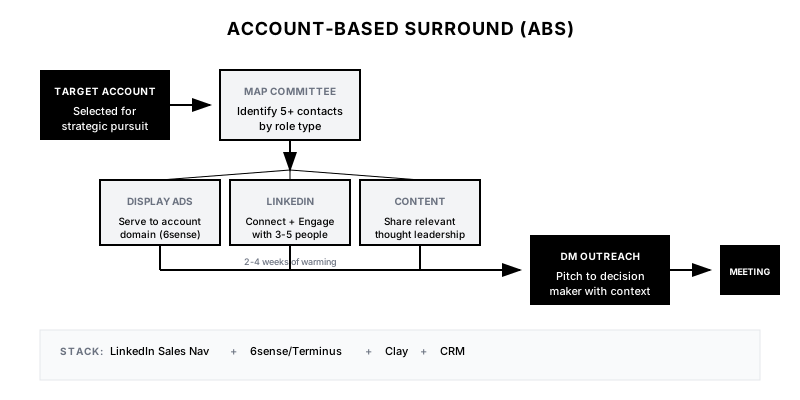
The Account-Based Surround (ABS) is a coordinated campaign that warms up an entire buying committee before your sales outreach hits the decision maker. Instead of cold-emailing the VP directly, you first: (1) connect with 3-5 influencers on LinkedIn, (2) serve personalized display ads to everyone at the company, and (3) engage with their content. By the time your pitch email arrives, multiple people at the account have seen your brand, and your SDR isn't a complete stranger.
Why It Matters
Enterprise deals are won by committees, not individuals. The average B2B purchase involves 6-10 decision makers. If you only reach the VP of Sales, you're depending on them to sell internally—and most won't. By warming up the entire buying committee, you create multiple paths into the account and dramatically increase the chances your message gets attention. When the VP's colleague says 'Oh yeah, I've seen these guys on LinkedIn,' your credibility multiplies.
Who It's For
- Enterprise sales teams with long sales cycles (3+ months)
- ABM programs targeting named accounts
- Companies with high ACV ($50k+) that justify multi-touch investment
- Marketing teams with display ad and LinkedIn budget for ABM
Preconditions
Required Tools
- LinkedIn Sales Navigator (for connection/engagement)
- ABM platform (6sense, Terminus, Demandbase) for display ads
- CRM with account hierarchy (Salesforce/HubSpot)
- Clay or similar for stakeholder enrichment
- Optional: Sendoso for gifting, Vidyard for personalized video
Required Fields/Properties
- Target Account List (named accounts for surround)
- Buying Committee Map (3-5 roles per account to engage)
- LinkedIn profiles for each committee member
- Ad creative assets by persona
- Personalized content by role
Definitions Required
- Which roles constitute the buying committee for your product
- Engagement sequence: ads → LinkedIn → email timing
- Surround duration before direct outreach (recommend: 2-4 weeks)
- Success criteria: what 'warmed up' means (views, connections, engagement)
Step-by-Step Workflow
Define Buying Committee Roles
Goal: Identify which roles to engage at each target account.
Actions:
- List 5-7 roles typically involved in buying your product
- Categorize: Decision Maker, Champion, Influencer, Blocker, User
- Define minimum contacts needed per account (recommend: 5)
- Prioritize by influence level and accessibility
- Document engagement strategy per role type
Implementation Notes: Don't forget the blockers (Legal, Finance, IT Security). They can kill a deal. Better to engage them early than be surprised in procurement.
Automation Logic:
BUYING COMMITTEE MAP EXAMPLE

DECISION MAKER (VP Sales / CRO)
- Engagement: LinkedIn connection request, thought leadership content
- Timing: Direct outreach after 2 weeks of surround

CHAMPION (Director RevOps / Head of Sales Ops)
- Engagement: LinkedIn, share relevant content, comment on posts
- Timing: Early engagement, potential internal advocate

INFLUENCER (Sales Managers)
- Engagement: Display ads, LinkedIn content engagement
- Timing: Background awareness throughout

BLOCKER (VP Finance, IT Security)
- Engagement: Display ads with security/ROI messaging
- Timing: Awareness phase only

USER (SDRs, AEs)
- Engagement: Display ads, community engagement
- Timing: Background awareness
Enrich & Map Stakeholders
Goal: Build complete contact list for buying committee at each account.
Actions:
- Import target accounts into Clay
- Use LinkedIn Sales Nav to identify contacts matching committee roles
- Enrich: LinkedIn URL, email, title, tenure, recent activity
- Build account-level view: company, contacts, roles, engagement status
- Identify 'connectors' (people with mutual connections to your team)
Implementation Notes: Quality over quantity. 5 well-researched contacts are better than 15 scraped emails. Focus on accuracy and relevance.
Launch Display Ad Surround
Goal: Serve personalized ads to everyone at target accounts.
Actions:
- Upload target account domains to ABM platform (6sense, Terminus)
- Create ad variants by persona (executive vs. practitioner messaging)
- Set up campaigns: awareness → consideration → decision maker spotlight
- Configure frequency caps (avoid ad fatigue)
- Run for 2-3 weeks before direct sales outreach
Implementation Notes: Display ads build familiarity, not clicks. Don't optimize for CTR—optimize for reach and frequency. You want them to see your brand 7-10 times before your SDR reaches out.
Automation Logic:
{
  "ad_campaign_structure": {
    "campaign_1": {
      "name": "Awareness - Executive",
      "audience": "C-suite, VP titles at target accounts",
      "creative": "Thought leadership, industry stats",
      "frequency_cap": "3x per week",
      "duration": "weeks 1-4"
    },
    "campaign_2": {
      "name": "Awareness - Practitioner",
      "audience": "Director, Manager titles at target accounts",
      "creative": "Product value prop, customer logos",
      "frequency_cap": "4x per week",
      "duration": "weeks 1-4"
    },
    "campaign_3": {
      "name": "Decision Maker Spotlight",
      "audience": "Identified decision makers only",
      "creative": "Personalized messaging, meeting CTA",
      "frequency_cap": "daily",
      "duration": "weeks 3-4"
    }
  }
}
Execute LinkedIn Engagement
Goal: Build warm connections with 3-5 stakeholders per account.
Actions:
- SDRs connect with 3-5 committee members per account
- Use personalized connection requests (not pitch-y)
- Engage with their content: like, comment, share
- Share relevant content they might find valuable
- Track: connection acceptance, engagement, profile views
Implementation Notes: Connection requests should reference something specific—a post, a mutual connection, a shared interest. 'I'd love to connect to learn from your experience in X' works better than 'I sell Y.'
Automation Logic:
LINKEDIN ENGAGEMENT SEQUENCE

WEEK 1:
- Day 1: View profiles of 5 committee members
- Day 3: Like/comment on any recent posts
- Day 5: Send connection requests to 3 'friendliest' profiles

WEEK 2:
- Accept pending connections
- Engage with new connections' content
- Send connection requests to remaining 2
- Share relevant industry content

WEEK 3:
- Continue content engagement
- DM any highly engaged connections with value-add
- Prep for direct decision-maker outreach

WEEK 4:
- Direct outreach to decision maker with multi-thread context
Coordinate Decision-Maker Outreach
Goal: Send main pitch after surround campaign has warmed the account.
Actions:
- Verify surround metrics: ad impressions, LinkedIn connections, engagement
- Craft email referencing the 'context' (mutual connections, content, etc.)
- Include social proof from the surround: 'Your colleague {{name}} connected with me'
- Personalize based on decision-maker's priorities/recent activity
- Send from rep who has most LinkedIn connections at the account
Implementation Notes: The decision-maker email should feel different from cold outreach. Reference the connections you've made, the content they engaged with, or the fact that you've 'been following the company's work.'
Maintain Multi-Thread Engagement
Goal: Keep the buying committee warm throughout the deal cycle.
Actions:
- After meeting booked, continue nurturing non-DM stakeholders
- Share deal-stage-appropriate content with champions
- Prepare blocker-specific materials (security, ROI) proactively
- Create internal champion enablement: slides they can share, talking points
- Track engagement across all threads to spot deal risk
Implementation Notes: The surround doesn't end when the deal starts. Multi-threading throughout the deal cycle is what separates closed-won from closed-lost.
Templates
LinkedIn Connection Request: Champion Role
Hi {{first_name}},

I came across your profile while researching {{company}}'s RevOps setup—impressive trajectory. I work with similar teams on [relevant topic] and would love to connect and learn from your experience.

No pitch, just genuinely interested in how you're approaching {{specific_challenge}}.

{{sender_name}}
Decision-Maker Email: Post-Surround
Subject: Following up on our mutual connections at {{company}}

Hi {{first_name}},

I've been following {{company}}'s growth—and have been lucky to connect with a few folks on your team ({{connection_1_name}}, {{connection_2_name}}) over the past few weeks.

Based on those conversations and what I'm seeing publicly, it seems like [specific challenge or initiative] might be on your radar.

We've helped teams like {{similar_company}} and {{similar_company_2}} tackle exactly that. Would you be open to a 20-minute conversation to see if there's a fit?

Best,
{{sender_name}}

P.S. {{connection_1_name}} mentioned you're the right person to talk to about this—hope that's accurate!
Champion Enablement: Internal Pitch Deck
INTERNAL CHAMPION ENABLEMENT KIT

For: {{champion_name}} at {{company}}
Purpose: Help you make the case internally

📊 SLIDES INCLUDED:
1. Problem Overview (tailored to {{company}}'s situation)
2. Our Approach (3-minute summary)
3. Customer Results (companies like {{company}})
4. ROI Calculator (pre-filled with {{company}}'s numbers)
5. Competitive Comparison (if you're evaluating others)

💬 TALKING POINTS FOR YOUR VP:
- "We're looking at this to solve [specific problem]"
- "ROI estimate is [X], payback in [Y] months"
- "Teams like [reference customer] have seen [result]"

📅 NEXT STEPS:
- I can join a call with your leadership if helpful
- Happy to provide exec references if you need them
Buying Committee Tracking Table
| Contact | Role | Title | LinkedIn | Connected | Ad Impressions | Engaged | Status |
|---------|------|-------|----------|-----------|----------------|---------|--------|
| Jane Smith | Decision Maker | VP Sales | {{url}} | No | 12 | No | Target for Week 4 |
| Bob Jones | Champion | Dir RevOps | {{url}} | Yes | 8 | Yes (liked post) | Warm - DM sent |
| Sarah Lee | Influencer | Sales Mgr | {{url}} | Yes | 10 | No | Connected |
| Mike Chen | Blocker | VP Finance | {{url}} | No | 6 | No | Ads only |
| Lisa Park | User | SDR Lead | {{url}} | Yes | 15 | Yes (commented) | Engaged |
Slack Alert: Account Ready for Outreach
🎯 *Account Surround Complete: Ready for Decision-Maker Outreach*

*Account:* {{company_name}}
*Industry:* {{industry}}
*Surround Duration:* {{weeks}} weeks

*Buying Committee Status:*
{{#each committee}}
• {{name}} ({{role}}): {{status}}
{{/each}}

*Surround Metrics:*
📊 Total Ad Impressions: {{total_impressions}}
🤝 LinkedIn Connections: {{connections}}/{{target_connections}}
💬 Content Engagements: {{engagements}}

*Recommended Action:* Send decision-maker outreach
*Decision Maker:* {{dm_name}} ({{dm_title}})
*Best Connector:* {{rep_with_most_connections}}

<{{crm_account_link}}|View Account> | <{{email_draft_link}}|Draft Email>
QA + Edge Cases
Test Cases Checklist
- Target account added → buying committee auto-enriched with 5+ contacts
- Display ads launched → impressions logged per account
- LinkedIn connections sent → tracked in CRM with response
- 3+ connections at account → decision-maker outreach triggered
- Email template correctly references connected stakeholders by name
- Blocker roles receive appropriate (security/ROI) ad messaging
- Account status dashboard shows real-time engagement per contact
Common Failure Modes
- Over-pitching too early: SDRs get impatient and pitch champions before decision-maker outreach. The surround is for warming, not selling.
- Connection request spam: Sending 20 connection requests in one day triggers LinkedIn restrictions. Pace at 5-10/day across accounts.
- Ad creative fatigue: Same ad shown 50 times becomes invisible. Rotate creative every 2 weeks.
- Missing the decision maker: Surrounding everyone except the actual decision maker. Always include the DM in display ads even if you don't connect on LinkedIn.
Troubleshooting Tips
- If connections not accepting: Review request copy, ensure profile looks credible, try warm intro if mutual connections exist
- If ads not serving: Check account domain accuracy, verify ABM platform has good match rates, expand targeting
- If DM outreach still feels cold: Extend surround period, increase engagement touchpoints, reference more specific context
- If deals stalling: Check if all committee members are nurtured, send blocker-specific content preemptively
KPIs and Reporting
KPIs to Track
- Account Coverage: >5 contacts identified per target account
- Connection Acceptance Rate: >40% of connection requests accepted
- Account Awareness: >60% of committee members saw ads (3+ impressions)
- Decision-Maker Reply Rate: >20% (vs. 5-10% for cold outreach)
- Multi-Thread Deals: >3 contacts engaged per opportunity created
Suggested Dashboard Widgets
- Account Surround Status: Table showing each target account, contacts identified, connections made, ad impressions, ready status
- Buying Committee Heatmap: Grid showing engagement level (cold/warm/hot) by contact by account
- Surround → Meeting Funnel: Funnel: Accounts Targeted → Surround Complete → DM Outreach → Reply → Meeting
- Multi-Thread by Deal: Chart showing # of contacts engaged per active opportunity